1.安装
1.1 创建虚拟环境
mkdir myproject
cd myproject
python3 -m venv venv
1.2 进入虚拟环境
. venv/bin/activate
1.3 安装 flask
pip install Flask
2.上手
2.1 最小 Demo
将下列代码保存为 hello.py:
from flask import Flask

app = Flask(__name__)

@app.route("/")
def hello_world():
    return "<p>Hello, World!</p>"
运行上述代码:
export FLASK_APP=hello
flask run
这样访问:http://127.0.0.1:5000 会看到 Hello, World!
2.2 基本知识
这里有 flask 的基本知识(非常重要的基础,大家可以自己看:链接
1.HTML Escaping (利用 Jinja,参考:链接
2.Routing (下面几个例子)
@app.route('/')
def index():
    return 'Index Page'

@app.route('/hello')
def hello():
    return 'Hello, World'

@app.route('/user/<username>')
def show_user_profile(username):
    # show the user profile for that user
    return f'User {escape(username)}'

@app.route('/post/<int:post_id>')
def show_post(post_id):
    # show the post with the given id, the id is an integer
    return f'Post {post_id}'

@app.route('/path/<path:subpath>')
def show_subpath(subpath):
    # show the subpath after /path/
    return f'Subpath {escape(subpath)}'
3.HTTP Methods
@app.route('/login', methods=['GET', 'POST'])
def login():
    if request.method == 'POST':
    else:
4.Static Files (url_for('static', filename='style.css'))
5.Rendering Templates (这个参考之前的 Jinja)
6.File Uploads、Cookies、Redirects and Errors、About Responses、APIs with JSON、Sessions、Message Flashing、Logging 这些等我们实际用到时再过来看
3.解构官网指导 Demo
第 1 节教大家如何利用 python 虚拟环境,快速构建 flask 环境;第 2 节带着大家简单熟悉了 flask 的编程规则(或风格)。
大家在着手本节时,务必将第 2 节中的基础的代码跟着官网敲一下!因为,这一节我们不是由简到难一步步搭建 flask 服务器,而是直接拿搭建好的反过来分析。
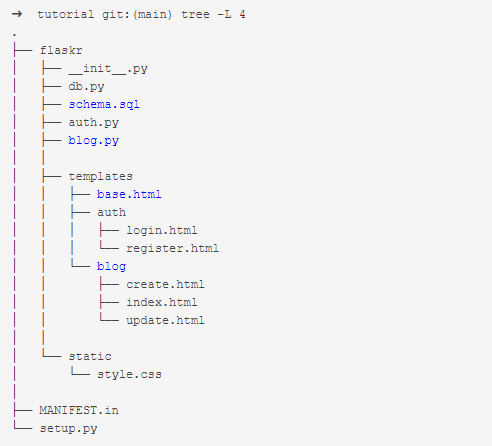
3.1 克隆与代码架构分析
$ git clone https://github.com/pallets/flask
$ cd flask
$ cd examples/tutorial
代码目录结构如下:
3.2 入口文件 init.py
def create_app(test_config=None):
    """Create and configure an instance of the Flask application."""
    # 1-创建一个 Flask 实例
    # 并设置一些 APP 需要用到的参数
    app = Flask(__name__, instance_relative_config=True)
    app.config.from_mapping(
        # a default secret that should be overridden by instance config
        SECRET_KEY="dev",
        # store the database in the instance folder
        DATABASE=os.path.join(app.instance_path, "flaskr.sqlite"),
    )

	# 2-测试用的
    if test_config is None:
        # load the instance config, if it exists, when not testing
        app.config.from_pyfile("config.py", silent=True)
    else:
        # load the test config if passed in
        app.config.update(test_config)

	# 3-创建一个文件夹,用来存 DB 运行时的产生的文件
    # ensure the instance folder exists
    try:
        os.makedirs(app.instance_path)
    except OSError:
        pass

    @app.route("/hello")
    def hello():
        return "Hello, World!"

    # register the database commands
    # 3.3 数据库设置(为 flask 新增一个 init_db 命令,这样直接敲 flask init_db 就能生成表)
    from flaskr import db

    db.init_app(app)

    # apply the blueprints to the app
    # #### 3.4 蓝图和视图(基于蓝图来管理组织视图,视图注册到蓝图,蓝图注册到应用)
    from flaskr import auth, blog

    app.register_blueprint(auth.bp)
    app.register_blueprint(blog.bp)

    # make url_for('index') == url_for('blog.index')
    # in another app, you might define a separate main index here with
    # app.route, while giving the blog blueprint a url_prefix, but for
    # the tutorial the blog will be the main index
    app.add_url_rule("/", endpoint="index")

    return app
3.3 数据库设置
该项目采用了 SQLite 作为数据库(Python 内置了,免去安装和配置工作)。
1.SQL 文件 schema.sql
SQLite 的数据存储在表格中,在向表格增删改查数据前,需要先建表。该项目中的 schema.sql 编写了建表的 SQL 语句。分别创建了一个 user 表和 post 表。
DROP TABLE IF EXISTS user;
DROP TABLE IF EXISTS post;

CREATE TABLE user (
  id INTEGER PRIMARY KEY AUTOINCREMENT,
  username TEXT UNIQUE NOT NULL,
  password TEXT NOT NULL
);

CREATE TABLE post (
  id INTEGER PRIMARY KEY AUTOINCREMENT,
  author_id INTEGER NOT NULL,
  created TIMESTAMP NOT NULL DEFAULT CURRENT_TIMESTAMP,
  title TEXT NOT NULL,
  body TEXT NOT NULL,
  FOREIGN KEY (author_id) REFERENCES user (id)
);
2)与数据库建立连接与断开
def get_db():
    """Connect to the application's configured database. The connection
    is unique for each request and will be reused if this is called
    again.
    """
    if "db" not in g:
        g.db = sqlite3.connect(
            current_app.config["DATABASE"], detect_types=sqlite3.PARSE_DECLTYPES
        )
        g.db.row_factory = sqlite3.Row

    return g.db


def close_db(e=None):
    """If this request connected to the database, close the
    connection.
    """
    db = g.pop("db", None)

    if db is not None:
        db.close()
g 是一个特殊结构,对于每次请求,会产生一个。
3)数据库初始化(生成表)
第 1 节的 schema.sql 用于建表,那么如何执行其中的建表命令呢? db.py 中的 init_db 就是干这个事情的。
def init_db():
    """Clear existing data and create new tables."""
    db = get_db()      # 获取数据库(如果没有则创建)

	# 读取 schema.sql 中的 SQL 命令,并用 db.executescript 执行 SQL 命令
    with current_app.open_resource("schema.sql") as f:
        db.executescript(f.read().decode("utf8"))
4)将 init_db 注册为 flask 命令
由于数据库初始化并不需要每次启动数据库时运行(不属于运行时需要执行的函数),我们需要将注册成 flask 一个指令,只要在命令行中敲 flask init-db 就能够执行 init_db,其实现方法如下:
@click.command("init-db")
@with_appcontext
def init_db_command():
    """Clear existing data and create new tables."""
    init_db()
    click.echo("Initialized the database.")

def init_app(app):
    """Register database functions with the Flask app. This is called by
    the application factory.
    """
    app.teardown_appcontext(close_db) # 在返回响应后进行清理时调用该函数
    app.cli.add_command(init_db_command) # 添加一个可以用flask命令调用的新命令
这样,执行完之后,flask.sqlite 文件将会出现在 instance 文件夹。
3.4 蓝图和视图
蓝图是一种组织一组相关视图和其他代码的方法。它们不是直接向应用程序注册视图和其他代码,而是向蓝图注册。然后,当蓝图在factory函数中可用时,它将在应用程序中注册。
该项目中有两个蓝图:auth 和 blog
bp = Blueprint("auth", __name__, url_prefix="/auth")   # in auth.py
bp = Blueprint("blog", __name__) # in blog.py
参数分别是:蓝图的名字,import_name(一般为 __name__),url 前缀
[1].官方 Demo Github 仓库
1)auth 视图
这里主要有三个路由:
@bp.route("/register", methods=("GET", "POST"))
def register():
...

@bp.route("/login", methods=("GET", "POST"))
def login():
...

@bp.route("/logout")
def logout():
2)blog 视图
这里主要有四个路由:
@bp.route("/")
def index():
...

@bp.route("/create", methods=("GET", "POST"))
@login_required
def create():
...

@bp.route("/<int:id>/update", methods=("GET", "POST"))
@login_required
def update(id):
...

@bp.route("/<int:id>/delete", methods=("POST",))
@login_required
def delete(id):
...
3)注册视图中各个功能实现介绍
注册
注册逻辑为:首先从 POST 中获取 username 和 password,然后调用数据库插入操作:
username = request.form["username"]password = request.form["password"]db.execute("INSERT INTO user (username, password) VALUES (?, ?)", (username, generate_password_hash(password)),)
登录
登录逻辑为:首先从 POST 中获取 username 和 password,然后调用数据库查询操作,获取该用户的密码,然后进行密码匹配:
user = db.execute("SELECT * FROM user WHERE username = ?",username,)).fetchone()check_password_hash(user["password"], password)
密码匹配后,需要创建 session:
if error is None:
    # store the user id in a new session and return to the index
    session.clear()
    session["user_id"] = user["id"]
    return redirect(url_for("index"))
注销
注销需要清空 session:
session.clear()
Session
Session 逻辑如下:注册一个方法,让其在任何 URL 请求之前执行,在其中做 Session 管理:
@bp.before_app_request
def load_logged_in_user():
    user_id = session.get('user_id')

    if user_id is None:
        g.user = None
    else:
        g.user = get_db().execute(
            'SELECT * FROM user WHERE id = ?', (user_id,)
        ).fetchone()
其他 View 使用认证
其他 View 也想使用认证该如何做?在 auth.py 中实现 login_required 函数,判断 user 是否为空,如果为空,则跳转到登录页面:
def login_required(view):
@functools.wraps(view)
def wrapped_view(**kwargs):
    if g.user is None:
        return redirect(url_for('auth.login'))

    return view(**kwargs)

return wrapped_view
4)博客视图中各个功能实现介绍
展示所有博客
逻辑如下:执行数据库查询操作,获取所有博客,然后加载:
@bp.route("/")
def index():
    """Show all the posts, most recent first."""
    db = get_db()
    posts = db.execute(
        "SELECT p.id, title, body, created, author_id, username"
        " FROM post p JOIN user u ON p.author_id = u.id"
        " ORDER BY created DESC"
    ).fetchall()
    return render_template("blog/index.html", posts=posts)
创建博客
逻辑如下:函数前加上 @login_required 前缀,这样就能自动判断是否已经登录,否则跳到登录页面;创建博客就是获取标题和内容,然后调用插入命令,进行插入:
@bp.route("/create", methods=("GET", "POST"))
@login_required
def create():
    """Create a new post for the current user."""
    if request.method == "POST":
        title = request.form["title"]
        body = request.form["body"]
        error = None

        if not title:
            error = "Title is required."

        if error is not None:
            flash(error)
        else:
            db = get_db()
            db.execute(
                "INSERT INTO post (title, body, author_id) VALUES (?, ?, ?)",
                (title, body, g.user["id"]),
            )
            db.commit()
            return redirect(url_for("blog.index"))

    return render_template("blog/create.html")
更新和删除博客
更新和删除博客,需要传入一个 id,然后有一个内部函数用于判断该 id 是否存在:
def get_post(id, check_author=True):
    """Get a post and its author by id.

    Checks that the id exists and optionally that the current user is
    the author.

    :param id: id of post to get
    :param check_author: require the current user to be the author
    :return: the post with author information
    :raise 404: if a post with the given id doesn't exist
    :raise 403: if the current user isn't the author
    """
    post = (
        get_db()
        .execute(
            "SELECT p.id, title, body, created, author_id, username"
            " FROM post p JOIN user u ON p.author_id = u.id"
            " WHERE p.id = ?",
            (id,),
        )
        .fetchone()
    )

    if post is None:
        abort(404, f"Post id {id} doesn't exist.")

    if check_author and post["author_id"] != g.user["id"]:
        abort(403)

    return post
因此,更新的逻辑如下:
@bp.route("/<int:id>/update", methods=("GET", "POST"))
@login_required
def update(id):
    """Update a post if the current user is the author."""
    post = get_post(id)

    if request.method == "POST":
        title = request.form["title"]
        body = request.form["body"]
        error = None

        if not title:
            error = "Title is required."

        if error is not None:
            flash(error)
        else:
            db = get_db()
            db.execute(
                "UPDATE post SET title = ?, body = ? WHERE id = ?", (title, body, id)
            )
            db.commit()
            return redirect(url_for("blog.index"))

    return render_template("blog/update.html", post=post)
删除的逻辑如下:
@bp.route("/<int:id>/delete", methods=("POST",))
@login_required
def delete(id):
    """Delete a post.

    Ensures that the post exists and that the logged in user is the
    author of the post.
    """
    get_post(id)
    db = get_db()
    db.execute("DELETE FROM post WHERE id = ?", (id,))
    db.commit()
    return redirect(url_for("blog.index"))
4.其他
其他还有一些,是大家玩熟了之后才需要看的:
- 工程部署安装
- 工程自动化测试
5.跑起 DEMO
最后,我们跑起 Demo 看看效果:
1)在 tutorial 目录下,创建虚拟环境,并安装 Flask:
python3 -m venv venv
. venv/bin/activate
pip install Flask
2)以开发者方式运行:
export FLASK_APP=flaskr
export FLASK_ENV=development
flask init-db
flask run
效果如下:

以上就是详解Python Flask框架的安装及应用的详细内容,更多关于Python Flask框架的资料请关注Devmax其它相关文章!