本文实例为大家分享了iOS实现卡片式滚动效果的具体代码,供大家参考,具体内容如下
先来张效果图吧:
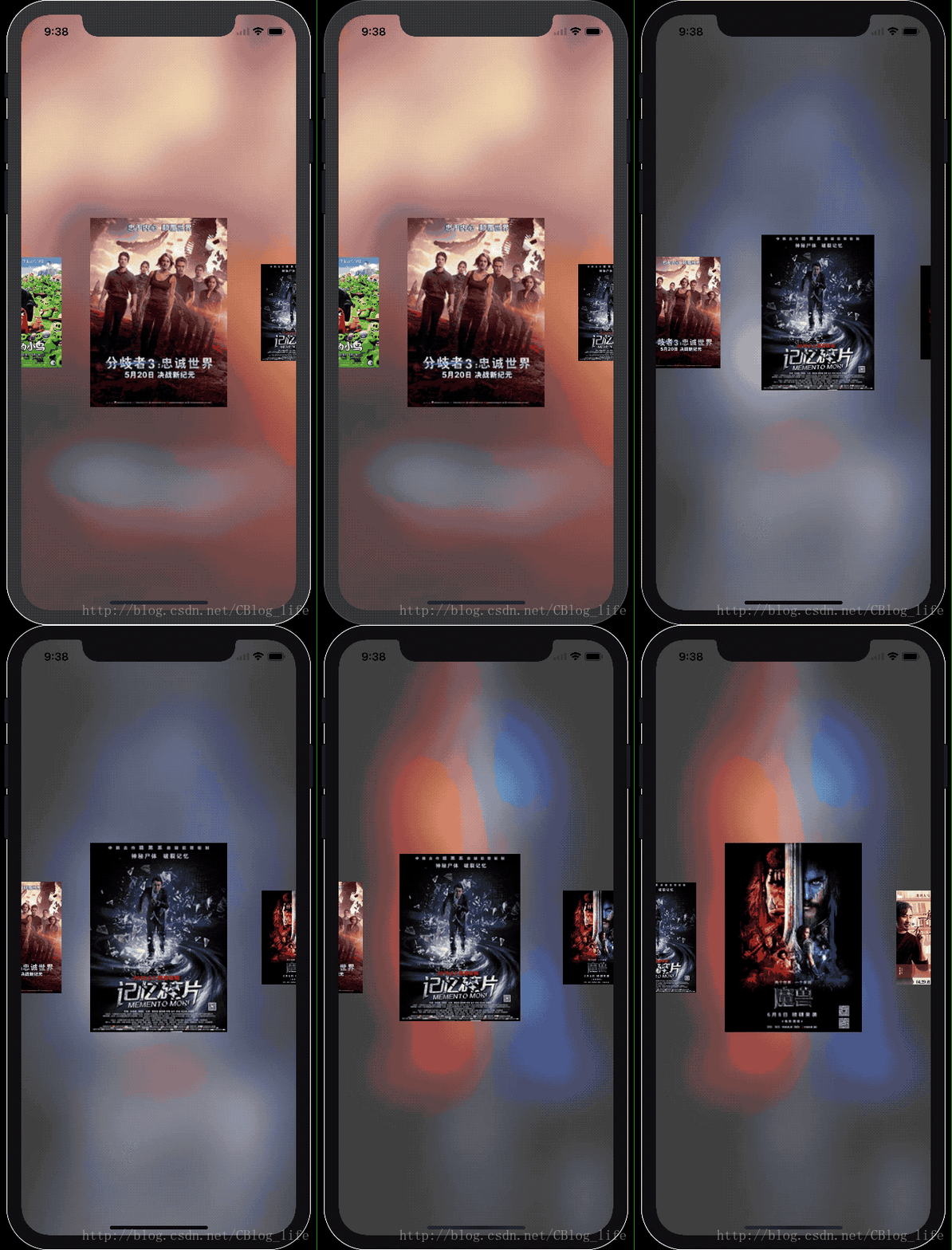
直接上源码了:
CardScrollView.h
#import <UIKit/UIKit.h>

@interface CardView : UIView

@property (nonatomic, assign) CGFloat zoomRate;

@property (nonatomic, strong) NSString *imgUrl;

- (UIImage *)getImage;

@end

@interface CardScrollView : UIView

@property (nonatomic, assign) CGFloat cardViewWidth;
@property (nonatomic, assign) CGFloat minCardZoomRate;
@property (nonatomic, assign) CGFloat maxCardZoomRate;

@property (nonatomic, assign) BOOL needBackgroundBlurImage;

- (void)setImgUrls:(NSArray<NSString *> *)imgUrls selectedCard:(void(^)(NSInteger selectedIndex))selectedCard;

@end
CardScrollView.m
#import "CardScrollView.h"

@interface CardView ()

@property (nonatomic, strong) UIImageView *imgView;

@end

@implementation CardView

- (instancetype)initWithFrame:(CGRect)frame {
 if (self = [super initWithFrame:frame]) {
 _imgView = [[UIImageView alloc] initWithFrame:CGRectMake(0, 0, CGRectGetWidth(frame), CGRectGetHeight(frame))];
 [_imgView setContentMode:UIViewContentModeScaleAspectFit];
 [_imgView setClipsToBounds:YES];
 [self addSubview:_imgView];
 }
 return self;
}

- (void)setZoomRate:(CGFloat)zoomRate {
 if (zoomRate < 0) {
 zoomRate = 0;
 }
 _zoomRate = zoomRate;
 CGFloat width = CGRectGetWidth(self.bounds);
 CGFloat height = CGRectGetHeight(self.bounds);
 CGFloat imgViewWidth = width * zoomRate;
 CGFloat imgViewHeight = height * zoomRate;
 _imgView.frame = CGRectMake((width - imgViewWidth) / 2, (height - imgViewHeight) / 2, imgViewWidth, imgViewHeight);
}

- (void)setImgUrl:(NSString *)imgUrl {
 _imgUrl = imgUrl;
 [_imgView setImage:[UIImage imageNamed:imgUrl]];
}

- (UIImage *)getImage {
 return [_imgView image];
}

@end

@interface CardScrollView () <UIScrollViewDelegate>

@property (nonatomic, strong) UIImageView *bgImageView;
@property (nonatomic, strong) UIVisualEffectView *blurView;

@property (nonatomic, strong) UIScrollView *scrollView;
@property (nonatomic, assign) CGFloat aroundSpacing;
@property (nonatomic, strong) NSArray<NSString *> *imgUrls;
@property (nonatomic, strong) NSMutableArray<CardView *> *cardViewArray;
@property (nonatomic, assign) NSInteger currentIndex;

@property (nonatomic, strong) void(^selectedCard)(NSInteger);

@end

@implementation CardScrollView

- (UIImageView *)bgImageView {
 if (!_bgImageView) {
 _bgImageView = [[UIImageView alloc] initWithFrame:self.bounds];
 }
 return _bgImageView;
}


- (UIVisualEffectView *)blurView {
 if (!_blurView) {
 [self addSubview:self.bgImageView];
 _blurView = [[UIVisualEffectView alloc] initWithFrame:self.bounds];
 [_blurView setEffect:[UIBlurEffect effectWithStyle:UIBlurEffectStyleLight]];
 }
 return _blurView;
}

- (UIScrollView *)scrollView {
 if (!_scrollView) {
 _scrollView = [[UIScrollView alloc] initWithFrame:self.bounds];
 _scrollView.delegate = self;
 [_scrollView setShowsHorizontalScrollIndicator:NO];
 }
 return _scrollView;
}

- (NSMutableArray<CardView *> *)cardViewArray {
 if (!_cardViewArray) {
 _cardViewArray = [NSMutableArray array];
 }
 return _cardViewArray;
}

- (void)layoutSubviews {
 [super layoutSubviews];
 if (_needBackgroundBlurImage) {
 [self addSubview:self.blurView];
 }
 [self addSubview:self.scrollView];
}

- (void)setImgUrls:(NSArray<NSString *> *)imgUrls selectedCard:(void (^)(NSInteger))selectedCard {
 _imgUrls = imgUrls;
 _selectedCard = selectedCard;
 [self layoutCardViews];
}

- (void)layoutCardViews {
 if (_cardViewWidth == 0) {
 _cardViewWidth = CGRectGetWidth(self.bounds) / 2;
 }
 if (_minCardZoomRate == 0) {
 _minCardZoomRate = 0.5;
 }
 if (_maxCardZoomRate == 0) {
 _maxCardZoomRate = 1;
 }
 _aroundSpacing = (CGRectGetWidth(self.bounds) - _cardViewWidth) / 2;
 for (int i = 0; i < [_imgUrls count]; i  ) {
 CardView *cardView = [[CardView alloc] initWithFrame:CGRectMake(_aroundSpacing   i * (_cardViewWidth), 0, _cardViewWidth, CGRectGetHeight(self.bounds))];
 cardView.zoomRate = _minCardZoomRate;
 cardView.imgUrl = _imgUrls[i];
 cardView.tag = i;
 UITapGestureRecognizer *tapGr = [[UITapGestureRecognizer alloc] initWithTarget:self action:@selector(clickCardView:)];
 [cardView addGestureRecognizer:tapGr];
 [_scrollView addSubview:cardView];
 [self.cardViewArray addObject:cardView];
 }
 [_scrollView setContentSize:CGSizeMake(CGRectGetMaxX([_cardViewArray lastObject].frame)   _aroundSpacing, 0)];
 [self setCardViewZoomRate:[_cardViewArray firstObject]];
 [self selectIndex:0];
}

- (void)clickCardView:(UIGestureRecognizer *)gestureCognizer {
 [self selectIndex:gestureCognizer.view.tag];
}

- (void)selectIndex:(NSInteger)index {
 _currentIndex = index;
 CardView *cardView = _cardViewArray[index];
 [_scrollView setContentOffset:CGPointMake(CGRectGetMidX(cardView.frame) - CGRectGetWidth(_scrollView.frame) / 2, 0) animated:YES];
 if (_needBackgroundBlurImage) {
 [_bgImageView setImage:[cardView getImage]];
 }
 if (_selectedCard) {
 _selectedCard(index);
 }
}

#pragma mark - 根据 CardView 在 X 轴的中心坐标 设置其 ZoomRate
- (void)setCardViewZoomRate:(CardView *)cardView {
 CGFloat offsetRate = ABS(_scrollView.contentOffset.x   CGRectGetWidth(_scrollView.frame) / 2 - CGRectGetMidX(cardView.frame)) / _cardViewWidth;
 CGFloat zoomRate = _maxCardZoomRate - offsetRate;
 if (zoomRate < _minCardZoomRate) {
 zoomRate = _minCardZoomRate;
 }
 [_scrollView bringSubviewToFront:cardView];
 [cardView setZoomRate:zoomRate];
}

#pragma mark - UIScrollView Delegate
- (void)scrollViewDidScroll:(UIScrollView *)scrollView {
 NSInteger index = floorf((scrollView.contentOffset.x - _aroundSpacing   CGRectGetWidth(_scrollView.frame) / 2) / _cardViewWidth);
 if (index < 0) {
 index = 0;
 }
 if (index > [_cardViewArray count] - 1) {
 index = [_cardViewArray count];
 }
 [self setCardViewZoomRate:_cardViewArray[index]];
}

- (void)scrollViewDidEndDecelerating:(UIScrollView *)scrollView {
 int index = (scrollView.contentOffset.x - _aroundSpacing   CGRectGetWidth(_scrollView.frame) / 2) / _cardViewWidth;
 [self selectIndex:index];
}

- (void)scrollViewDidEndDragging:(UIScrollView *)scrollView willDecelerate:(BOOL)decelerate {
 if (!decelerate) {
 [self scrollViewDidEndDecelerating:scrollView];
 }
}

@end
使用:ViewController.m
#import "ViewController.h"
#import "CardScrollView.h"

@interface ViewController ()

@property (weak, nonatomic) IBOutlet CardScrollView *cardScrollView;
//@property (nonatomic, strong) CardScrollView *cardScrollView;

@property (nonatomic, strong) NSMutableArray<NSString *> *imgUrls;

@end

@implementation ViewController

- (NSMutableArray<NSString *> *)imgUrls {
 if (!_imgUrls) {
 _imgUrls = [NSMutableArray array];
 for (int i = 0; i < 9; i  ) {
  [_imgUrls addObject:[NSString stringWithFormat:@"%d", i   1]];
 }
 }
 return _imgUrls;
}

//- (CardScrollView *)cardScrollView {
// if (!_cardScrollView) {
// _cardScrollView = [[CardScrollView alloc] initWithFrame:self.view.bounds];
// _cardScrollView.cardViewWidth = 150;
// _cardScrollView.needBackgroundBlurImage = YES;
// }
// return _cardScrollView;
//}

- (void)viewDidAppear:(BOOL)animated {
 [super viewDidAppear:animated];
// [self.view addSubview:self.cardScrollView];
 [_cardScrollView setImgUrls:self.imgUrls selectedCard:^(NSInteger selectedIndex) {

 }];
}

@end
我一般习惯Storyboard开发,所以这里就使用的Storyboard拖拽的,代码中注释掉的 是纯代码使用的方法。
以上就是本文的全部内容,希望对大家的学习有所帮助,也希望大家多多支持Devmax。