需求场景: 业务方希望有表格可以体现员工的考勤信息,要具体到上午下午,统计司机上下班打卡所产生的数据。产品提出想做成三级表头根据页面查询条件的年月去动态生成表格的表头。三级分别是月份日期,对应的星期,以及每天的上午以及下午。
效果如下:
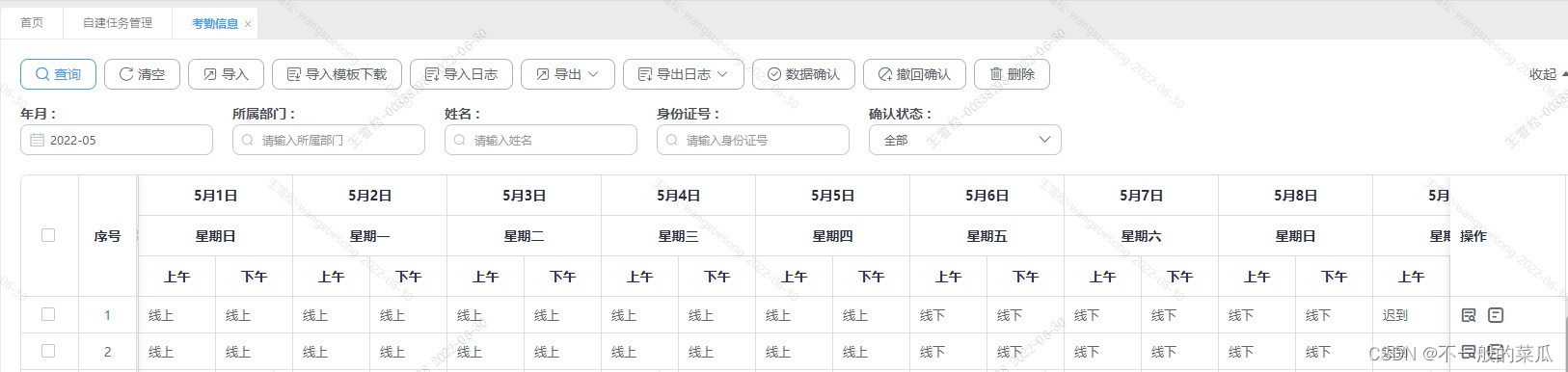
Avue配置方式
通过对avue-crud组件的option的配置如下:
{
  label: `${$this.month}月${$this.dateList[0].ri}日`,  // 月份
  headerAlign: 'center',
  children: [
   {
     label: `星期${$this.dateList[0].xq}`,
     headerAlign: 'center',
     children: [
      {
        label: '上午',
        prop: 'oneAmAttendance',
        headerAlign: 'center',
        props: { label: 'name', value: 'code' },
        type: 'select',
        dicData: $this.attendanceTypeList,
        formatter: (row, value, label, column) => {
          try {
            let satData = ''
            $this.attendanceTypeList.find((item) => {
              if (item.code === row.oneAmAttendance) {
                satData = item.name
              }
            })
            return satData
          } catch (e) {
            console.log(e)
          }
        }
       },
       {
         label: '下午',
         prop: 'onePmAttendance',
         headerAlign: 'center',
         props: { label: 'name', value: 'code' },
         type: 'select',
         dicData: $this.attendanceTypeList,
         formatter: (row, value, label, column) => {
           try {
             let satData = ''
             $this.attendanceTypeList.find((item) => {
               if (item.code === row.onePmAttendance) {
                 satData = item.name
               }
             })
             return satData
           } catch (e) {
            console.log(e)
           }
         }
       }
     ]
    }
  ]
 },
在data中声明需要的变量以及获取每个月天数以及对应星期的方法
data(){
  return {
    dateList: [], // 日期list
    month: 0, // 选中的月份
    dayNum: 0 // 选中月的天数
  }
}

created(){
  this.montInfo(GetYearLastMonth())
  // 当前月的天数
  const arr = GetYearLastMonth().split('-')
  this.month = parseInt(arr[1])
  this.dayNum = this.dayNumFn(parseInt(arr[0]), parseInt(arr[1]))
}
methods(){
      // 月日以及对应的星期
   montInfo(res) {
      /**
	 * 获取一个月多少天,并获取月初星期几
	 */
      const daxier = ['一', '二', '三', '四', '五', '六', '日'];
      const date = res ? new Date(res) : new Date()
      const y = date.getFullYear()
      const m = date.getMonth()   1
      var date2 = new Date(y, m, 0)
      var rq = date2.getDate() // 日 本月最后一天

      var xq = date2.getDay(); // 星期 本月第一天星期几  new Date(0).getDay()
      var rq2 = rq % 7
      if (rq2 === 0) {
        xq = rq2   1
      } else {
        if (rq2 > xq) xq  = 7
        xq = xq - rq2
      }

      var data = [];
      for (var i = 1; i <= rq; i  ) {
        data.push({
          'ri': i,
          'xq': daxier[xq]
        })

        xq = (  xq === 7) ? 0 : xq
      }
      this.dateList = data
    },
    // 获取选中月的天数
    dayNumFn(year, month) {
      return new Date(year, month, 0).getDate()
    },
}
根据查询条件去切换表头
{
  label: '年月',
  search: true,
  hide: true,
  searchPlaceholder: '请选择年月',
  searchClearable: false,
  prop: 'yearMonth',
  type: 'month',
  // 日期组件格式化
  format: 'yyyy-MM', // 展示值
  // 单元格格式化
  valueFormat: 'yyyy-MM', // value
  searchDefault: GetYearLastMonth(),
  pickerOptions: {
    disabledDate: (time) => {
      return time.getTime() > new Date(GetYearLastMonth()).getTime()
    }
  },
  // 查询条件月份切换的同事重新渲染表头
  change(value) {
    // 当前月的天数
    $this.montInfo(value.value)
    const arr = value.value.split('-')
    $this.month = parseInt(arr[1])
    $this.dayNum = $this.dayNumFn(parseInt(arr[0]), parseInt(arr[1]))
  }
},
因为不同的月份日期有不同,比如2月只有28天而1月有31天。所以大于28的日期需要单独处理一下
{
            label: $this.dayNum > 28 ? `${$this.month}月${$this.dateList[28].ri}日` : '',
            headerAlign: 'center',
            hide: $this.dayNum < 28,
            children: [
              {
                label: $this.dayNum > 28 ? `星期${$this.dateList[28].xq}` : '',
                headerAlign: 'center',
                children: [
                  {
                    label: '上午',
                    prop: 'twentyNineAmAttendance',
                    headerAlign: 'center',
                    props: { label: 'name', value: 'code' },
                    type: 'select',
                    dicData: $this.attendanceTypeList,
                    formatter: (row, value, label, column) => {
                      try {
                        let satData = ''
                        $this.attendanceTypeList.find((item) => {
                          if (item.code === row.twentyNineAmAttendance) {
                            satData = item.name
                          }
                        })
                        return satData
                      } catch (e) {
                        console.log(e)
                      }
                    }
                  },
                  {
                    label: '下午',
                    prop: 'twentyNinePmAttendance',
                    headerAlign: 'center',
                    props: { label: 'name', value: 'code' },
                    type: 'select',
                    dicData: $this.attendanceTypeList,
                    formatter: (row, value, label, column) => {
                      try {
                        let satData = ''
                        $this.attendanceTypeList.find((item) => {
                          if (item.code === row.twentyNinePmAttendance) {
                            satData = item.name
                          }
                        })
                        return satData
                      } catch (e) {
                        console.log(e)
                      }
                    }
                  }
                ]
              }
            ]
          },
          {
            label: $this.dayNum > 28 ? `${$this.month}月${$this.dateList[29].ri}日` : '',
            headerAlign: 'center',
            hide: $this.dayNum < 30,
            children: [
              {
                label: $this.dayNum > 28 ? `星期${$this.dateList[29].xq}` : '',
                headerAlign: 'center',
                children: [
                  {
                    label: '上午',
                    prop: 'thirtyAmAttendance',
                    headerAlign: 'center',
                    props: { label: 'name', value: 'code' },
                    type: 'select',
                    dicData: $this.attendanceTypeList,
                    formatter: (row, value, label, column) => {
                      try {
                        let satData = ''
                        $this.attendanceTypeList.find((item) => {
                          if (item.code === row.thirtyAmAttendance) {
                            satData = item.name
                          }
                        })
                        return satData
                      } catch (e) {
                        console.log(e)
                      }
                    }
                  },
                  {
                    label: '下午',
                    prop: 'thirtyPmAttendance',
                    headerAlign: 'center',
                    props: { label: 'name', value: 'code' },
                    type: 'select',
                    dicData: $this.attendanceTypeList,
                    formatter: (row, value, label, column) => {
                      try {
                        let satData = ''
                        $this.attendanceTypeList.find((item) => {
                          if (item.code === row.thirtyPmAttendance) {
                            satData = item.name
                          }
                        })
                        return satData
                      } catch (e) {
                        console.log(e)
                      }
                    }
                  }
                ]
              }
            ]
          },
          {
            label: $this.dayNum === 31 ? `${$this.month}月${$this.dateList[30].ri}日` : '',
            headerAlign: 'center',
            hide: $this.dayNum !== 31,
            children: [
              {
                label: $this.dayNum === 31 ? `星期${$this.dateList[30].xq}` : '',
                headerAlign: 'center',
                children: [
                  {
                    label: '上午',
                    prop: 'thirtyOneAmAttendance',
                    headerAlign: 'center',
                    props: { label: 'name', value: 'code' },
                    type: 'select',
                    dicData: $this.attendanceTypeList,
                    formatter: (row, value, label, column) => {
                      try {
                        let satData = ''
                        $this.attendanceTypeList.find((item) => {
                          if (item.code === row.thirtyOneAmAttendance) {
                            satData = item.name
                          }
                        })
                        return satData
                      } catch (e) {
                        console.log(e)
                      }
                    }
                  },
                  {
                    label: '下午',
                    prop: 'thirtyOnePmAttendance',
                    headerAlign: 'center',
                    props: { label: 'name', value: 'code' },
                    type: 'select',
                    dicData: $this.attendanceTypeList,
                    formatter: (row, value, label, column) => {
                      try {
                        let satData = ''
                        $this.attendanceTypeList.find((item) => {
                          if (item.code === row.thirtyOnePmAttendance) {
                            satData = item.name
                          }
                        })
                        return satData
                      } catch (e) {
                        console.log(e)
                      }
                    }
                  }
                ]
              }
            ]
          },
Element-UI三级表头动态写法
element-ui的写法相对简单一些,因为配置项没办法进行遍历渲染。
template里面的写法
<el-table
    :data="tableData"
    style="width: 100%" >
    <el-table-column
      prop="month"
      label="月份"
      width="150"
      header-align="center">
    </el-table-column>
    <!-- 这里使用遍历的形式来进行渲染 -->
    <template v-for="(item,index) in dateList" >
      <el-table-column :label="`${month}月${item.ri}日`" header-align="center" :key="'date'   index">
        <el-table-column header-align="center" :label="`星期${item.xq}`" >
          <el-table-column header-align="center" :prop="item.sw" label="上午" width="120" ></el-table-column>
          <el-table-column header-align="center" :prop="item.xw" label="下午" width="120" ></el-table-column>
        </el-table-column>
      </el-table-column>
    </template>
  </el-table>
data中还是声明变量,methods中还是应用和上面类似的方法
data(){
    return {
      dateList: [], // 日期list
      month: 0, // 选中的月份
      dayNum: 0, // 选中月的天数
    }
  }
  created() {
    this.montInfo(GetYearLastMonth())
    // 当前月的天数
    const arr = GetYearLastMonth().split('-')
    this.month = parseInt(arr[1])
    this.dayNum = this.dayNumFn(parseInt(arr[0]), parseInt(arr[1]))
  },
  methods: {
    // 月日以及对应的星期
    montInfo(res) {
      /**
	 * 获取一个月多少天,并获取月初星期几
	 */
      const daxier = ['一', '二', '三', '四', '五', '六', '日'];
      //  这里是每个上午下午展示为不同的变量
      const amArr = ['oneAmAttendance', 'twoAmAttendance', 'threeAmAttendance', 'fourAmAttendance', 'fiveAmAttendance', 'sixAmAttendance', 'sevenAmAttendance', 'eightAmAttendance', 'nineAmAttendance', 'tenAmAttendance', 'elevenAmAttendance', 'twelveAmAttendance', 'thirteenAmAttendance', 'fourteenAmAttendance', 'fifteenAmAttendance', 'oneAmAttendance', 'twoAmAttendance', 'threeAmAttendance', 'fourAmAttendance', 'fiveAmAttendance', 'sixAmAttendance', 'sevenAmAttendance', 'eightAmAttendance', 'nineAmAttendance', 'tenAmAttendance', 'elevenAmAttendance', 'twelveAmAttendance', 'thirteenAmAttendance', 'fourteenAmAttendance', 'fifteenAmAttendance', 'sixteenAmAttendance', 'seventeenAmAttendance', 'eighteenAmAttendance', 'nineteenAmAttendance', 'twentyAmAttendance', 'twentyOneAmAttendance', 'twentyTwoAmAttendance', 'twentyThreeAmAttendance', 'twentyFourAmAttendance', 'twentyFiveAmAttendance', 'twentySixAmAttendance', 'twentySevenAmAttendance', 'twentyEightAmAttendance', 'twentyNineAmAttendance', 'thirtyAmAttendance', 'thirtyOneAmAttendance']
      const pmArr = [
        'onePmAttendance', 'twoPmAttendance', 'threePmAttendance', 'fourPmAttendance', 'fivePmAttendance', 'sixPmAttendance', 'sevenPmAttendance', 'eightPmAttendance', 'ninePmAttendance', 'tenPmAttendance', 'elevenPmAttendance', 'twelvePmAttendance', 'thirteenPmAttendance', 'fourteenPmAttendance', 'fifteenPmAttendance', 'onePmAttendance', 'twoPmAttendance', 'threePmAttendance', 'fourPmAttendance', 'fivePmAttendance', 'sixPmAttendance', 'sevenPmAttendance', 'eightPmAttendance', 'ninePmAttendance', 'tenPmAttendance', 'elevenPmAttendance', 'twelvePmAttendance', 'thirteenPmAttendance', 'fourteenPmAttendance', 'fifteenPmAttendance', 'sixteenPmAttendance', 'seventeenPmAttendance', 'eighteenPmAttendance', 'nineteenPmAttendance', 'twentyPmAttendance', 'twentyOnePmAttendance', 'twentyTwoPmAttendance', 'twentyThreePmAttendance', 'twentyFourPmAttendance', 'twentyFivePmAttendance', 'twentySixPmAttendance', 'twentySevenPmAttendance', 'twentyEightPmAttendance', 'twentyNinePmAttendance', 'thirtyPmAttendance', 'thirtyOnePmAttendance'
      ]
      const date = res ? new Date(res) : new Date()
      const y = date.getFullYear()
      const m = date.getMonth()   1
      var date2 = new Date(y, m, 0)
      var rq = date2.getDate() // 日 本月最后一天

      var xq = date2.getDay(); // 星期 本月第一天星期几  new Date(0).getDay()
      var rq2 = rq % 7
      if (rq2 === 0) {
        xq = rq2   1
      } else {
        if (rq2 > xq) xq  = 7
        xq = xq - rq2
      }

      var data = [];
      for (var i = 1; i <= rq; i  ) {
        data.push({
          'ri': i,
          'xq': daxier[xq]
        })

        xq = (  xq === 7) ? 0 : xq
      }
      data.map((item, index) => {
        item.sw = amArr[index]
        item.xw = pmArr[index]
      })
      this.dateList = data
    },
    // 获取选中月的天数
    dayNumFn(year, month) {
      console.log(new Date(year, month, 0).getDate())
      return new Date(year, month, 0).getDate()
    }
  }
element-ui渲染的效果
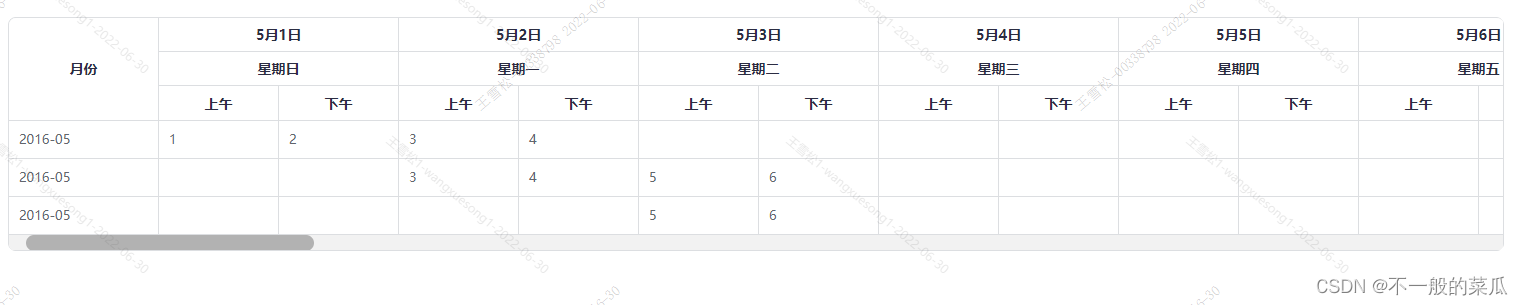
到此这篇关于Avue和Element-UI动态三级表头的实现的文章就介绍到这了,更多相关Element 动态三级表头内容请搜索Devmax以前的文章或继续浏览下面的相关文章希望大家以后多多支持Devmax!