本文实例为大家分享了vue视频时间进度条组件的使用方法,供大家参考,具体内容如下
有些视频是以视频流的形式进行渲染的,没有视频滚动条,所以就写了24h的时间组件
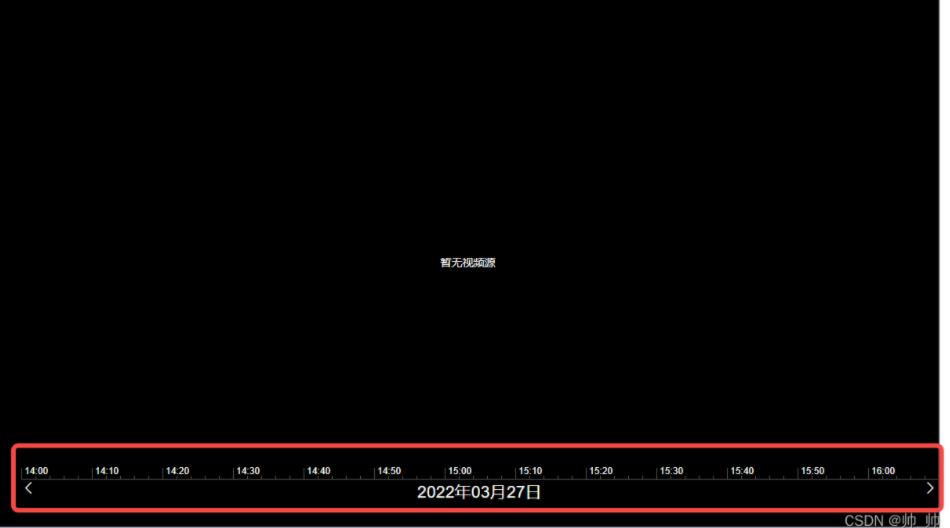
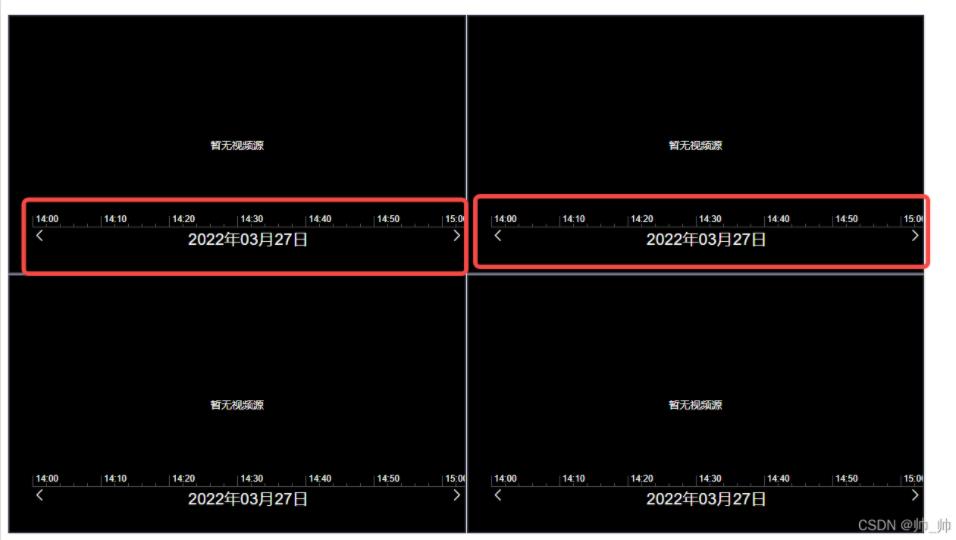
实现思路:
1、24h的时间刻度线总宽度为12960px
2、点击24h线的某一点,获取这一点离左侧原点的距离(使用dom元素layerX和offsetLeft综合判断)
3、计算点击时线段的占比比率
4、每天的时间是86400000毫秒
5、占比比率乘以86400000就是获取的你点击的时间
代码如下:
<template>
  <div class="time-main">
    <div class="center-content" ref="centerRef">
      <div
        ref="timeRef"
        class="time-line"
        @click.capture="clickTimeLine($event)"
      >
        <template v-for="(item, i) in timeArr">
          <div
            :key="'a'   i"
            class="base-line"
            :style="{ left: 90 * i   'px', height: 14   'px' }"
          ></div>
          <div :key="i" class="base-title" :style="{ left: 4   90 * i   'px' }">
            {{ item }}
          </div>
          <div
            :key="'b'   i"
            class="base-line"
            :style="{ left: 18   90 * i   'px' }"
          ></div>
          <div
            :key="'c'   i"
            class="base-line"
            :style="{ left: 36   90 * i   'px' }"
          ></div>
          <div
            :key="'d'   i"
            class="base-line"
            :style="{ left: 54   90 * i   'px' }"
          ></div>
          <div
            :key="'e'   i"
            class="base-line"
            :style="{ left: 72   90 * i   'px' }"
          ></div>
        </template>
      </div>
    </div>
    <div class="btn-content">
      <div class="left-arow" @click="clickRightMove">
        <i class="el-icon-arrow-left"></i>
      </div>
      <div>{{ yesterdayTime | formatDateTime }}</div>
      <div class="right-arow" @click="clickLeftMove">
        <i class="el-icon-arrow-right"></i>
      </div>
    </div>
  </div>
</template>
<script>
import {
  compare,
  exactDiv,
  exactMul,
  exactSub,
  exactAdd,
  decimalsFormat,
} from "@/util/util.js";
export default {
  name: "timeLine",
  // inject: ["screenNum"],
  // watch: {
  //   screenNum: {
  //     handler(val) {
  //       console.log("切换了val==", val);
  //     },
  //   },
  // },
  props: {
    dateArr: {
      type: Array,
    },
  },
  data() {
    return {
      clickCnt: 0,
      leftMoveWidth: 0,
      endTimeFlag: false,
      timeArr: [
        "00:00",
        "00:10",
        "00:20",
        "00:30",
        "00:40",
        "00:50",
        "01:00",
        "01:10",
        "01:20",
        "01:30",
        "01:40",
        "01:50",
        "02:00",
        "02:10",
        "02:20",
        "02:30",
        "02:40",
        "02:50",
        "03:00",
        "03:10",
        "03:20",
        "03:30",
        "03:40",
        "03:50",
        "04:00",
        "04:10",
        "04:20",
        "04:30",
        "04:40",
        "04:50",
        "05:00",
        "05:10",
        "05:20",
        "05:30",
        "05:40",
        "05:60",
        "06:00",
        "06:10",
        "06:20",
        "06:30",
        "06:40",
        "06:50",
        "07:00",
        "07:10",
        "07:20",
        "07:30",
        "07:40",
        "07:50",
        "08:00",
        "08:10",
        "08:20",
        "08:30",
        "08:40",
        "08:50",
        "09:00",
        "09:10",
        "09:20",
        "09:30",
        "09:40",
        "09:50",
        "10:00",
        "10:10",
        "10:20",
        "10:30",
        "10:40",
        "10:50",
        "11:00",
        "11:10",
        "11:20",
        "11:30",
        "11:40",
        "11:50",
        "12:00",
        "12:10",
        "12:20",
        "12:30",
        "12:40",
        "12:50",
        "13:00",
        "13:10",
        "13:20",
        "13:30",
        "13:40",
        "13:50",
        "14:00",
        "14:10",
        "14:20",
        "14:30",
        "14:40",
        "14:50",
        "15:00",
        "15:10",
        "15:20",
        "15:30",
        "15:40",
        "15:50",
        "16:00",
        "16:10",
        "16:20",
        "16:30",
        "16:40",
        "16:50",
        "17:00",
        "17:10",
        "17:20",
        "17:30",
        "17:40",
        "17:50",
        "18:00",
        "18:10",
        "18:20",
        "18:30",
        "18:40",
        "18:50",
        "19:00",
        "19:10",
        "19:20",
        "19:30",
        "19:40",
        "19:50",
        "20:00",
        "20:10",
        "20:20",
        "20:30",
        "20:40",
        "20:50",
        "21:00",
        "21:10",
        "21:20",
        "21:30",
        "21:40",
        "21:50",
        "22:00",
        "22:10",
        "22:20",
        "22:30",
        "22:40",
        "22:50",
        "23:00",
        "23:10",
        "23:20",
        "23:30",
        "23:40",
        "23:50",
      ],
      switchWidthNum: 540,
      yesterdayTime: 0,
      clickTimeVal: 0,
    };
  },
  mounted() {
    // this.handleWidthFn();
    this.dealScrollMove();
    // console.log("mounted==", this.dateArr);
  },
  methods: {
    dealScrollMove() {
      if (this.$refs.centerRef.offsetWidth >= 540) {
        this.switchWidthNum = 540;
      } else if (this.$refs.centerRef.offsetWidth >= 360) {
        this.switchWidthNum = 360;
      } else if (this.$refs.centerRef.offsetWidth >= 270) {
        this.switchWidthNum = 270;
      } else if (this.$refs.centerRef.offsetWidth >= 180) {
        this.switchWidthNum = 180;
      } else {
        this.switchWidthNum = 90;
      }
      let time0 = new Date(new Date().toLocaleDateString()).getTime(); //获取当日0点时间戳
      let time1 = new Date().getTime(); // 当前时间

      let sumTimeWidth = 12960;
      let dayTimeSum = 86400000; //一天的毫秒数

      // if (this.clickTimeVal) {
      //   time1 = this.clickTimeVal;
      //   console.log("进==", time1);
      //   console.log("进=2=", this.clickTimeVal);
      // }
      if (this.dateArr.length > 0) {
        time1 = this.dateArr[0];
        time0 = exactSub(time0, dayTimeSum);
        console.log("进==", this.dateArr);
        console.log("进=2=", this.clickTimeVal);
      }
      let timeSub = exactSub(time1, time0);

      // console.log("timeSub=", timeSub);

      if (this.dateArr.length > 0) {
        this.yesterdayTime = this.dateArr[0];
        this.clickTimeVal = this.dateArr[0];
      } else {
        this.yesterdayTime = exactSub(time0, dayTimeSum);
      }

      let dayPer = exactDiv(timeSub, dayTimeSum); //一天的百分比

      console.log("exactDiv(timeSub, dayTimeSum)==", this.yesterdayTime);
      // console.log("dayPer==", dayPer);
      let scrollWidth = exactMul(sumTimeWidth, dayPer);
      // console.log("scrollWidth=333333=", scrollWidth);
      // console.log("scrollWidth=33333555553=", this.switchWidthNum);
      // 除以switchWidthNum 获取点击的个数
      let switchClickCnt = exactDiv(scrollWidth, this.switchWidthNum);
      // console.log("switchClickCnt==", switchClickCnt);
      this.clickCnt = parseInt(switchClickCnt) - 1;
      this.clickLeftMove();
      // console.log("点击的数量1===", this.clickCnt);
    },
    handleWidthFn() {
      this.$nextTick(() => {
        if (this.$refs.centerRef.offsetWidth >= 540) {
          this.switchWidthNum = 540;
        } else if (this.$refs.centerRef.offsetWidth >= 360) {
          this.switchWidthNum = 360;
        } else if (this.$refs.centerRef.offsetWidth >= 270) {
          this.switchWidthNum = 270;
        } else if (this.$refs.centerRef.offsetWidth >= 180) {
          this.switchWidthNum = 180;
        } else {
          this.switchWidthNum = 90;
        }
      });
    },
    clickTimeLine(event) {
      // console.log("event==", event);
      // console.log("event=layerX==", event.layerX);
      // console.log("event=layerX=target===", event.target.offsetLeft);
      let sumTimeWidth = 12960;
      let dayTimeSum = 86400000; //一天的毫秒数
      let time0 = new Date(new Date().toLocaleDateString()).getTime(); //获取当日0点时间戳
      let yesterdayTime = exactSub(time0, dayTimeSum);
      let timePointNum = 0;

      // className: "time-line"
      if (event.target.className == "time-line") {
        timePointNum = event.layerX;
      } else {
        timePointNum = exactAdd(event.layerX, event.target.offsetLeft);
      }

      let timemove = exactAdd(timePointNum, this.leftMoveWidth);

      let timePer = exactDiv(timemove, sumTimeWidth); // 点击的百分比
      let clickTimeNum = exactMul(dayTimeSum, timePer); //
      let trueTimeNum = exactAdd(clickTimeNum, yesterdayTime); // time
      let fomretTime = parseInt(trueTimeNum);
      this.clickTimeVal = new Date(fomretTime).getTime();
      this.$emit(
        "handleClickTimeLineFn",

        new Date(fomretTime)
      );

      // console.log("trueTimeNum==", trueTimeNum);
      // console.log("fomretTime==", fomretTime);
      // console.log("new Date==", new Date(fomretTime));
    },
    clickLeftMove() {
      // console.log("点击的数量==2=", this.clickCnt);
      this.handleWidthFn();
      // console.log("this.$refs.centerRef==", this.$refs.centerRef);
      // console.log("centerRef=offsetWidth=", this.$refs.centerRef.offsetWidth);
      // console.log("centerRef=clientWidth=", this.$refs.centerRef.clientWidth);
      if (this.endTimeFlag) {
        return;
      }

      this.clickCnt  ;
      this.leftMoveWidth = this.clickCnt * this.switchWidthNum;
      let letWidth = this.clickCnt * this.switchWidthNum   "px";
      // console.log(this.clickCnt);
      // console.log("this.$refs.timeRef==", this.$refs.timeRef);
      if (this.leftMoveWidth   this.$refs.centerRef.offsetWidth > 12960) {
        letWidth = 12960 - this.$refs.centerRef.offsetWidth   "px";
        this.endTimeFlag = true;
      } else {
        this.endTimeFlag = false;
      }
      this.$refs.timeRef.style.transform = "translateX(-"   letWidth   ")";
      this.$refs.timeRef.style.transition = "all 0.5s";
    },
    clickRightMove() {
      this.handleWidthFn();
      if (this.clickCnt > 0) {
        this.clickCnt--;
      }
      this.leftMoveWidth = this.clickCnt * this.switchWidthNum;
      let letWidth = this.clickCnt * this.switchWidthNum   "px";
      // console.log(this.clickCnt);
      // console.log("this.$refs.timeRef==", this.$refs.timeRef);
      if (this.endTimeFlag) {
        this.endTimeFlag = false;
      }
      this.$refs.timeRef.style.transform = "translateX(-"   letWidth   ")";
      this.$refs.timeRef.style.transition = "all 0.5s";
    },
  },
};
</script>
<style scoped lang="scss">
.time-main {
  position: relative;
  width: 100%;
  margin: auto;
  overflow: hidden;
  // display: flex;
  //   border: 1px solid red;
}
.center-content {
  width: calc(100% - 30px);
  margin-left: 30px;
  overflow: hidden;
}
.btn-content {
  width: calc(100% - 30px);
  margin-left: 30px;
  display: flex;
  justify-content: space-between;
  color: #fff;
}
.time-line {
  position: relative;
  font-size: 12px;
  /* left: -7357.15px; */
  //   left: 30px;
  height: 19px;
  width: 12960px;
  border-bottom: 1px solid rgb(90, 90, 90);
  margin: 0px;
  padding: 0px;
  transition: left 0.9s ease 0s;
  color: #fff;
  z-index: 10;
  &:hover {
    cursor: pointer;
  }

  .base-title {
    position: absolute;
    left: 4px;
    bottom: 3px;
    color: #fff;
    z-index: -1;
  }
}

.base-line {
  position: absolute;
  width: 1px;
  height: 4px;

  bottom: 0px;
  background-color: rgb(90, 90, 90);
  z-index: 9;
}
.left-arow {
  // position: absolute;
  // left: 2%;
  color: #fff;
  font-size: 20px;
}
.right-arow {
  // position: absolute;
  // right: 2%;
  color: #fff;
  font-size: 20px;
}
</style>
以上就是本文的全部内容,希望对大家的学习有所帮助,也希望大家多多支持Devmax。