前言
App 常用控件 -- 多级下拉菜单, 如团购类, 房屋类, 对数据进行筛选. 有一级, 二级, 三级, 再多就不会以这种样式,呈现给用户了. 作者就简单聊一下 多级下拉菜单

一 目标
- 默认显示一个 TableView, 点击数据后, 添加第二个TableView, 并实现大小变化
- 第二次打开下拉菜单. 保存上次选中数据
二 菜单控件DropMenuView
.h文件
#import <UIKit/UIKit.h>

@class DropMenuView;
@protocol DropMenuViewDelegate <NSObject>

-(void)dropMenuView:(DropMenuView *)view didSelectName:(NSString *)str;

@end

@interface DropMenuView : UIView

@property (nonatomic, weak) id<DropMenuViewDelegate> delegate;
/** 箭头变化 */
@property (nonatomic, strong) UIView *arrowView;

/**
 控件设置
 @param view 提供控件 位置信息
 @param tableNum 显示TableView数量
 @param arr 使用数据
 */
-(void)creatDropView:(UIView *)view withShowTableNum:(NSInteger)tableNum withData:(NSArray *)arr;

/** 视图消失 */
- (void)dismiss;

@end
.m文件
#import "DropMenuView.h"

#define kWidth [UIScreen mainScreen].bounds.size.width
#define kHeight [UIScreen mainScreen].bounds.size.height

@interface DropMenuView ()<UITableViewDelegate, UITableViewDataSource>
{
@private
  /** 保存 选择的数据(行数) */
  NSInteger selects[3];
}

@property (nonatomic, assign) BOOL show;  // 按钮点击后 视图显示/隐藏
@property (nonatomic, assign) CGFloat rowHeightNum; // 设置 rom 高度

/* 底层取消按钮 */
@property (nonatomic, strong) UIButton *cancelButton;
/** 表视图数组 */
@property (nonatomic, strong) NSArray *tableViewArr;
/** 表视图的 底部视图 */
@property (nonatomic, strong) UIView *tableViewUnderView;
/** 显示 TableView 数量 */
@property (nonatomic, assign) NSInteger tableCount;
/** 数据 */
@property (nonatomic, strong) NSArray *dataArr;

@end


@implementation DropMenuView


- (instancetype)init
{
  self = [super init];
  if (self) {

    /** 数据初始化 */
    self.dataArr = [NSArray array];

    /** 保存 初始值为-1 */
    for (int i = 0; i < 3; i  ) {
      selects[i] = -1;
    }

    /* 底层取消按钮 */
    self.cancelButton = [UIButton buttonWithType:UIButtonTypeCustom];
    self.cancelButton.backgroundColor = [UIColor colorWithWhite:0.0 alpha:0.3];
    [self.cancelButton addTarget:self action:@selector(clickCancelButton:) forControlEvents:UIControlEventTouchUpInside];
    [self addSubview:self.cancelButton];

    /** 表视图的 底部视图初始化 */
    self.tableViewUnderView = [[UIView alloc] init];
    self.tableViewUnderView.backgroundColor = [UIColor colorWithRed:0.74 green:0.73 blue:0.76 alpha:1.000];
    [self.cancelButton addSubview:self.tableViewUnderView];

    /** 默认设置为no, row高度为40 */
    self.show = NO;
    self.rowHeightNum = 40.0f;

  }
  return self;
}


-(void)creatDropView:(UIView *)view withShowTableNum:(NSInteger)tableNum withData:(NSArray *)arr{

  if (!self.show) {

    self.show = !self.show;

    // 显示 TableView数量
    self.tableCount = tableNum;

    // 数据
    self.dataArr = arr;
    for (UITableView *tableView in self.tableViewArr) {
      [tableView reloadData];
    }

    // 初始位置 设置
    CGFloat x = 0.f;
    CGFloat y = view.frame.origin.y   view.frame.size.height;
    CGFloat w = kWidth;
    CGFloat h = kHeight - y;

    self.frame = CGRectMake(x, y, w, h);
    self.cancelButton.frame = CGRectMake(0, 0, self.frame.size.width, self.frame.size.height);
    self.tableViewUnderView.frame = CGRectMake(0, 0, self.frame.size.width, self.rowHeightNum * 7);

    if (!self.superview) {

      [[[UIApplication sharedApplication] keyWindow] addSubview:self];
      self.alpha = 0.0f;
      [UIView animateWithDuration:0.2f animations:^{
        self.alpha = 1.0f;
      }];


      [self loadSelects];
      [self adjustTableViews];
    }

  }else{
    /** 什么也不选择时候, 再次点击按钮 消失视图 */
    [self dismiss];
  }
}


#pragma mark - 加载选中的TableView
-(void)loadSelects{

  [self.tableViewArr enumerateObjectsUsingBlock:^(UITableView *tableView, NSUInteger idx, BOOL * _Nonnull stop) {

    // 刷新TableView数据
    [tableView reloadData];

    // 选中TableView某一行
    [tableView selectRowAtIndexPath:[NSIndexPath indexPathForRow:selects[idx] inSection:0] animated:NO scrollPosition:UITableViewScrollPositionNone];

    // 加 !idx 是因为 循环第一次 idx == 0 方法不执行, 所以需要循环一次 加载一个TableView.
    if((selects[idx] != -1 && !tableView.superview) || !idx) {

      [self.tableViewUnderView addSubview:tableView];

      [UIView animateWithDuration:0.2 animations:^{
        if (self.arrowView) {
          self.arrowView.transform = CGAffineTransformMakeRotation(M_PI);
        }
      }];
    }
  }];

}

#pragma mark - 重置TableView的 位置
-(void)adjustTableViews{

  // 显示的 TableView 数量
  int addTableCount = 0;
  for (UITableView *tableView in self.tableViewArr) {

    if (tableView.superview) {
      addTableCount  ;
    }
  }

  for (int i = 0; i < addTableCount; i  ) {

    UITableView *tableView = self.tableViewArr[i];
    CGRect adjustFrame = tableView.frame;

    adjustFrame.size.width = kWidth / addTableCount ;
    adjustFrame.origin.x = adjustFrame.size.width * i   0.5 * i;
    adjustFrame.size.height = self.tableViewUnderView.frame.size.height ;

    tableView.frame = adjustFrame;
  }

}


#pragma mark - TableView协议

/** 行数 */
-(NSInteger)tableView:(UITableView *)tableView numberOfRowsInSection:(NSInteger)section{

  NSInteger __block count;
  [self.tableViewArr enumerateObjectsUsingBlock:^(id _Nonnull obj, NSUInteger idx, BOOL * _Nonnull stop) {

    if (obj == tableView) {

      NSInteger firstSelectRow = ((UITableView *)self.tableViewArr[0]).indexPathForSelectedRow.row ;
      NSInteger secondSelectRow = ((UITableView *)self.tableViewArr[1]).indexPathForSelectedRow.row ;

      count = [self countForChooseTable:idx firstTableSelectRow:firstSelectRow withSecondTableSelectRow:secondSelectRow];
    }
  }];

  return count;
}

// 可以将 方法提出来, 如果有需要 可以设置为协议实现封装, 作者仅提取一个, 其他均在 TableView自身协议中写
-(NSInteger)countForChooseTable:(NSInteger)idx firstTableSelectRow:(NSInteger)firstSelectRow withSecondTableSelectRow:(NSInteger)secondSelectRow{

  if (idx == 0) {

    return self.dataArr.count;

  }else if (idx == 1){

    if (firstSelectRow == -1) {

      return 0;

    }else{

      if (self.tableCount == 2) {

        return [self.dataArr[firstSelectRow][@"subcategories"] count];

      }else{

        return [self.dataArr[firstSelectRow][@"sub"] count];
      }

    }

  }else{

    if (secondSelectRow == -1) {

      return 0;
    }else{

      return [self.dataArr[firstSelectRow][@"sub"][secondSelectRow][@"sub"] count];

    }

  }
}


/** 自定义cell */
-(UITableViewCell *)tableView:(UITableView *)tableView cellForRowAtIndexPath:(NSIndexPath *)indexPath{

  UITableViewCell *cell = [tableView dequeueReusableCellWithIdentifier:@"DropCell"];
  cell.textLabel.font = [UIFont systemFontOfSize:14];


  if (self.tableCount == 1) {

    cell.textLabel.text = self.dataArr[indexPath.row][@"label"];

  }else if (self.tableCount == 2){

    NSInteger firstSelectRow = ((UITableView *)self.tableViewArr[0]).indexPathForSelectedRow.row;

    if (tableView == self.tableViewArr[0]) {

      cell.textLabel.text = self.dataArr[indexPath.row][@"name"];

    }else if (tableView == self.tableViewArr[1]){

      cell.textLabel.text = self.dataArr[firstSelectRow][@"subcategories"][indexPath.row];
    }

  }else if (self.tableCount == 3){

     NSInteger firstSelectRow = ((UITableView *)self.tableViewArr[0]).indexPathForSelectedRow.row;
     NSInteger secondSelectRow = ((UITableView *)self.tableViewArr[1]).indexPathForSelectedRow.row;

    if (tableView == self.tableViewArr[0]) {

      cell.textLabel.text = self.dataArr[indexPath.row][@"name"];

    }else if (tableView == self.tableViewArr[1]){

      cell.textLabel.text = self.dataArr[firstSelectRow][@"sub"][indexPath.row][@"name"];

    }else if (tableView == self.tableViewArr[2]){


      cell.textLabel.text = self.dataArr[firstSelectRow][@"sub"][secondSelectRow][@"sub"][indexPath.row];
    }
  }

  return cell;
}


/** 点击 */
-(void)tableView:(UITableView *)tableView didSelectRowAtIndexPath:(NSIndexPath *)indexPath{


  UITableView *secondTableView = self.tableViewArr[1];
  UITableView *thirdTableView = self.tableViewArr[2];

  if (self.tableCount == 1) {

    [self saveSelects];
    [self dismiss];
    [_delegate dropMenuView:self didSelectName:self.dataArr[indexPath.row][@"label"]];

  }else if (self.tableCount == 2){

    if (tableView == self.tableViewArr[0]) {

      if (!secondTableView.superview) {
        [self.tableViewUnderView addSubview:secondTableView];
      }
      [secondTableView reloadData];
      [self adjustTableViews];

    }else if (tableView == self.tableViewArr[1]){

      [self saveSelects];
      [self dismiss];

       NSInteger firstSelectRow = ((UITableView *)self.tableViewArr[0]).indexPathForSelectedRow.row;

       [_delegate dropMenuView:self didSelectName:self.dataArr[firstSelectRow][@"subcategories"][indexPath.row]];
    }

  }else if (self.tableCount == 3){

    NSInteger firstSelectRow = ((UITableView *)self.tableViewArr[0]).indexPathForSelectedRow.row;
    NSInteger secondSelectRow = ((UITableView *)self.tableViewArr[1]).indexPathForSelectedRow.row;

    if (tableView == self.tableViewArr[0]) {


      if (!secondTableView.superview) {
        [self.tableViewUnderView addSubview:secondTableView];
      }
      [self adjustTableViews];
      [secondTableView reloadData];

    }else if (tableView == self.tableViewArr[1]){


      if (!thirdTableView.superview) {
        [self.tableViewUnderView addSubview:thirdTableView];
      }
      [self adjustTableViews];
      [thirdTableView reloadData];

    }else if (tableView == self.tableViewArr[2]){

      [self saveSelects];
      [self dismiss];
      [_delegate dropMenuView:self didSelectName:self.dataArr[firstSelectRow][@"sub"][secondSelectRow][@"sub"][indexPath.row]];

    }
  }

}


#pragma mark - 记录 选择状态
-(void)saveSelects{

  [self.tableViewArr enumerateObjectsUsingBlock:^(UITableView *tableView, NSUInteger idx, BOOL * _Nonnull stop) {

    selects[idx] = tableView.superview ? tableView.indexPathForSelectedRow.row : -1;
  }];
}


#pragma mark - 视图消失
- (void)dismiss{

  if(self.superview) {

    self.show = !self.show;

    [self endEditing:YES];

    [UIView animateWithDuration:.25f animations:^{
      self.alpha = .0f;
    } completion:^(BOOL finished) {

      [self.tableViewUnderView.subviews enumerateObjectsUsingBlock:^(UIView *obj, NSUInteger idx, BOOL *stop) {
        [obj removeFromSuperview];
      }];

      [self removeFromSuperview];
      [UIView animateWithDuration:0.2 animations:^{
        if (self.arrowView) {
          self.arrowView.transform = CGAffineTransformMakeRotation(0);
        }
      }];
    }];

  }
}

/** 底部按钮, 视图消失 */
-(void)clickCancelButton:(UIButton *)button{

  [self dismiss];
}


/** 懒加载 */
-(NSArray *)tableViewArr{

  if (_tableViewArr == nil) {

    _tableViewArr = @[[[UITableView alloc] init], [[UITableView alloc] init], [[UITableView alloc] init]];

    for (UITableView *tableView in _tableViewArr) {

      [tableView registerClass:[UITableViewCell class] forCellReuseIdentifier:@"DropCell"];
      tableView.delegate = self;
      tableView.dataSource = self;
      tableView.frame = CGRectMake(0, 0, 0, 0);
      tableView.backgroundColor = [UIColor whiteColor];
      tableView.tableFooterView = [[UIView alloc] init];
      tableView.showsVerticalScrollIndicator = NO;
      tableView.rowHeight = self.rowHeightNum;
    }
  }

  return _tableViewArr;
}

@end
三 调用控件MenuScreeningView
.h文件
#import <UIKit/UIKit.h>

@interface MenuScreeningView : UIView

#pragma mark - 筛选菜单消失
-(void)menuScreeningViewDismiss;

@end
.m文件
#import "MenuScreeningView.h"
#import "DropMenuView.h"

#define kWidth [UIScreen mainScreen].bounds.size.width
#define kHeight [UIScreen mainScreen].bounds.size.height

@interface MenuScreeningView ()<DropMenuViewDelegate>

@property (nonatomic, strong) UIButton *oneLinkageButton;
@property (nonatomic, strong) UIButton *twoLinkageButton;
@property (nonatomic, strong) UIButton *threeLinkageButton;

@property (nonatomic, strong) DropMenuView *oneLinkageDropMenu;
@property (nonatomic, strong) DropMenuView *twoLinkageDropMenu;
@property (nonatomic, strong) DropMenuView *threeLinkageDropMenu;

@property (nonatomic, strong) NSArray *addressArr;
@property (nonatomic, strong) NSArray *categoriesArr;
@property (nonatomic, strong) NSArray *sortsArr;


@end


@implementation MenuScreeningView

- (instancetype)initWithFrame:(CGRect)frame
{
  self = [super initWithFrame:frame];
  if (self) {


    self.oneLinkageButton = [UIButton buttonWithType:UIButtonTypeCustom];
    self.oneLinkageButton.frame = CGRectMake(0, 0, kWidth/3, 36);
    [self setUpButton:self.oneLinkageButton withText:@"一级"];

    self.oneLinkageDropMenu = [[DropMenuView alloc] init];
    self.oneLinkageDropMenu.arrowView = self.oneLinkageButton.imageView;
    self.oneLinkageDropMenu.delegate = self;


    self.twoLinkageButton = [UIButton buttonWithType:UIButtonTypeCustom];
    self.twoLinkageButton.frame = CGRectMake(kWidth/3, 0, kWidth/3, 36);
    [self setUpButton:self.twoLinkageButton withText:@"二级"];

    self.twoLinkageDropMenu = [[DropMenuView alloc] init];
    self.twoLinkageDropMenu.arrowView = self.twoLinkageButton.imageView;
    self.twoLinkageDropMenu.delegate = self;


    self.threeLinkageButton = [UIButton buttonWithType:UIButtonTypeCustom];
    self.threeLinkageButton.frame = CGRectMake(2 * kWidth/3, 0, kWidth/3, 36);
    [self setUpButton:self.threeLinkageButton withText:@"三级"];

    self.threeLinkageDropMenu = [[DropMenuView alloc] init];
    self.threeLinkageDropMenu.arrowView = self.threeLinkageButton.imageView;
    self.threeLinkageDropMenu.delegate = self;


    /** 最下面横线 */
    UIView *horizontalLine = [[UIView alloc] initWithFrame:CGRectMake(0, self.frame.size.height - 0.6, kWidth, 0.6)];
    horizontalLine.backgroundColor = [UIColor colorWithWhite:0.8 alpha:1.000];
    [self addSubview:horizontalLine];


  }
  return self;
}


#pragma mark - 按钮点击推出菜单 (并且其他的菜单收起)
-(void)clickButton:(UIButton *)button{


  if (button == self.oneLinkageButton) {

    [self.twoLinkageDropMenu dismiss];
    [self.threeLinkageDropMenu dismiss];

    [self.oneLinkageDropMenu creatDropView:self withShowTableNum:1 withData:self.sortsArr];

  }else if (button == self.twoLinkageButton){

    [self.oneLinkageDropMenu dismiss];
    [self.threeLinkageDropMenu dismiss];

    [self.twoLinkageDropMenu creatDropView:self withShowTableNum:2 withData:self.categoriesArr];

  }else if (button == self.threeLinkageButton){

    [self.oneLinkageDropMenu dismiss];
    [self.twoLinkageDropMenu dismiss];

    [self.threeLinkageDropMenu creatDropView:self withShowTableNum:3 withData:self.addressArr];
  }
}


#pragma mark - 筛选菜单消失
-(void)menuScreeningViewDismiss{

  [self.oneLinkageDropMenu dismiss];
  [self.twoLinkageDropMenu dismiss];
  [self.threeLinkageDropMenu dismiss];
}


#pragma mark - 协议实现
-(void)dropMenuView:(DropMenuView *)view didSelectName:(NSString *)str{

  if (view == self.oneLinkageDropMenu) {

    [self.oneLinkageButton setTitle:str forState:UIControlStateNormal];
    [self buttonEdgeInsets:self.oneLinkageButton];

  }else if (view == self.twoLinkageDropMenu){

    [self.twoLinkageButton setTitle:str forState:UIControlStateNormal];
    [self buttonEdgeInsets:self.twoLinkageButton];

  }else if (view == self.threeLinkageDropMenu){

    [self.threeLinkageButton setTitle:str forState:UIControlStateNormal];
    [self buttonEdgeInsets:self.threeLinkageButton];

  }
}


#pragma mark - 设置Button
-(void)setUpButton:(UIButton *)button withText:(NSString *)str{

  [button addTarget:self action:@selector(clickButton:) forControlEvents:UIControlEventTouchUpInside];
  [self addSubview:button];
  [button setTitle:str forState:UIControlStateNormal];
  button.titleLabel.font = [UIFont systemFontOfSize:11];
  button.titleLabel.lineBreakMode = NSLineBreakByTruncatingTail;
  [button setTitleColor:[UIColor colorWithWhite:0.3 alpha:1.000] forState:UIControlStateNormal];
  [button setImage:[UIImage imageNamed:@"downarr"] forState:UIControlStateNormal];

  [self buttonEdgeInsets:button];

  UIView *verticalLine = [[UIView alloc]init];
  verticalLine.backgroundColor = [UIColor colorWithWhite:0.9 alpha:1.0];
  [button addSubview:verticalLine];
  verticalLine.frame = CGRectMake(button.frame.size.width - 0.5, 3, 0.5, 30);
}

-(void)buttonEdgeInsets:(UIButton *)button{

  [button setTitleEdgeInsets:UIEdgeInsetsMake(0, -button.imageView.bounds.size.width   2, 0, button.imageView.bounds.size.width   10)];
  [button setImageEdgeInsets:UIEdgeInsetsMake(0, button.titleLabel.bounds.size.width   10, 0, -button.titleLabel.bounds.size.width   2)];

}


#pragma mark - 懒加载
-(NSArray *)addressArr{

  if (_addressArr == nil) {

    NSDictionary *dic = [NSDictionary dictionaryWithContentsOfFile:[[NSBundle mainBundle] pathForResource:@"address.plist" ofType:nil]];

    _addressArr = dic[@"address"];
  }

  return _addressArr;
}

-(NSArray *)categoriesArr{

  if (_categoriesArr == nil) {

    _categoriesArr = [NSArray arrayWithContentsOfFile:[[NSBundle mainBundle] pathForResource:@"categories.plist" ofType:nil]];
  }

  return _categoriesArr;
}

-(NSArray *)sortsArr{

  if (_sortsArr == nil) {

    _sortsArr = [NSArray arrayWithContentsOfFile:[[NSBundle mainBundle] pathForResource:@"sorts.plist" ofType:nil]];
  }

  return _sortsArr;
}

@end
四 调用
   MenuScreeningView *menuScreening = [[MenuScreeningView alloc] initWithFrame:CGRectMake(0, 64, kWidth, 36)];
  [self.view addSubview:menuScreening];
  menuScreening.backgroundColor = [UIColor whiteColor];
五 效果图
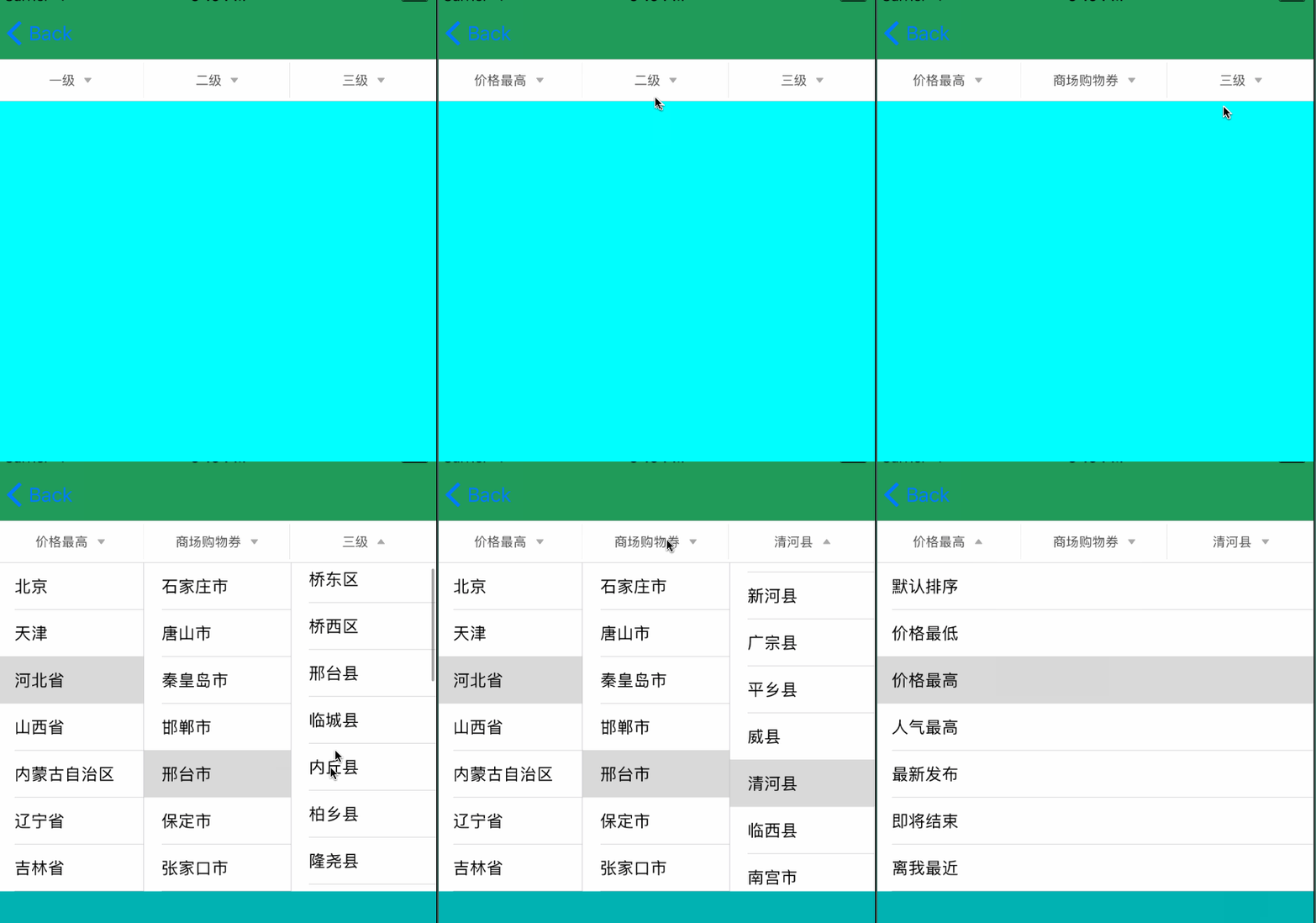
六 demo下载
因为数据源 无法上次上传[简书], 所以上传个demo, 细节方面, 可能有未注意地方,仅供参考.
传送门 : LinkageMenu_jb51.rar
以上就是本文的全部内容,希望对大家的学习有所帮助,也希望大家多多支持Devmax。