一、jQuery排序
eq()排序,可以看作是一个筛选方法
- jQuery 中获得的对象,内部包含选择的一组原生 js 对象,在 jQuery 对象中会进行一个新的大的排序,这个排序与原来的 HTML 结构没有关系。
所以eq() 方法在 jQuery 对象中通过下标获取某个对象,下标是 jQuery 对象中的大的排序的下标。
//选中所有p标签
var $ps = $("p");
//生成了一个jquery对象,内部包含了所有的元素js对象
// 是一个类数组对象,内部会按照获取顺序进行一个大排序
// 排序与自己原来的父级没有关系,只与在jQuery对象中的新的位置有关

// 给指定位置对象添加颜色
$ps.eq(1).css("background-color","pink")
$ps.eq(4).css("background-color","skyblue")
$ps.eq(8).css("background-color","purple")
$ps.eq(7).css("background-color","lightgreen")
$ps.eq(10).css("background-color","orange")
//对所有获取的元素进行了排序,跟原来的结构没有关系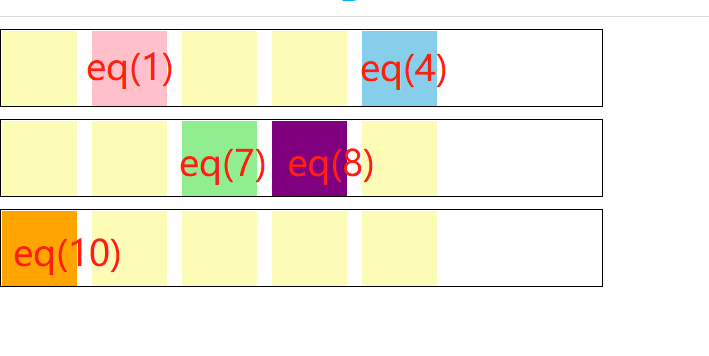
第三组div里p标签
<div class="b3">
     <p></p>
     <p class="b2p"></p>
     <p></p>
     <p></p>
     <p></p>
</div>
----------
<script>
  // 通过类名选中标签
  $(".b2p").eq(2).css("background-color","red")
  //得到第3组类名为b2p的 p 标签,让它变成红色
</script>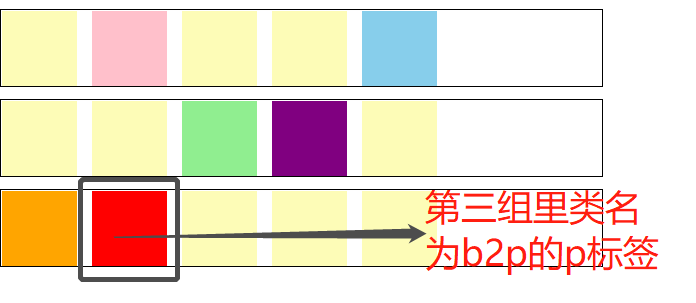
二、index()方法
- jQuery 对象调用
index()方法时,得到的是它自己在 HTML 结构中的兄弟中的下标位置。与新生成的jQuery 对象内部的大排序没有关系。 - 它依赖于自身元素在父级中同级元素之间的位置
//index() 兄弟中的排序
$ps.click(function(){
  //点击输出自己的index值
  console.log($(this).index());
})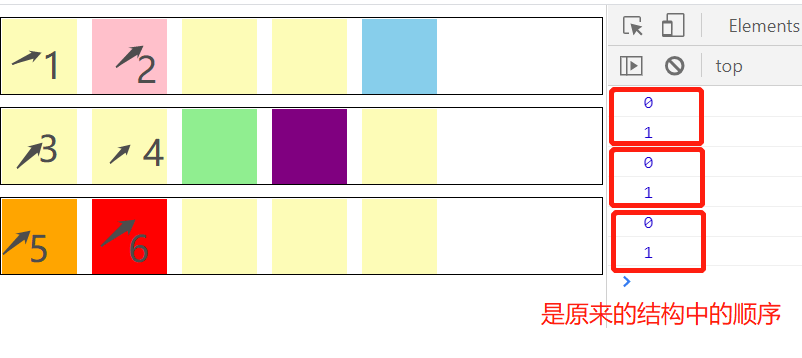
上图为依次点击图中p标签后,所显示结果
jQuery中设置排他方法,在jQuery中可以通过this特殊设置进行链式调用,让兄弟通过siblings方法,批量设置成默认效果。
三、应用:Tab栏特效中的排他
- 自己的级别的排他:给自己this添加(要添加的属性)类名,让其他的兄弟删除该类名。
- 对应的部分的排他:给对应位置的元素添加 (要添加的属性)类名,其他兄弟删除该类名。
- 找对应关系,使用的是自己的index()下标,让另一组中下标相同的项作为对应项。
- 通过选中另一组的对应项利用eq()方法选择下标项。
html部分:
<style>
  *{
     margin: 0;
     padding: 0;
   }
  ul{
     list-style: none;
   }
 .tab{
      width: 360px;
      height: 200px;
      border-top: 2px solid #206f96;
      margin: 100px;
      float: left;
    }

 .tab .title{
      width: 360px;
      height: 40px;
      overflow: hidden;
   }
 .tab .title span{
     float: left;
     width: 88px;
     height: 38px;
     border: 1px solid #52819c;
     border-bottom: 1px solid #52819c;
     background-color: #c0f3f7;
     font: 16px/34px "SunSim";
     text-align: center;
    }
  .tab .title span.current{
     height: 40px;
     background-color: rgb(255, 255, 255);
    }
 .tab .title span a{
     color: rgb(34, 34, 34);
     text-decoration: none;
   }
 .tab .detail{
      height: 258px;
      padding: 17px 0 0 9px;
  }
 .tab .detail ul{
      display: none;
  }
 .tab .detail ul.current{
     display: block;
 }
 .tab .detail ul li a{
    color: #000;
    text-decoration: none;
 }
 .tab .detail ul li.first{
    font-weight: bold;
 }
  </style>
</head>
<body>
  <div class="tab">
     <div class="title">
        <span class="current"><a href="#" rel="external nofollow"  rel="external nofollow"  rel="external nofollow"  rel="external nofollow"  rel="external nofollow"  rel="external nofollow"  rel="external nofollow"  rel="external nofollow"  rel="external nofollow"  rel="external nofollow"  rel="external nofollow"  rel="external nofollow"  rel="external nofollow"  rel="external nofollow"  rel="external nofollow"  rel="external nofollow"  rel="external nofollow"  rel="external nofollow"  rel="external nofollow"  rel="external nofollow"  rel="external nofollow" >上路</a></span>
        <span><a href="#" rel="external nofollow"  rel="external nofollow"  rel="external nofollow"  rel="external nofollow"  rel="external nofollow"  rel="external nofollow"  rel="external nofollow"  rel="external nofollow"  rel="external nofollow"  rel="external nofollow"  rel="external nofollow"  rel="external nofollow"  rel="external nofollow"  rel="external nofollow"  rel="external nofollow"  rel="external nofollow"  rel="external nofollow"  rel="external nofollow"  rel="external nofollow"  rel="external nofollow"  rel="external nofollow" >中路</a> / <a href="#" rel="external nofollow"  rel="external nofollow"  rel="external nofollow"  rel="external nofollow"  rel="external nofollow"  rel="external nofollow"  rel="external nofollow"  rel="external nofollow"  rel="external nofollow"  rel="external nofollow"  rel="external nofollow"  rel="external nofollow"  rel="external nofollow"  rel="external nofollow"  rel="external nofollow"  rel="external nofollow"  rel="external nofollow"  rel="external nofollow"  rel="external nofollow"  rel="external nofollow"  rel="external nofollow" >辅助</a></span>
        <span><a href="#" rel="external nofollow"  rel="external nofollow"  rel="external nofollow"  rel="external nofollow"  rel="external nofollow"  rel="external nofollow"  rel="external nofollow"  rel="external nofollow"  rel="external nofollow"  rel="external nofollow"  rel="external nofollow"  rel="external nofollow"  rel="external nofollow"  rel="external nofollow"  rel="external nofollow"  rel="external nofollow"  rel="external nofollow"  rel="external nofollow"  rel="external nofollow"  rel="external nofollow"  rel="external nofollow" >打野</a></span>
        <span><a href="#" rel="external nofollow"  rel="external nofollow"  rel="external nofollow"  rel="external nofollow"  rel="external nofollow"  rel="external nofollow"  rel="external nofollow"  rel="external nofollow"  rel="external nofollow"  rel="external nofollow"  rel="external nofollow"  rel="external nofollow"  rel="external nofollow"  rel="external nofollow"  rel="external nofollow"  rel="external nofollow"  rel="external nofollow"  rel="external nofollow"  rel="external nofollow"  rel="external nofollow"  rel="external nofollow" >下路</a></span>

    </div>
   <div class="detail">
      <ul class="current">
         <li class="first"><a href="#" rel="external nofollow"  rel="external nofollow"  rel="external nofollow"  rel="external nofollow"  rel="external nofollow"  rel="external nofollow"  rel="external nofollow"  rel="external nofollow"  rel="external nofollow"  rel="external nofollow"  rel="external nofollow"  rel="external nofollow"  rel="external nofollow"  rel="external nofollow"  rel="external nofollow"  rel="external nofollow"  rel="external nofollow"  rel="external nofollow"  rel="external nofollow"  rel="external nofollow"  rel="external nofollow" >夏侯惇</a></li>
         <li><a href="#" rel="external nofollow"  rel="external nofollow"  rel="external nofollow"  rel="external nofollow"  rel="external nofollow"  rel="external nofollow"  rel="external nofollow"  rel="external nofollow"  rel="external nofollow"  rel="external nofollow"  rel="external nofollow"  rel="external nofollow"  rel="external nofollow"  rel="external nofollow"  rel="external nofollow"  rel="external nofollow"  rel="external nofollow"  rel="external nofollow"  rel="external nofollow"  rel="external nofollow"  rel="external nofollow" >李信</a></li>
         <li><a href="#" rel="external nofollow"  rel="external nofollow"  rel="external nofollow"  rel="external nofollow"  rel="external nofollow"  rel="external nofollow"  rel="external nofollow"  rel="external nofollow"  rel="external nofollow"  rel="external nofollow"  rel="external nofollow"  rel="external nofollow"  rel="external nofollow"  rel="external nofollow"  rel="external nofollow"  rel="external nofollow"  rel="external nofollow"  rel="external nofollow"  rel="external nofollow"  rel="external nofollow"  rel="external nofollow" >曜</a></li>
         <li><a href="#" rel="external nofollow"  rel="external nofollow"  rel="external nofollow"  rel="external nofollow"  rel="external nofollow"  rel="external nofollow"  rel="external nofollow"  rel="external nofollow"  rel="external nofollow"  rel="external nofollow"  rel="external nofollow"  rel="external nofollow"  rel="external nofollow"  rel="external nofollow"  rel="external nofollow"  rel="external nofollow"  rel="external nofollow"  rel="external nofollow"  rel="external nofollow"  rel="external nofollow"  rel="external nofollow" >吕布</a></li>
     </ul>
     <ul>
        <li class="first"><a href="#" rel="external nofollow"  rel="external nofollow"  rel="external nofollow"  rel="external nofollow"  rel="external nofollow"  rel="external nofollow"  rel="external nofollow"  rel="external nofollow"  rel="external nofollow"  rel="external nofollow"  rel="external nofollow"  rel="external nofollow"  rel="external nofollow"  rel="external nofollow"  rel="external nofollow"  rel="external nofollow"  rel="external nofollow"  rel="external nofollow"  rel="external nofollow"  rel="external nofollow"  rel="external nofollow" >上官婉儿</a></li>
        <li><a href="#" rel="external nofollow"  rel="external nofollow"  rel="external nofollow"  rel="external nofollow"  rel="external nofollow"  rel="external nofollow"  rel="external nofollow"  rel="external nofollow"  rel="external nofollow"  rel="external nofollow"  rel="external nofollow"  rel="external nofollow"  rel="external nofollow"  rel="external nofollow"  rel="external nofollow"  rel="external nofollow"  rel="external nofollow"  rel="external nofollow"  rel="external nofollow"  rel="external nofollow"  rel="external nofollow" >弈星</a></li>
        <li><a href="#" rel="external nofollow"  rel="external nofollow"  rel="external nofollow"  rel="external nofollow"  rel="external nofollow"  rel="external nofollow"  rel="external nofollow"  rel="external nofollow"  rel="external nofollow"  rel="external nofollow"  rel="external nofollow"  rel="external nofollow"  rel="external nofollow"  rel="external nofollow"  rel="external nofollow"  rel="external nofollow"  rel="external nofollow"  rel="external nofollow"  rel="external nofollow"  rel="external nofollow"  rel="external nofollow" >甄姬</a></li>
        <li><a href="#" rel="external nofollow"  rel="external nofollow"  rel="external nofollow"  rel="external nofollow"  rel="external nofollow"  rel="external nofollow"  rel="external nofollow"  rel="external nofollow"  rel="external nofollow"  rel="external nofollow"  rel="external nofollow"  rel="external nofollow"  rel="external nofollow"  rel="external nofollow"  rel="external nofollow"  rel="external nofollow"  rel="external nofollow"  rel="external nofollow"  rel="external nofollow"  rel="external nofollow"  rel="external nofollow" >女娲</a></li>
     </ul>
     <ul>
        <li class="first"><a href="#" rel="external nofollow"  rel="external nofollow"  rel="external nofollow"  rel="external nofollow"  rel="external nofollow"  rel="external nofollow"  rel="external nofollow"  rel="external nofollow"  rel="external nofollow"  rel="external nofollow"  rel="external nofollow"  rel="external nofollow"  rel="external nofollow"  rel="external nofollow"  rel="external nofollow"  rel="external nofollow"  rel="external nofollow"  rel="external nofollow"  rel="external nofollow"  rel="external nofollow"  rel="external nofollow" >赵云</a></li>
        <li><a href="#" rel="external nofollow"  rel="external nofollow"  rel="external nofollow"  rel="external nofollow"  rel="external nofollow"  rel="external nofollow"  rel="external nofollow"  rel="external nofollow"  rel="external nofollow"  rel="external nofollow"  rel="external nofollow"  rel="external nofollow"  rel="external nofollow"  rel="external nofollow"  rel="external nofollow"  rel="external nofollow"  rel="external nofollow"  rel="external nofollow"  rel="external nofollow"  rel="external nofollow"  rel="external nofollow" >露娜</a></li>
        <li><a href="#" rel="external nofollow"  rel="external nofollow"  rel="external nofollow"  rel="external nofollow"  rel="external nofollow"  rel="external nofollow"  rel="external nofollow"  rel="external nofollow"  rel="external nofollow"  rel="external nofollow"  rel="external nofollow"  rel="external nofollow"  rel="external nofollow"  rel="external nofollow"  rel="external nofollow"  rel="external nofollow"  rel="external nofollow"  rel="external nofollow"  rel="external nofollow"  rel="external nofollow"  rel="external nofollow" >娜可露露</a></li>
        <li><a href="#" rel="external nofollow"  rel="external nofollow"  rel="external nofollow"  rel="external nofollow"  rel="external nofollow"  rel="external nofollow"  rel="external nofollow"  rel="external nofollow"  rel="external nofollow"  rel="external nofollow"  rel="external nofollow"  rel="external nofollow"  rel="external nofollow"  rel="external nofollow"  rel="external nofollow"  rel="external nofollow"  rel="external nofollow"  rel="external nofollow"  rel="external nofollow"  rel="external nofollow"  rel="external nofollow" >夏侯惇</a></li>
     </ul>
     <ul>
        <li class="first"><a href="#" rel="external nofollow"  rel="external nofollow"  rel="external nofollow"  rel="external nofollow"  rel="external nofollow"  rel="external nofollow"  rel="external nofollow"  rel="external nofollow"  rel="external nofollow"  rel="external nofollow"  rel="external nofollow"  rel="external nofollow"  rel="external nofollow"  rel="external nofollow"  rel="external nofollow"  rel="external nofollow"  rel="external nofollow"  rel="external nofollow"  rel="external nofollow"  rel="external nofollow"  rel="external nofollow" >后羿</a></li>
        <li><a href="#" rel="external nofollow"  rel="external nofollow"  rel="external nofollow"  rel="external nofollow"  rel="external nofollow"  rel="external nofollow"  rel="external nofollow"  rel="external nofollow"  rel="external nofollow"  rel="external nofollow"  rel="external nofollow"  rel="external nofollow"  rel="external nofollow"  rel="external nofollow"  rel="external nofollow"  rel="external nofollow"  rel="external nofollow"  rel="external nofollow"  rel="external nofollow"  rel="external nofollow"  rel="external nofollow" >虞姬</a></li>
        <li><a href="#" rel="external nofollow"  rel="external nofollow"  rel="external nofollow"  rel="external nofollow"  rel="external nofollow"  rel="external nofollow"  rel="external nofollow"  rel="external nofollow"  rel="external nofollow"  rel="external nofollow"  rel="external nofollow"  rel="external nofollow"  rel="external nofollow"  rel="external nofollow"  rel="external nofollow"  rel="external nofollow"  rel="external nofollow"  rel="external nofollow"  rel="external nofollow"  rel="external nofollow"  rel="external nofollow" >狄仁杰</a></li>
        <li><a href="#" rel="external nofollow"  rel="external nofollow"  rel="external nofollow"  rel="external nofollow"  rel="external nofollow"  rel="external nofollow"  rel="external nofollow"  rel="external nofollow"  rel="external nofollow"  rel="external nofollow"  rel="external nofollow"  rel="external nofollow"  rel="external nofollow"  rel="external nofollow"  rel="external nofollow"  rel="external nofollow"  rel="external nofollow"  rel="external nofollow"  rel="external nofollow"  rel="external nofollow"  rel="external nofollow" >鲁班</a></li>
     </ul>
  </div>
 </div>
</body>
script部分:
<script src="../jq/jquery-1.12.4.min.js"></script>
<script>
  //获取元素
  var $spans = $(".tab .title span");
  //添加鼠标移上事件
  $spans.mouseenter(function(){
    // 存储对应span下标的下标值,后面需要找到对应的ul
    var ind = $(this).index();
    // 自己级别的排他
    //$(this).addClass("current").siblings().removeClass("current");
    $(".tab .detail ul").eq(ind)
    .addClass("current").siblings().removeClass("current")

    </script>
上面的方法在一个tab栏中效果实现没有问题, 但是当页面有多个tab栏时,jQuery对象中大排序和index获取的顺序就会不统
出现问题
解决方法:span和ul的查找全部使用链式调用,通过节点关系查找
<script src="../jq/jquery-1.12.4.min.js"></script>
<script>
   // 查找所有对应ul时,不要单独选择所有的ul,通过当前的 this 的节点关系查找
   // 链式调用的方式,找到自己父级中的兄弟中的所有子级
  $(this).addClass("current").siblings().removeClass("current")
  .parent().siblings().children().eq(ind).addClass("current")
  .siblings().removeClass("current");
  // title的兄弟detail
  })
</script>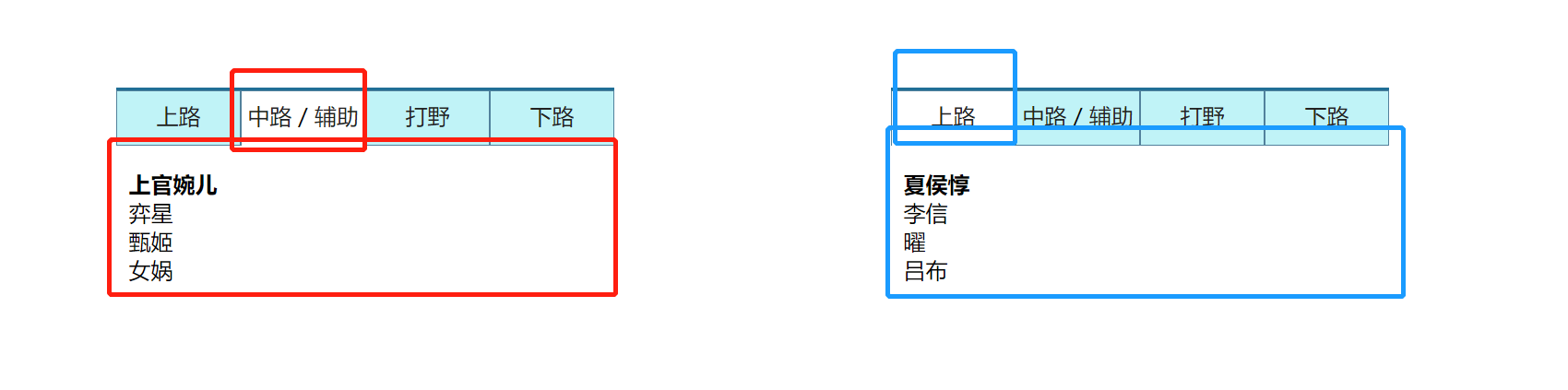
jQuery 对象进行的操作都是批量操作,批量操作只能执行一些简单的效果,如果想对 JQ 对象中的每一个元素以及内部的后
代元素进行一些复杂操作,程序很难执行
each()遍历
each()的参数是一个函数
作用:对jQuery对象中的元素每一个都执行函数内部的操作
each方法基本原理就是for循环,从对象的下标为0的项一直遍历到最后一项,然后对每一项进行操作
优点:
each的函数内部也有一个this,指向的是进来遍历的每一次的元素。
<body>
 <div class="box">
    <p></p>
    <p></p>
    <p></p>
    <p></p>
    <h2>h2</h2>
 </div>
 <div class="box">
      <p></p>
       <p></p>
       <p></p>
        <p></p>
        <h2>h2</h2>
  </div>

</body>

<script src="../jq/jquery-1.12.4.min.js"></script>
<script>
var $box = $(".box");
//每个div内的第二个p添加红色
$box.each(function(){
   $(this).children().eq(1).css("background-color","pink");
})
</script>each的函数可以传一个参数i,i表示的是这一次的遍历对象在整体的jQuery对象大排序中的下标位置
  //通过each()操作
$ps.each(function(i){
 // i 记录的是这一次遍历时,当前元素在jQuery对象大排序中的位置
     $(this).click(function(){
     console.log($(this).index())
     //这个内部的this是事件源
    console.log(i);
     })
 })
同理,如果想实现表格隔列变色的话,依靠jQuery大排列顺序来实现奇偶不同变色的话,后期若给表格再添加列,都会出现问题,无法对应。所以使用each()方法,将每一行作为一个操作单元,让每一行中的列进行隔列变色
var $trs = $("tr");
$trs.each(function(){
    $(this).children(":odd").css("background-color","skyblue");
})
另一种方法就是使用td判断,只要不使用jQuery的大排序,就不会影响后期插入列
$("td").each(function(){
    //判断当前td在父级中所处的位置
    if($(this).index() % 2 == 0){
       $(this).css("background-color","skyblue");
    }
})
到此这篇关于基于jQuery排序及应用实现Tab栏特效的文章就介绍到这了,更多相关jQuery实现Tab栏特效内容请搜索Devmax以前的文章或继续浏览下面的相关文章希望大家以后多多支持Devmax!