一、需求
满足用户自行配置表格,减少对系统代码维护量。
二、效果
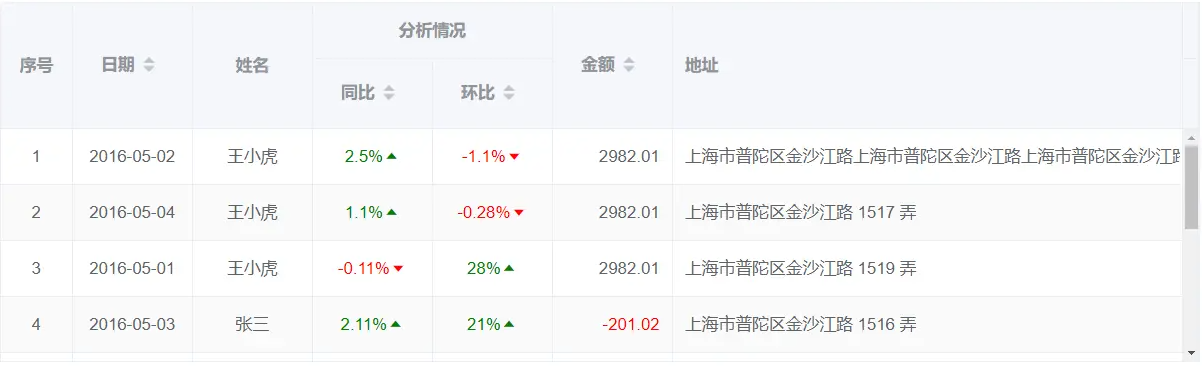
表头json:
说明:scope(字段名可另取)为是否对该列开启插槽。有propChildren包含多级表头。
tableHead: [{
    key: '1',
    label: '日期',
    prop: 'date',
    width: '100',
    headerAlign: 'center',
    align: 'center',
    scope: false,
    sortable: true
  },
  {
    key: '2',
    label: '姓名',
    prop: 'name',
    width: '100',
    headerAlign: 'center',
    align: 'center',
    scope: false,
    sortable: false
  },
  {
    key: '3',
    label: '分析情况',
    prop: 'analysis',
    width: '100',
    headerAlign: 'center',
    propChildren: [{
      key: '31',
      label: '同比',
      prop: 'TB',
      width: '100',
      headerAlign: 'center',
      align: 'center',
      scope: true,
      sortable: true
    },
    {
      key: '32',
      label: '环比',
      prop: 'HB',
      width: '100',
      headerAlign: 'center',
      align: 'center',
      scope: true,
      sortable: true
    },]
  },
  {
    key: '4',
    label: '金额',
    prop: 'price',
    width: '100',
    headerAlign: 'center',
    align: 'right',
    scope: false,
    sortable: true
  },
  {
    key: '5',
    label: '地址',
    prop: 'address',
    width: '',
    headerAlign: 'left',
    align: 'left',
    scope: false,
    sortable: false
  }
  ],
三、全部代码
<template>
  <el-table
    :data="tableData"
    stripe
    resizable
    border
    height="300"
    style="width: 1000px"
  >
    <el-table-column
      type="index"
      :index="indexMethod"
      label="序号"
      align="center"
      width="60"
    >
    </el-table-column>
    <el-table-column
      v-for="(item, index) in tableHead"
      :key="index"
      :prop="item.prop"
      :label="item.label"
      :width="item.width"
      :align="item.align"
      :headerAlign="item.headerAlign"
      :sortable="item.sortable"
      show-overflow-tooltip
    >
      <el-table-column
        v-for="(item, index) in item.propChildren"
        :key="index"
        :prop="item.prop"
        :label="item.label"
        :width="item.width"
        :align="item.align"
        :headerAlign="item.headerAlign"
        :sortable="item.sortable"
        show-overflow-tooltip
      >
        <template slot-scope="scope">
          <div v-if="item.scope === true">
            <div v-if="scope.row[item.prop] == ''">
              {{ scope.row[item.prop] }}
            </div>
            <div v-else-if="scope.row[item.prop] > '0'" style="color: green">
              {{ scope.row[item.prop] }}%<i class="el-icon-caret-top"></i>
            </div>
            <div v-else-if="scope.row[item.prop] < '0'" style="color: red">
              {{ scope.row[item.prop] }}%<i class="el-icon-caret-bottom"></i>
            </div>
          </div>
          <div v-else-if="scope.row[item.prop] < '0'" style="color: red">
            {{ scope.row[item.prop] }}
          </div>
          <div v-else>{{ scope.row[item.prop] }}</div>
        </template>
      </el-table-column>
      <template slot-scope="scope">
          <div v-if="item.scope === true">
            <div v-if="scope.row[item.prop] == ''">
              {{ scope.row[item.prop] }}
            </div>
            <div v-else-if="scope.row[item.prop] < '0'" style="color: red">
              {{ scope.row[item.prop] }}
            </div>
             <div v-else-if="scope.row[item.prop] > '0'">
              {{ scope.row[item.prop] }}
            </div>
          </div>
        <div v-else>{{ scope.row[item.prop] }}</div>
        </template>
    </el-table-column>
  </el-table>
</template>

<script>
export default {
  data() {
    return {
      // 单表头  是否对该列进行数据比较,靠scope来判断。
      tableHead: [{
        key: '1',
        label: '日期',
        prop: 'date',
        width: '100',
        headerAlign: 'center',
        align: 'center',
        scope: false,
        sortable: true
      },
      {
        key: '2',
        label: '姓名',
        prop: 'name',
        width: '100',
        headerAlign: 'center',
        align: 'center',
        scope: false,
        sortable: false
      },
      {
        key: '3',
        label: '分析情况',
        prop: 'analysis',
        width: '100',
        headerAlign: 'center',
        propChildren: [{
          key: '31',
          label: '同比',
          prop: 'TB',
          width: '100',
          headerAlign: 'center',
          align: 'center',
          scope: true,
          sortable: true
        },
        {
          key: '32',
          label: '环比',
          prop: 'HB',
          width: '100',
          headerAlign: 'center',
          align: 'center',
          scope: true,
          sortable: true
        },]
      },
      {
        key: '4',
        label: '金额',
        prop: 'price',
        width: '100',
        headerAlign: 'center',
        align: 'right',
        scope: false,
        sortable: true
      },
      {
        key: '5',
        label: '地址',
        prop: 'address',
        width: '',
        headerAlign: 'left',
        align: 'left',
        scope: false,
        sortable: false
      }
      ],

      // 数据
      tableData: [{
        date: '2016-05-02',
        name: '王小虎',
        HB: '-1.1',
        TB: '2.5',
        price: '2982.01',
        address: '上海市普陀区金沙江路上海市普陀区金沙江路上海市普陀区金沙江路上海市普陀区金沙江路上海市普陀区金沙江路 1518 弄'
      }, {
        date: '2016-05-04',
        name: '王小虎',
        HB: '-0.28',
        TB: '1.1',
        price: '2982.01',
        address: '上海市普陀区金沙江路 1517 弄'
      }, {
        date: '2016-05-01',
        name: '王小虎',
        HB: '28',
        TB: '-0.11',
        price: '2982.01',
        address: '上海市普陀区金沙江路 1519 弄'
      }, {
        date: '2016-05-03',
        name: '张三',
        HB: '21',
        TB: '2.11',
        price: '-201.02',
        address: '上海市普陀区金沙江路 1516 弄'
      }, {
        date: '2016-05-11',
        name: '张三',
        HB: '0.28',
        TB: '-1.1',
        price: '2982.01',
        address: '上海市普陀区金沙江路 1516 弄'
      }, {
        date: '2016-05-02',
        name: '王小虎',
        HB: '-0.18',
        TB: '-1.15',
        price: '2982.01',
        address: '上海市普陀区金沙江路上海市普陀区金沙江路上海市普陀区金沙江路上海市普陀区金沙江路上海市普陀区金沙江路 1518 弄'
      }, {
        date: '2016-05-04',
        name: '王小虎',
        HB: '-1.01',
        TB: '1.1',
        price: '2982.01',
        address: '上海市普陀区金沙江路 1517 弄'
      }, {
        date: '2016-05-01',
        name: '王小虎',
        HB: '-28',
        TB: '2.11',
        price: '2982.01',
        address: '上海市普陀区金沙江路 1519 弄'
      }, {
        date: '2016-05-03',
        name: '张三',
        HB: '',
        TB: '0.1',
        price: '-200.01',
        address: '上海市普陀区金沙江路 1516 弄'
      }, {
        date: '2016-05-11',
        name: '张三',
        HB: '18',
        TB: '-0.81',
        price: '2982.01',
        address: '上海市普陀区金沙江路 1516 弄'
      }],
    }
  },
  methods: {
    indexMethod(index) {
      return index   1;
    }
  }
}
</script>
到此这篇关于vue element动态多表头与动态插槽的文章就介绍到这了,更多相关vue element动态多表头与动态插槽内容请搜索Devmax以前的文章或继续浏览下面的相关文章希望大家以后多多支持Devmax!