下面我们通过实例代码来一步步看怎么实现, 首先建立了两个模型类, 一个Friend, 一个FriendGroup类. 数据源用的本地的一个plist文件. plist文件中包含了FriendGroup的name,friends数组等属性.
Friend.h 示例代码
#import <Foundation/Foundation.h>

@interface Friend : NSObject
@property (nonatomic, copy) NSString *name;
@end
FriendGroup.h 示例代码
#import <Foundation/Foundation.h>
@interface FriendGroup : NSObject
@property (nonatomic, copy) NSString *name;
// 数组中存放的为Friend类的实例对象
@property (nonatomic, copy) NSMutableArray *friends;
// 用来判断分组是否打开(opened属性正是实现下拉列表的关键)
@property (nonatomic, assign, getter = isOpened) BOOL opened;
// 自定义方法用来赋值
-(void)setFriendGroupDic:(NSMutableDictionary *)dic;
@end
FriendGroup.m 示例代码
#import "FriendGroup.h"
#import "Friend.h"
@implementation FriendGroup

-(void)setFriendGroupDic:(NSMutableDictionary *)dic
{
// 通过字典给FriendGroup的属性赋值
 [self setValuesForKeysWithDictionary:dic];
 NSMutableArray *tempArray = [NSMutableArray array];
// 遍历friends属性数组
 for (NSMutableDictionary *dic in self.friends) {
  Friend *friend = [[Friend alloc] init];
  [friend setValuesForKeysWithDictionary:dic];
  [tempArray addObject:friend];
 }
 //重新对friends属性数组赋值,此时存的都是Friend对象
 self.friends = [NSMutableArray arrayWithArray:tempArray];
}
@end
在ViewController中创建一个tableView
#import "ViewController.h"
#import "SectionView.h"
#import "FriendGroup.h"
#import "Friend.h"
#define kTableViewReuse @"reuse"
@interface ViewController ()<UITableViewDelegate, UITableViewDataSource, SectionViewDelegate>
@property (nonatomic, strong) UITableView *tableView;
// 数组中存放FriendGroup的实例对象
@property (nonatomic, strong) NSMutableArray *allArray;
@end

@implementation ViewController

- (void)viewDidLoad {
 [super viewDidLoad];
 self.allArray =[NSMutableArray array];
 [self creatTableView];
 [self getData];
}

- (void)creatTableView {
 self.tableView = [[UITableView alloc] initWithFrame:self.view.bounds style:UITableViewStylePlain];
 _tableView.delegate = self;
 _tableView.dataSource = self;
 [_tableView registerClass:[UITableViewCell class] forCellReuseIdentifier:kTableViewReuse];
 [self.view addSubview:_tableView];
}
// 获取数据
- (void)getData {
 NSString *filePath = [[NSBundle mainBundle] pathForResource:@"friends.plist" ofType:nil];
 NSArray *tempArray = [NSArray arrayWithContentsOfFile:filePath];
 for (NSMutableDictionary *dic in tempArray) {
  FriendGroup *friendGroup = [[FriendGroup alloc] init];
  [friendGroup setFriendGroupDic:dic];
  [self.allArray addObject:friendGroup];
 }
 [self.tableView reloadData];
}

- (CGFloat)tableView:(UITableView *)tableView heightForHeaderInSection:(NSInteger)section {
 return 50;
}
// SectionView必须实现的协议方法
- (void)touchAction:(SectionView *)sectionView {

}
#pragma mark - TableView Delegate
-(UIView *)tableView:(UITableView *)tableView viewForHeaderInSection:(NSInteger)section
{
 FriendGroup *friendGroup = [self.allArray objectAtIndex:section];
 //放一个封装的view,view上有一个label和imageVIew,自带touch事件,点击触发协议方法
 SectionView *sectionView = [[SectionView alloc] initWithFrame:CGRectMake(0, 0, 375, 50)];
 sectionView.delegate = self;
 sectionView.tag = section   1000;
 sectionView.textLabel.text = friendGroup.name;
 sectionView.group = friendGroup;
 return sectionView;
}
#pragma mark - TableView DataSource
- (NSInteger)numberOfSectionsInTableView:(UITableView *)tableView {
 return _allArray.count;
}
- (NSInteger)tableView:(UITableView *)tableView numberOfRowsInSection:(NSInteger)section {
 return [_allArray[section] friends].count;
}
- (UITableViewCell *)tableView:(UITableView *)tableView cellForRowAtIndexPath:(NSIndexPath *)indexPath {
 UITableViewCell *cell = [tableView dequeueReusableCellWithIdentifier:kTableViewReuse];
 FriendGroup *friendGroup = _allArray[indexPath.section];
 Friend *friend = friendGroup.friends[indexPath.row];
 cell.textLabel.text = friend.name;
 return cell;
}
#pragma mark - Memory Waring
- (void)didReceiveMemoryWarning {
 [super didReceiveMemoryWarning];
 // Dispose of any resources that can be recreated.
}


@end
可以从上面代码看到, 创建了一个tableView. 并根据数组个数给分区数量赋值, 然后在tableView: viewForHeaderInSection:方法里, 用一个自定的view给分区头视图赋值. 在tableView: cellForRowAtIndexPath:方法里给每个分区对应的cell进行了赋值. 先看一下效果.
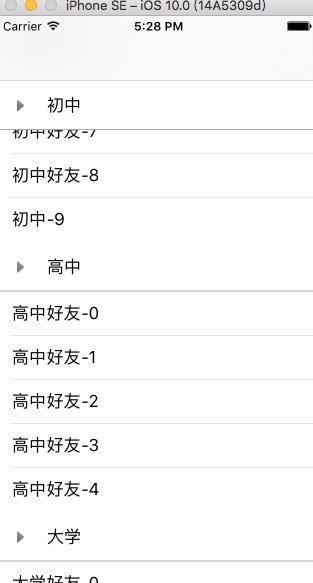
从上图可以看到现在每个分区中对应有不同数量的row,但是还没有实现我们想要的效果.所以再往下继续看.
SectionView.m
-(void)touchesBegan:(NSSet *)touches withEvent:(UIEvent *)event
{
 [self.delegate touchAction:self];
}
/*
 [self.delegate touchAction:self];
 协议方法会刷新tableview,然后会刷新tableview的 viewForHeaderInSection:方法
 就会重新布局SectionView所以会走layoutSubviews方法
 */
-(void)layoutSubviews
{
 [super layoutSubviews];
// 改变imageView的transform属性 点击时有开闭的效果
 [UIView animateWithDuration:0.3 animations:^{
  _imageView.transform = _group.opened ? CGAffineTransformMakeRotation(M_PI_2) : CGAffineTransformMakeRotation(0);
 }];
}
点击SectionView时 就让代理人去执行协议方法,但是在VC的协议方法中什么都没写, 所以需要完善一下
- (void)touchAction:(SectionView *)sectionView {
// 通过前面设置的tag值找到分区的index
 NSInteger index = sectionView.tag - 1000;
 FriendGroup *group = [self.allArray objectAtIndex:index];
// 每次点击, 状态变为与原来相反的值
 group.opened = !group.isOpened;
 [self.tableView reloadSections:[NSIndexSet indexSetWithIndex:index] withRowAnimation:UITableViewRowAnimationNone];
}
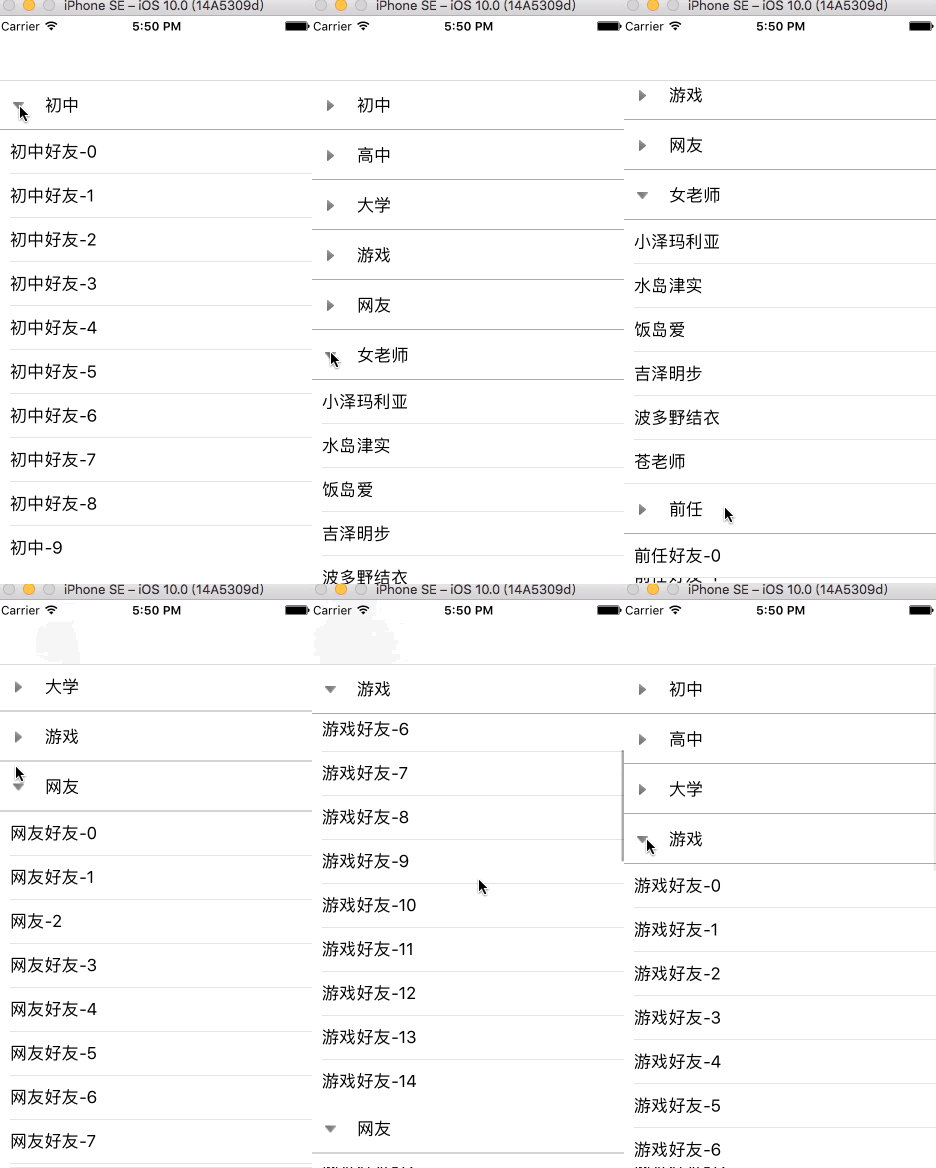
我们平时用的QQ下拉列表, 未打开时不显示好友, 打开后才展示好友列表. 所以应该在numberOfRowsInSection方法中要进行设置.
- (NSInteger)tableView:(UITableView *)tableView numberOfRowsInSection:(NSInteger)section {
 FriendGroup *group = [self.allArray objectAtIndex:section];
// 如果未打开 count为0 如果打开 count为group的属性数组对应的个数
 NSInteger count = group.isOpened ? group.friends.count : 0;
 return count;
}
效果如下图
总结
以上就是IOS实现简易版的QQ下拉列表的全部内容,效果虽然很简单,但还会希望对大家开发IOS有所帮助。