本文实例为大家分享了JS实现贪吃蛇游戏的具体代码,供大家参考,具体内容如下
效果图:
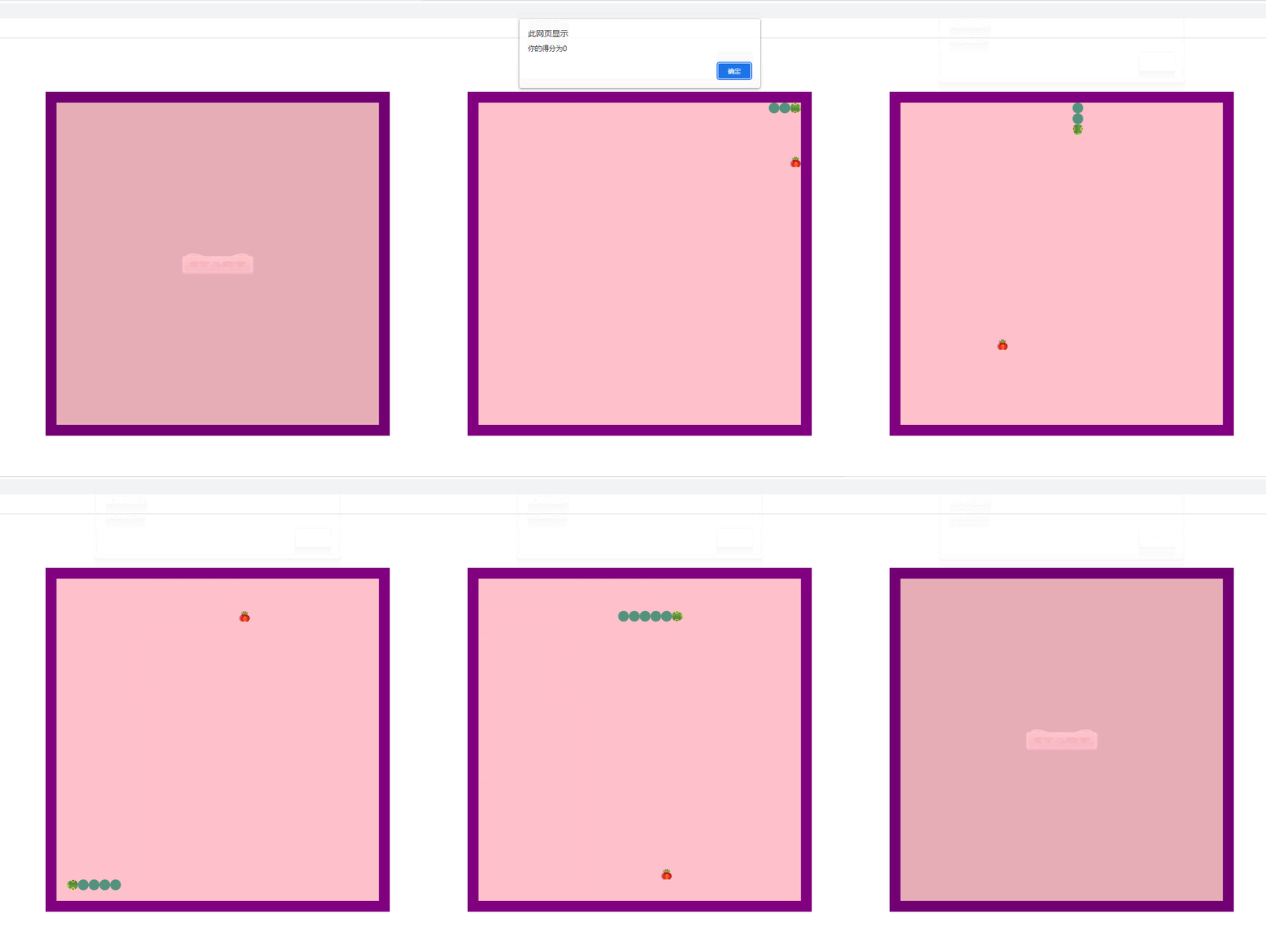
完整代码如下:
html:
<!DOCTYPE html>
<html lang="en">

<head>
    <meta charset="UTF-8">
    <meta http-equiv="X-UA-Compatible" content="IE=edge">
    <meta name="viewport" content="width=device-width, initial-scale=1.0">
    <title>Document</title>
    <link rel="stylesheet" href="index.css" >
    <script src="index.js"></script>
</head>

<body>
    <div class="content">
        <div class="btn startBtn"><button></button></div>
        <div class="btn pauseBtn"><button></button></div>
        <div id="snakeWrap">
            <!-- <div class="snakeHead"></div>
            <div class="snakeBody"></div>
            <div class="food"></div> -->
        </div>
    </div>

</body>

</html>
css:
.content {
    position: relative;
    width: 640px;
    height: 640px;
    margin: 100px auto;
}

.btn {
    width: 100%;
    height: 100%;
    position: absolute;
    top: 0;
    left: 0;
    background-color: black;
    opacity: .1;
    z-index: 2;
}

.btn button {
    background: none;
    border: none;
    background-size: 100% 100%;
    cursor: pointer;
    outline: none;
    position: absolute;
    left: 50%;
    top: 50%;
}

.startBtn button {
    width: 200px;
    height: 80px;
    background-image: url(../贪吃蛇/img/btn.gif);
    margin-left: -100px;
    margin-top: -40px;
}

.pauseBtn {
    display: none;
}

.pauseBtn button {
    width: 70px;
    height: 70px;
    background-image: url(../贪吃蛇/img/btn4.png);
    margin-left: -35px;
    margin-top: -35px;
}

#snakeWrap {
    width: 600px;
    height: 600px;
    background-color: pink;
    border: 20px solid purple;
    position: relative;
}


/* #snakeWrap div {
    width: 20px;
    height: 20px;
} */

.snakeHead {
    background-image: url(../贪吃蛇/img/snake.png);
    background-size: cover;
}

.snakeBody {
    background-color: rgb(85, 146, 126);
    border-radius: 50%;
}

.food {
    background-image: url(../贪吃蛇/img/草莓.png);
    background-size: cover;
}
js:
window.addEventListener('load', function() {
    // 声明方块的宽高,行数和列数
    var sw = 20,
        sh = 20,
        tr = 30,
        td = 30;

    var snake = null, //蛇的实例
        food = null, //食物的实例
        game = null; //游戏的实例

    function Square(x, y, classname) {
        this.x = sw * x;
        this.y = sh * y;
        this.class = classname;

        this.viewContent = document.createElement('div'); //方块对应的DOM元素
        this.viewContent.className = this.class;
        this.parent = document.getElementById('snakeWrap'); //方块的父级
    }
    //创建方块DOM,并添加到页面里
    Square.prototype.create = function() {
        this.viewContent.style.position = 'absolute';
        this.viewContent.style.width = sw   'px';
        this.viewContent.style.height = sh   'px';
        this.viewContent.style.left = this.x   'px';
        this.viewContent.style.top = this.y   'px';
        this.parent.appendChild(this.viewContent);

    };
    Square.prototype.remove = function() {
        this.parent.removeChild(this.viewContent);
    };
    //蛇
    function Snake() {
        this.head = null //存蛇头的信息
        this.tail = null //存蛇尾的信息
        this.pos = []; //存蛇身上每个方块的位置

        //存储蛇走的方向,用一个对象来表示
        this.directionNum = {
            left: {
                x: -1,
                y: 0,
                rotate: 180
            },
            right: {
                x: 1,
                y: 0,
                rotate: 0
            },
            up: {
                x: 0,
                y: -1,
                rotate: -90
            },
            down: {
                x: 0,
                y: 1,
                rotate: 90
            }
        };
    }
    //初始化
    Snake.prototype.init = function() {
        //创建蛇头
        var snakeHead = new Square(2, 0, 'snakeHead');
        snakeHead.create();
        this.head = snakeHead; //存储蛇头信息
        this.pos.push([2, 0]); //把蛇头的位置存起来

        //创建蛇身体1
        var snakeBody1 = new Square(1, 0, 'snakeBody');
        snakeBody1.create();
        this.pos.push([1, 0]); //把蛇身1的坐标存起来

        //创建蛇身体2
        var snakeBody2 = new Square(0, 0, 'snakeBody');
        snakeBody2.create();
        this.tail = snakeBody2; //把蛇尾的信息存起来
        this.pos.push([0, 0]); //把蛇身1的坐标存起来

        //形成链表关系
        snakeHead.last = null;
        snakeHead.next = snakeBody1;

        snakeBody1.last = snakeHead;
        snakeBody1.next = snakeBody2;

        snakeBody2.last = snakeBody1;
        snakeBody2.next = null;

        //给蛇添加一条属性,用来表示蛇的走向
        this.direction = this.directionNum.right; //默认让蛇往右走
    };

    //该方法用来获取蛇头的下一个位置对应的元素,要根据元素做不同的事情
    Snake.prototype.getNextPos = function() {
        var nextPos = [ //蛇头要走的下一个点的坐标
            this.head.x / sw   this.direction.x,
            this.head.y / sh   this.direction.y
        ];
        // console.log(nextPos[0]);

        //下个点是自己,游戏结束
        var selfCollied = false; //是否撞到自己,默认是否
        //value表示数组中的某一项
        this.pos.forEach(function(value) {
            // console.log(nextPos[0], value[0]);
            if (value[0] == nextPos[0] && value[1] == nextPos[1]) {
                selfCollied = true;
                // console.log(2);
            }
        });
        if (selfCollied) {
            console.log('撞到自己了!');
            this.strategies.die.call(this);
            return;
        }

        // 下个点是墙,游戏结束
        if (nextPos[0] < 0 || nextPos[1] < 0 || nextPos[0] > td - 1 || nextPos[1] > tr - 1) {
            console.log('撞墙!');
            this.strategies.die.call(this);
            return;
        }

        // 下个点是食物,吃
        if (food && food.pos[0] == nextPos[0] && food.pos[1] == nextPos[1]) {
            //如这条件成立,说明蛇头走的下一点是食物的点
            console.log('撞到食物了');
            this.strategies.eat.call(this);
            return;
        }

        // 下个点什么都不是,继续走
        this.strategies.move.call(this);

    };
    // 处理碰撞后要做的事
    Snake.prototype.strategies = {
        move: function(format) { //format这个参数用于决定要不要删除最后一个方块(蛇尾),当传了这个参数就表示要做的事情是吃
            //创建新身体(在旧蛇头的位置)

            var newBody = new Square(this.head.x / sw, this.head.y / sh, 'snakeBody');
            //更新链表的关系
            newBody.next = this.head.next;
            newBody.next.last = newBody;
            newBody.last = null;

            //把旧蛇头从原来的位置删除
            this.head.remove();
            newBody.create();

            //创建新的蛇头(蛇头下一个要走到的点nextPos)
            var newHead = new Square(this.head.x / sw   this.direction.x, this.head.y / sh   this.direction.y, 'snakeHead');

            //更新链表关系
            newHead.next = newBody;
            newHead.last = null;
            newBody.last = newHead;
            newHead.viewContent.style.transform = 'rotate('   this.direction.rotate   'deg)';
            newHead.create();

            //蛇身上的每一个方块的坐标也要更新
            this.pos.splice(0, 0, [this.head.x / sw   this.direction.x, this.head.y / sh   this.direction.y])
            this.head = newHead; //还要把this.head的信息更新一下

            if (!format) { //如果format的值为false,表示需要删除(除了吃之外的操作)
                this.tail.remove();
                this.tail = this.tail.last;
                this.pos.pop();
            }
        },
        eat: function() {
            this.strategies.move.call(this, true);
            createFood();
            game.score  ;
        },
        die: function() {
            // console.log('die');
            game.over();
        }
    }


    snake = new Snake();


    //创建食物
    function createFood() {
        //食物小方块的随机坐标

        var x = null;
        var y = null;

        var include = true; //循环跳出的条件,true表示食物坐标在蛇身上。(需要继续循环)false表示食物的坐标不再蛇身上(不用继续循环)
        while (include) {
            x = Math.round(Math.random() * (td - 1));
            y = Math.round(Math.random() * (tr - 1));

            snake.pos.forEach(function(value) {
                if (x != value[0] && y != value[1]) {
                    //这个条件成立说明现在随机出来的这个坐标,在蛇身上没有找到。
                    include = false;
                }
            });
        }

        //生成食物
        food = new Square(x, y, 'food');
        //存储生成食物的坐标,用于跟蛇头要走的下一坐标对比
        food.pos = [x, y];

        var foodDom = document.querySelector('.food');
        if (foodDom) {
            foodDom.style.left = x * sw   'px';
            foodDom.style.top = y * sh   'px';
        } else {
            food.create();
        }

    }
    //创建游戏逻辑
    function Game() {
        this.timer = null;
        this.score = 0;
    }
    Game.prototype.init = function() {
        snake.init();
        // snake.getNextPos();
        createFood();
        var flag = true;
        document.onkeydown = function(ev) {
            //当蛇在往右走,不能按左键
            if (ev.which == 37 && snake.direction != snake.directionNum.right) {
                if (flag) {
                    flag = false;
                    setTimeout(function() {
                        snake.direction = snake.directionNum.left;
                        flag = true;
                    }, 150)
                }

            } else if (ev.which == 38 && snake.direction != snake.directionNum.down) {
                if (flag) {
                    flag = false;
                    setTimeout(function() {
                        snake.direction = snake.directionNum.up;
                        flag = true;
                    }, 150)
                }
            } else if (ev.which == 39 && snake.direction != snake.directionNum.left) {
                if (flag) {
                    flag = false;
                    setTimeout(function() {
                        snake.direction = snake.directionNum.right;
                        flag = true;
                    }, 150)
                }
            } else if (ev.which == 40 && snake.direction != snake.directionNum.up) {
                if (flag) {
                    flag = false;
                    setTimeout(function() {
                        snake.direction = snake.directionNum.down;
                        flag = true;
                    }, 150)
                }
            }
        }
        this.start();
    };
    //开始游戏
    Game.prototype.start = function() {
        this.timer = setInterval(function() {
            snake.getNextPos();
        }, 150);
    };
    //暂停游戏
    Game.prototype.pause = function() {
        clearInterval(this.timer);
    };
    //游戏结束
    Game.prototype.over = function() {
        clearInterval(this.timer);
        alert('你的得分为'   this.score);

        //游戏回到初始状态
        var snakeWrap = document.getElementById('snakeWrap');
        snakeWrap.innerHTML = '';

        snake = new Snake();
        game = new Game();

        var startBtnWrap = document.querySelector('.startBtn');
        startBtnWrap.style.display = 'block';
    };
    //开启游戏
    game = new Game();
    var startBtn = document.querySelector('.startBtn button');
    console.log(startBtn);
    startBtn.onclick = function() {
        startBtn.parentNode.style.display = 'none';
        game.init();
    };
    //暂停游戏
    var snakeWrap = document.getElementById('snakeWrap');
    console.log(snakeWrap);
    var pauseBtn = document.querySelector('.pauseBtn button');
    console.log(pauseBtn);
    snakeWrap.onclick = function() {
        game.pause();
        pauseBtn.parentNode.style.display = 'block';
        console.log(123);
    };
    pauseBtn.onclick = function() {
        game.start();
        pauseBtn.parentNode.style.display = 'none';
    }
})
以上就是本文的全部内容,希望对大家的学习有所帮助,也希望大家多多支持Devmax。