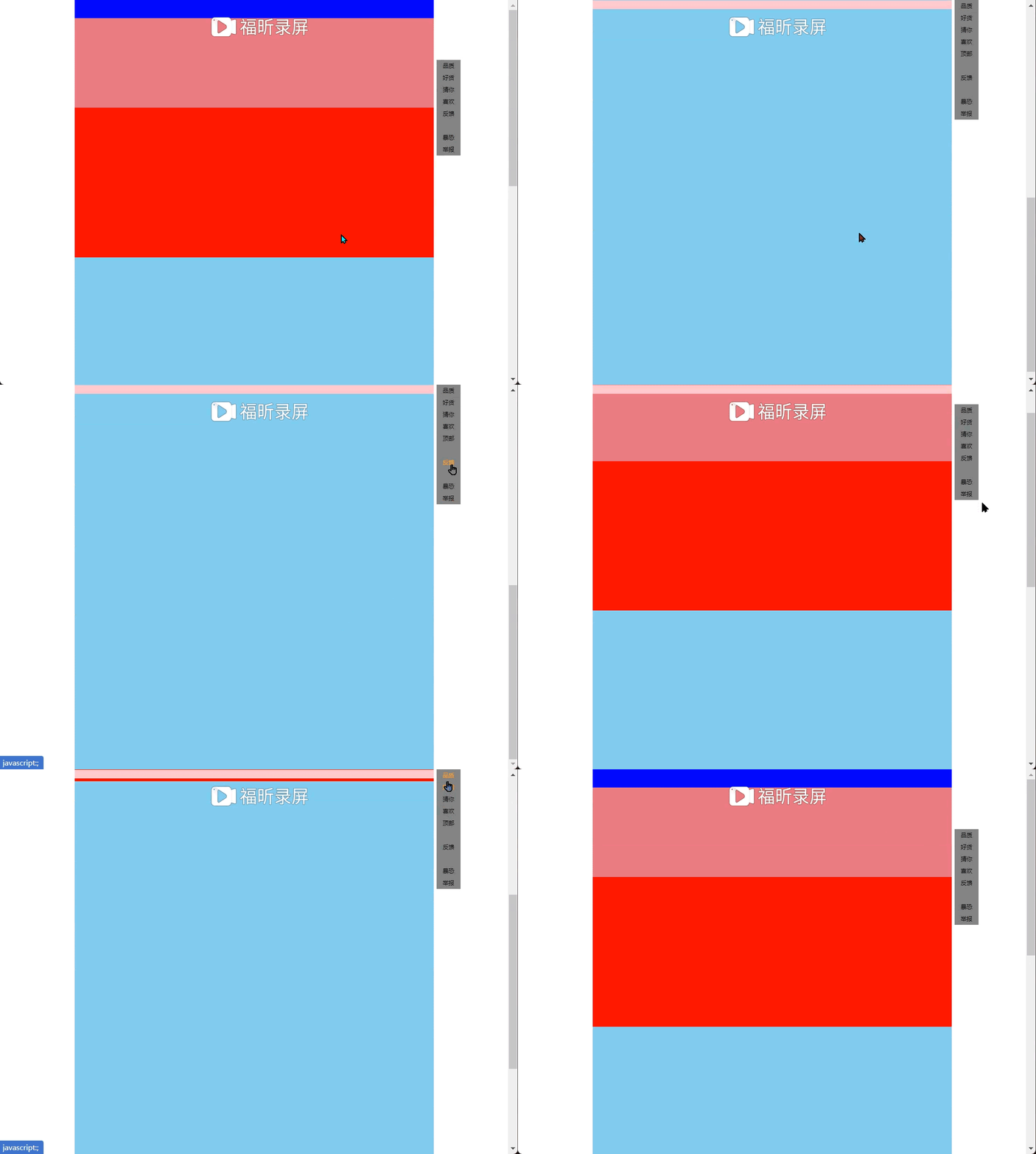
效果图
实现代码
<!DOCTYPE html>
<html lang="en">

<head>
    <meta charset="UTF-8">
    <meta http-equiv="X-UA-Compatible" content="IE=edge">
    <meta name="viewport" content="width=device-width, initial-scale=1.0">
    <title>Document</title>
    <style>
        * {
            margin: 0px;
            padding: 0px
        }

        .box {
            width: 1200px;
            margin: 0 auto;
            position: relative;
        }

        .navfix {
            display: none;
            width: 1200px;
            height: 30px;
            background-color: pink;
            position: sticky;
            top: 0px
        }

        .goodetem,
        .contain1 {
            width: 1200px;
            height: 500px;
            background-color: red;
        }

        .contain1 {
            height: 300px;
            background-color: rgb(226, 111, 130);
        }

        .youlike {
            width: 1200px;
            height: 1800px;
            background-color: skyblue;
        }

        a {
            text-decoration: none;
            color: black
        }

        .bar a {
            display: block;
            width: 80px;
            height: 80px;
            background-color: grey;
            text-align: center;
            line-height: 40px;
        }

        .bar {
            width: 100px;
            height: 100px;
            position: absolute;
            left: 1210px;
            top: 200px;
        }

        a:hover {
            color: orange
        }
    </style>
    <script src="jquery.min.js"></script>
</head>

<body>
    <div class="box">
        <div class="top1" style="background-color:blue;width:1200px;height:60px;"></div>
        <div class="navfix"></div>
        <div class="contain1"></div>
        <div class="goodetem"></div>
        <div class="youlike"></div>
        <div class="bar">
            <a href="javascript:;" rel="external nofollow"  rel="external nofollow"  rel="external nofollow"  rel="external nofollow"  rel="external nofollow"  rel="external nofollow"  rel="external nofollow"  rel="external nofollow"  rel="external nofollow"  rel="external nofollow"  class="pinzhi">品质<br>好货</a><a href="javascript:;" rel="external nofollow"  rel="external nofollow"  rel="external nofollow"  rel="external nofollow"  rel="external nofollow"  rel="external nofollow"  rel="external nofollow"  rel="external nofollow"  rel="external nofollow"  rel="external nofollow"  class="like">猜你<br>喜欢</a><a href="javascript:;" rel="external nofollow"  rel="external nofollow"  rel="external nofollow"  rel="external nofollow"  rel="external nofollow"  rel="external nofollow"  rel="external nofollow"  rel="external nofollow"  rel="external nofollow"  rel="external nofollow"  class="top" style="display:none">顶部</a><a href="javascript:;" rel="external nofollow"  rel="external nofollow"  rel="external nofollow"  rel="external nofollow"  rel="external nofollow"  rel="external nofollow"  rel="external nofollow"  rel="external nofollow"  rel="external nofollow"  rel="external nofollow" >反馈</a><a href="javascript:;" rel="external nofollow"  rel="external nofollow"  rel="external nofollow"  rel="external nofollow"  rel="external nofollow"  rel="external nofollow"  rel="external nofollow"  rel="external nofollow"  rel="external nofollow"  rel="external nofollow" >暴恐<br>举报</a>
        </div>
    </div>
    <script>
        $(function() {
            // console.log($('.bar').offset().top);
            // console.log($('.bar').offset().left);

            var a = $('.bar').offset().left
            $(window).scroll(function() {
                    console.log($('document, html').scrollTop());
                    if ($('document, html').scrollTop() >= $('.bar').offset().top) {
                        $('.bar').css('position', 'fixed')
                        $('.bar').css('top', 0)
                        $('.bar').css('left', a)
                    }
                    if ($('document, html').scrollTop() < 200) {
                        $('.bar').css('position', 'absolute')
                        $('.bar').css('top', 200)
                        $('.bar').css('left', 1210)
                    }
                    if ($('document, html').scrollTop() >= 300) {
                        $('.top').css('display', 'block')
                    } else {
                        $('.top').css('display', 'none')
                    }
                    if (
                        $('document, html').scrollTop() >= 65
                    ) {
                        $('.navfix').css('display', 'block')
                    } else {
                        $('.navfix').css('display', 'none')
                    }
                })
                //添加bar的点击事件,返回到相应的位置上去
                //优化,应该给每个小模块添加一个索引号,与大盒子相对应,一开始将所有的模块一起添加一个点击事件,再回到相对应大盒子的位置
            $('.top').click(function() {
                $('document, html').stop().animate({
                    scrollTop: 0
                })
            })
            $('.pinzhi').click(function() {
                $('document, html').stop().animate({
                    scrollTop: 358
                })
            })
            $('.like').click(function() {
                $('document, html').stop().animate({
                    scrollTop: 888
                })
            })
        })
    </script>
</body>

</html>
品优购电梯导航效果:
1、当滚动到今日推荐模块,就让电梯导航显示出来
2、点击电梯导航页面可以滚动到相应的内容区域
没必要每个模块都加一个点击事件

1、核心:电梯导航模块和内容区模块是一一对应的
根据左侧小盒子的索引号来找相应的大盒子
console.log($(this).index()); //获取点击的索引号
console.log($('.folr div').eq($(this).index())); //获取与索引号相对应的内容
2、当点击电梯导航某个小模块,就可以拿到当前小模块的索引号
3、就可以把animate要移动的距离求出来:当前索引号内容区模块他的offset().top
4、当页面滚动到内容区域的某个模块,左侧电梯导航,相对应的小li模块,也会添加current类,兄弟移除current类
1、这个功能是在页面滚动的时候触发的,因此需要写在页面滚动事件里面
2、需要用到each,遍历内容区域大模块,each里面能拿到内容区域每一个模块元素和索引号
3、判断条件:被卷去的头部大于等于内容区域里面每个模块的offset().top。
4、利用这个索引号找到相应的电梯导航小li添加类
bug:
1、当点击小li,执行动画的时候,不需要执行页面滚动事件里面li的背景选择,不加类名--节流阀(互斥锁) var flag = true 通过多加一个判断条件来实现 当animate执行完之后,就打开页面滚动里面li的背景选择(回调函数)

<!DOCTYPE html>
<html lang="en">

<head>
    <meta charset="UTF-8">
    <meta http-equiv="X-UA-Compatible" content="IE=edge">
    <meta name="viewport" content="width=device-width, initial-scale=1.0">
    <title>Document</title>
    <style>
        .box {
            width: 600px;
            margin: 10px auto;
            position: relative;
        }

        .hoomtool,
        .phone,
        .diannao,
        .jiayodianqi,
        .shenghuo {
            width: 600px;
            height: 800px;
        }

        .hoomtool {
            background-color: pink;
        }

        .phone {
            background-color: red;
        }

        .diannao {
            background-color: blue;
        }

        .jiayodianqi {
            background-color: grey;
        }

        .shenghuo {
            background-color: skyblue;
        }

        a {
            text-decoration: none;
            color: black;
            font-size: 25px;
        }

        .bar {
            width: 140px;
            position: fixed;
            top: 300px;
            left: 20px;
            display: none;
            margin: 0px;
            padding: 0px;
        }

        ul {
            padding: 0px;
        }

        li {
            list-style: none;
            height: 50px;
            text-align: center;
            line-height: 50px;
        }

        .nav {
            height: 400px;
            background-color: purple;
        }

        .tuijian {
            height: 50px;
            background-color: rgb(121, 97, 97)
        }

        .current {
            background-color: red;
        }
    </style>
    <script src="jquery.min.js"></script>
</head>

<body>
    <div class="box">
        <div class="nav"></div>
        <div class="tuijian" class="dff">今日推荐</div>
        <!-- 单独包括再一个大盒子里面,便于索引--内容区域 -->
        <div class="folr">
            <div class="hoomtool">家用电器</div>
            <div class="phone">手机通讯</div>
            <div class="diannao">电脑办公</div>
            <div class="jiayodianqi">家居家具</div>
            <div class="shenghuo">生活用品</div>
        </div>
        <div class="bar">
            <ul>
                <li class="current"><a href="javascript:;" rel="external nofollow"  rel="external nofollow"  rel="external nofollow"  rel="external nofollow"  rel="external nofollow"  rel="external nofollow"  rel="external nofollow"  rel="external nofollow"  rel="external nofollow"  rel="external nofollow" >家用电器</a></li>
                <li><a href="javascript:;" rel="external nofollow"  rel="external nofollow"  rel="external nofollow"  rel="external nofollow"  rel="external nofollow"  rel="external nofollow"  rel="external nofollow"  rel="external nofollow"  rel="external nofollow"  rel="external nofollow" >手机通讯</a></li>
                <li><a href="javascript:;" rel="external nofollow"  rel="external nofollow"  rel="external nofollow"  rel="external nofollow"  rel="external nofollow"  rel="external nofollow"  rel="external nofollow"  rel="external nofollow"  rel="external nofollow"  rel="external nofollow" >电脑办公</a></li>
                <li><a href="javascript:;" rel="external nofollow"  rel="external nofollow"  rel="external nofollow"  rel="external nofollow"  rel="external nofollow"  rel="external nofollow"  rel="external nofollow"  rel="external nofollow"  rel="external nofollow"  rel="external nofollow" >家居家具</a></li>
                <li><a href="javascript:;" rel="external nofollow"  rel="external nofollow"  rel="external nofollow"  rel="external nofollow"  rel="external nofollow"  rel="external nofollow"  rel="external nofollow"  rel="external nofollow"  rel="external nofollow"  rel="external nofollow" >生活用品</a></li>
            </ul>
        </div>
    </div>
    <script>
        $(function() {
            var flag = true
            var a = $('.tuijian').offset().top
                // console.log(a);
            $('.bar').fadeOut()
            $(window).scroll(function() {
                    //1、导航栏的显示与隐藏
                    if ($('document, html').scrollTop() >= a) {
                        $('.bar').fadeIn()
                    } else {
                        $('.bar').fadeOut()
                    }
                    //4、当页面滚动到内容区域的某个模块,左侧电梯导航,相对应的小li模块,也会添加current类,兄弟移除current类
                    if (flag == true) {
                        $('.folr div').each(function(index, eld) {
                            // console.log($(eld).offset().top);
                            if ($('document, html').scrollTop() >= $(eld).offset().top) {
                                $('ul li').eq(index).addClass('current')
                                $('ul li').eq(index).siblings().removeClass('current')
                            }
                        })

                    }

                })
                //2、电梯对应效果
            $('ul li').click(function() {
                console.log($(this).index()); //获取点击的索引号
                //每次点击li,就需要计算页面要去往的位置
                //选出对应索引号内容区的盒子
                console.log($('.folr div').eq($(this).index())); //获取与索引号相对应的内容
                flag = false
                    // $('document,html').scrollTop($('.folr div').eq($(this).index()).offset().top)//要添加动画效果(动画滚动效果)
                $('document,html').animate({
                        scrollTop: $('.folr div').eq($(this).index()).offset().top
                            //只要一滚动就会触发上面的滚动事件
                    }, function() {
                        flag = true
                    })
                    //3、点击之后让当前的li添加current类名,兄弟则移除类名
                $(this).addClass('current')
                $(this).siblings().removeClass('current')

            })
        })
    </script>
</body>

</html>
以上就是jQuery实现侧边导航栏及滑动电梯效果(仿淘宝)的详细内容,更多关于jQuery导航栏的资料请关注Devmax其它相关文章!