本文实例讲述了AJAX实现数据的增删改查操作。分享给大家供大家参考,具体如下:
主页:index.html
<!DOCTYPE html>
<html>
 <head>
 <meta charset="UTF-8">
 <title></title>
 <script src="http://libs.baidu.com/jquery/2.1.4/jquery.min.js"></script>
 </head>
 <body>
 编号:<input type="text" value="" id="pno"/><br>
 姓名:<input type="text" value="" id="name"/><br>
 性别:男:<input type="radio" name="sex" value="男">女:<input type="radio" name="sex" value="女"><br>
 年龄:<select id="age">
  <option value="15">15</option>
  <option value="16">16</option>
  <option value="17">17</option>
  <option value="18">18</option>
  <option value="19">19</option>
  <option value="20">20</option>
  <option value="21">21</option>
  <option value="22">22</option>
  <option value="23">23</option>
  <option value="24">24</option>
  <option value="25">25</option>
 </select><br>
 身高:<input type="text" value="" id="height"/><br>
 体重:<input type="text" value="" id="weight"/><br>
 <input type="button" value="插入" id="btn_1" onclick="submit()"/>
 <br>
 <br>
 <br>

 编号:<input type="text" value="" id="pno_query"/>
 <input type="button" value="查询" id="btn_2" onclick="query()"/>
 <table id="queryResult">
  <tr>
  <td>编号</td>
  <td>姓名</td>
  <td>性别</td>
  <td>年龄</td>
  <td>身高</td>
  <td>体重</td>
  </tr>
  <tr>
  <td></td>
  <td></td>
  <td></td>
  <td></td>
  <td></td>
  <td></td>
  </tr>
 </table>


 <br>
 <br>
 <br>
 编号:<input type="text" value="" id="pno_del"/>
 <input type="button" value="删除" id="btn_3" onclick="del()"/>

 <br>
 <br>
 <br>
 编号:<input type="text" value="" id="pno_up"/><br>
 姓名:<input type="text" value="" id="name_up"/><br>
 性别:男:<input type="radio" name="sex_up" value="男">女:<input type="radio" name="sex_up" value="女"><br>
 年龄:<select id="age_up">
  <option value="15">15</option>
  <option value="16">16</option>
  <option value="17">17</option>
  <option value="18">18</option>
  <option value="19">19</option>
  <option value="20">20</option>
  <option value="21">21</option>
  <option value="22">22</option>
  <option value="23">23</option>
  <option value="24">24</option>
  <option value="25">25</option>
 </select><br>
 身高:<input type="text" value="" id="height_up"/><br>
 体重:<input type="text" value="" id="weight_up"/><br>
 <input type="button" value="更新" id="btn_4" onclick="update()"/>

 </body>

 <script type="text/javascript">
 /*
 var x = $("#queryResult").html();

 for(var i=0; i < 20 ; i  ) {
  x  = '<tr><td></td><td></td><td></td><td></td><td></td><td></td></tr>';
 }
 $("#queryResult").html(x);*/
 function submit() {
 var pno = $("#pno").val();
 var name = $("#name").val();
 var sex = $('input[name="sex"]:checked').val();
 var age = $("#age").val();
 var height = $("#height").val();
 var weight = $("#weight").val();

 var data={

  "pno":pno,
  "name":name,
  "sex":sex,
  "age":age,
  "height":height,
  "weight" : weight
 }


 $.ajax({
  type : "post",
  url : "Hello",
  data : data,
  cache : true,
  async : true,
  success: function (data ,textStatus, jqXHR){
     if(data.code == 200){
      alert("插入成功了");
     }else{
      alert(data.message);
     }
   },
     error:function (XMLHttpRequest, textStatus, errorThrown) {

       alert(typeof(errorThrown));
     }

 });
 }


 function query() {

 var pno = $("#pno_query").val();
 var str = ["编号","姓名","性别","年龄","身高","体重"];
 $.ajax({
  type : "post",
  url : "HelloQuery",
  data : {
  "pno": pno
  },
  cache : true,
  async : true,
  success: function (data ,textStatus, jqXHR){
  //data = $.parseJSON(data);
  var j = 0;
  var x = 1;
  //for(var i=1; i <20; i  ) {
   for(var p in data){//遍历json对象的每个key/value对,p为key
   console.log(data[p]);
   if(j == 6) {
    j = 0;
    x  ;
   }
    $("#queryResult tr:eq(" x ") td:eq(" j ")").html(data[p]);
    console.log(data[p]);
    j  ;
   }
  //}


   },
     error:function (XMLHttpRequest, textStatus, errorThrown) {

       alert(typeof(errorThrown));
     }

 });
 }

 function del() {
 var pno = $("#pno_del").val();

 $.ajax({
  type : "post",
  url : "HelloDelete",
  data : {
  "pno": pno
  },
  cache : true,
  async : true,
  success: function (data ,textStatus, jqXHR){
  if(data.code == 200){
      alert("删除成功了");
     }else{
      alert(data.message);
     }
   },
     error:function (XMLHttpRequest, textStatus, errorThrown) {

       alert(typeof(errorThrown));
     }

 });
 }

 function update() {
 var pno = $("#pno_up").val();
 var name = $("#name_up").val();
 var sex = $('input[name="sex_up"]:checked').val();
 var age = $("#age_up").val();
 var height = $("#height_up").val();
 var weight = $("#weight_up").val();

 var data={

  "pno":pno,
  "name":name,
  "sex":sex,
  "age":age,
  "height":height,
  "weight" : weight
 }


 $.ajax({
  type : "post",
  url : "HelloUpdate",
  data : data,
  cache : true,
  async : true,
  success: function (data ,textStatus, jqXHR){
     if(data.code == 200){
      alert("更新成功了");
     }else{
      alert(data.message);
     }
   },
     error:function (XMLHttpRequest, textStatus, errorThrown) {

       alert(typeof(errorThrown));
     }

 });
 }


 </script>
</html>
增加的Serlvet:Hello.java
package com.web;

import java.io.IOException;
import javax.servlet.ServletException;
import javax.servlet.annotation.WebServlet;
import javax.servlet.http.HttpServlet;
import javax.servlet.http.HttpServletRequest;
import javax.servlet.http.HttpServletResponse;

import com.mysql.MysqlUtil;

/**
 * Servlet implementation class Hello
 */
@WebServlet("/Hello")
public class Hello extends HttpServlet {
 private static final long serialVersionUID = 1L;

  /**
   * @see HttpServlet#HttpServlet()
   */
  public Hello() {
    super();
    // TODO Auto-generated constructor stub
  }

 /**
 * @see HttpServlet#doGet(HttpServletRequest request, HttpServletResponse response)
 */
 protected void doGet(HttpServletRequest request, HttpServletResponse response) throws ServletException, IOException {
 // TODO Auto-generated method stub
 response.getWriter().append("Served at: ").append(request.getContextPath());
 }

 /**
 * @see HttpServlet#doPost(HttpServletRequest request, HttpServletResponse response)
 */
 protected void doPost(HttpServletRequest request, HttpServletResponse response) throws ServletException, IOException {
 response.setCharacterEncoding("utf-8");
 response.setContentType("application/json; charset=utf-8");

 String pno = request.getParameter("pno");
 String name = request.getParameter("name");
 String sex = request.getParameter("sex");
 String age = request.getParameter("age");
 String height = request.getParameter("height");
 String weight = request.getParameter("weight");

 String sqlInsert = "INSERT INTO Person (Pno,Pname,Psex,Page,Pheight,Pweight) VALUES('";
 sqlInsert  = pno  "','";
 sqlInsert  = name  "','";
 sqlInsert  = sex  "',";
 sqlInsert  = age  ",";
 sqlInsert  = height  ",";
 sqlInsert  = weight  ")";

 int message = MysqlUtil.add(sqlInsert);
 String rep = "";
 if(message == 1) {
  rep = "{\"code\":200,\"message\":\"成功插入数据库\"}";
 }else {
  rep = "{\"code\":\"999\",\"message\":\"插入失败了\"}";
 }
 response.getWriter().write(rep);


 }

}
删除的Servlet:HelloDelete.java
package com.web;

import java.io.IOException;
import javax.servlet.ServletException;
import javax.servlet.annotation.WebServlet;
import javax.servlet.http.HttpServlet;
import javax.servlet.http.HttpServletRequest;
import javax.servlet.http.HttpServletResponse;

import com.mysql.MysqlUtil;

/**
 * Servlet implementation class HelloDelete
 */
@WebServlet("/HelloDelete")
public class HelloDelete extends HttpServlet {
 private static final long serialVersionUID = 1L;

  /**
   * @see HttpServlet#HttpServlet()
   */
  public HelloDelete() {
    super();
    // TODO Auto-generated constructor stub
  }

 /**
 * @see HttpServlet#doGet(HttpServletRequest request, HttpServletResponse response)
 */
 protected void doGet(HttpServletRequest request, HttpServletResponse response) throws ServletException, IOException {
 // TODO Auto-generated method stub
 response.getWriter().append("Served at: ").append(request.getContextPath());
 }

 /**
 * @see HttpServlet#doPost(HttpServletRequest request, HttpServletResponse response)
 */
 protected void doPost(HttpServletRequest request, HttpServletResponse response) throws ServletException, IOException {
 response.setCharacterEncoding("utf-8");
 response.setContentType("application/json; charset=utf-8");

 String pno = request.getParameter("pno");


 String sqlDel = "delete from Person where pno=" pno;


 int message = MysqlUtil.del(sqlDel);
 String rep = "";
 if(message == 1) {
  rep = "{\"code\":\"200\",\"message\":\"成功删除\"}";
 }else {
  rep = "{\"code\":\"999\",\"message\":\"删除失败\"}";
 }
 response.getWriter().write(rep);
 }

}
更新的Servlet:HelloUpdate.java
package com.web;

import java.io.IOException;
import javax.servlet.ServletException;
import javax.servlet.annotation.WebServlet;
import javax.servlet.http.HttpServlet;
import javax.servlet.http.HttpServletRequest;
import javax.servlet.http.HttpServletResponse;

import com.mysql.MysqlUtil;

/**
 * Servlet implementation class HelloUpdate
 */
@WebServlet("/HelloUpdate")
public class HelloUpdate extends HttpServlet {
 private static final long serialVersionUID = 1L;

  /**
   * @see HttpServlet#HttpServlet()
   */
  public HelloUpdate() {
    super();
    // TODO Auto-generated constructor stub
  }

 /**
 * @see HttpServlet#doGet(HttpServletRequest request, HttpServletResponse response)
 */
 protected void doGet(HttpServletRequest request, HttpServletResponse response) throws ServletException, IOException {
 // TODO Auto-generated method stub
 response.getWriter().append("Served at: ").append(request.getContextPath());
 }

 /**
 * @see HttpServlet#doPost(HttpServletRequest request, HttpServletResponse response)
 */
 protected void doPost(HttpServletRequest request, HttpServletResponse response) throws ServletException, IOException {
 response.setCharacterEncoding("utf-8");
 response.setContentType("application/json; charset=utf-8");

 String pno = request.getParameter("pno");
 String name = request.getParameter("name");
 String sex = request.getParameter("sex");
 String age = request.getParameter("age");
 String height = request.getParameter("height");
 String weight = request.getParameter("weight");

 String sqlupdate = "update Person set ";
// sqlupdate  = "Pno='"  pno  "',";
 sqlupdate  = "Pname='"  name  "',";
 sqlupdate  = "Psex='"  sex  "',";
 sqlupdate  = "Page="  age  ",";
 sqlupdate  = "Pheight="  height  ",";
 sqlupdate  = "Pweight="  weight;
 sqlupdate  = " where Pno='" pno "'";
 System.out.println(sqlupdate);
 int message = MysqlUtil.update(sqlupdate);
 String rep = "";
 if(message == 1) {
  rep = "{\"code\":\"200\",\"message\":\"成功插入数据库\"}";
 }else {
  rep = "{\"code\":\"999\",\"message\":\"插入失败了\"}";
 }
 response.getWriter().write(rep);

 }

}
查询的Servlet:HelloQuery.java
package com.web;

import java.io.IOException;
import java.util.ArrayList;
import java.util.Arrays;
import java.util.List;
import java.util.Map;

import javax.servlet.ServletException;
import javax.servlet.annotation.WebServlet;
import javax.servlet.http.HttpServlet;
import javax.servlet.http.HttpServletRequest;
import javax.servlet.http.HttpServletResponse;

import com.mysql.MysqlUtil;

/**
 * Servlet implementation class HelloQuery
 */
@WebServlet("/HelloQuery")
public class HelloQuery extends HttpServlet {
 private static final long serialVersionUID = 1L;

  /**
   * @see HttpServlet#HttpServlet()
   */
  public HelloQuery() {
    super();
    // TODO Auto-generated constructor stub
  }

 /**
 * @see HttpServlet#doGet(HttpServletRequest request, HttpServletResponse response)
 */
 protected void doGet(HttpServletRequest request, HttpServletResponse response) throws ServletException, IOException {
 // TODO Auto-generated method stub
 response.getWriter().append("Served at: ").append(request.getContextPath());
 }

 /**
 * @see HttpServlet#doPost(HttpServletRequest request, HttpServletResponse response)
 */
 protected void doPost(HttpServletRequest request, HttpServletResponse response) throws ServletException, IOException {
 response.setCharacterEncoding("utf-8");
 response.setContentType("application/json; charset=utf-8");
 String pno = request.getParameter("pno");
 String[] params = {"Pno","Pname","Psex","Page","Pheight","Pweight"};
 String sql = "select * from Person where Pno=" pno;
 String data = "{";

 String[] str = {"编号","姓名","性别","年龄","身高","体重"};
 List<Map<String,String>> listmap = new ArrayList<>();
 listmap = MysqlUtil.show(sql, params);
 for(int i =0 ; i<listmap.size();i  ) {
  for(int j=0 ; j<listmap.get(i).size();j  ) {
  data  = "\"" str[j] "\":" "\"" listmap.get(i).get(params[j]) "\",";
  }
 }
 data = data.substring(0, data.length()-1);
 data  = "}";


 System.out.println(data);
 response.getWriter().write(data);
 }


}
页面如下:
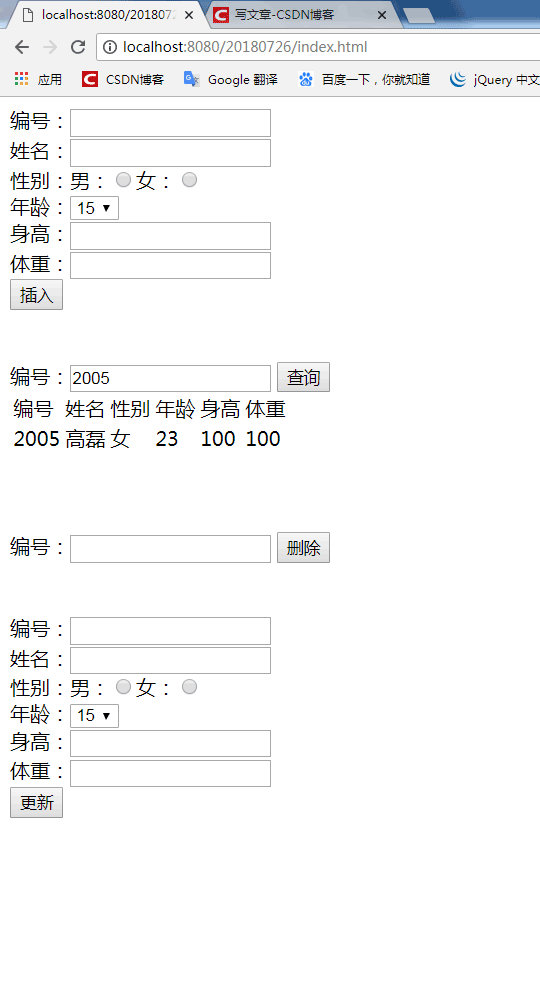
对应的数据库:

git克隆地址:https://github.com/dreamiboy/JDBCUtil.git
更多关于ajax相关内容感兴趣的读者可查看本站专题:《jquery中Ajax用法总结》、《JavaScript中ajax操作技巧总结》、《PHP ajax技巧与应用小结》及《asp.net ajax技巧总结专题》
希望本文所述对大家ajax程序设计有所帮助。