前言
最近想要换个脑子玩玩,写个页面玩玩~
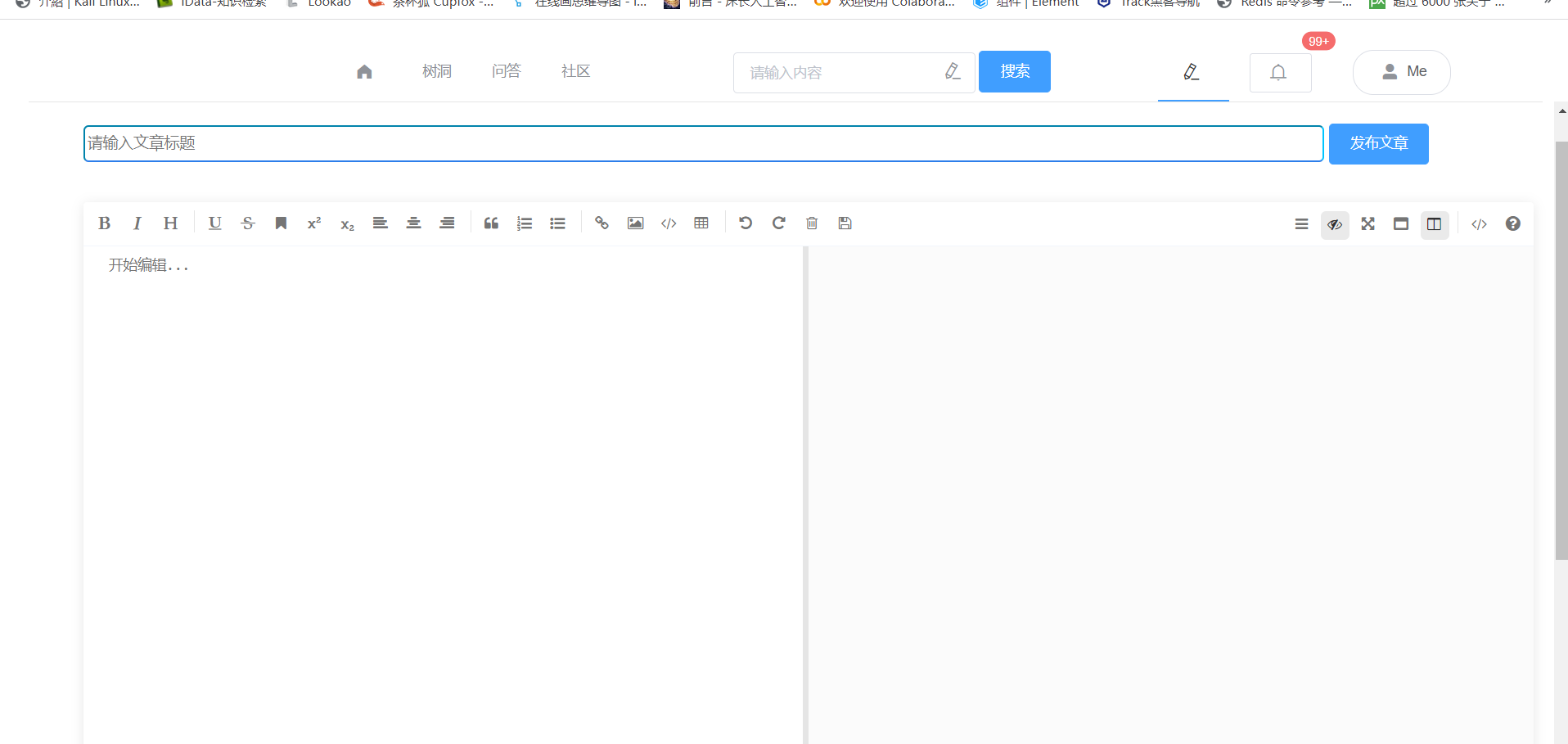
先看看效果:
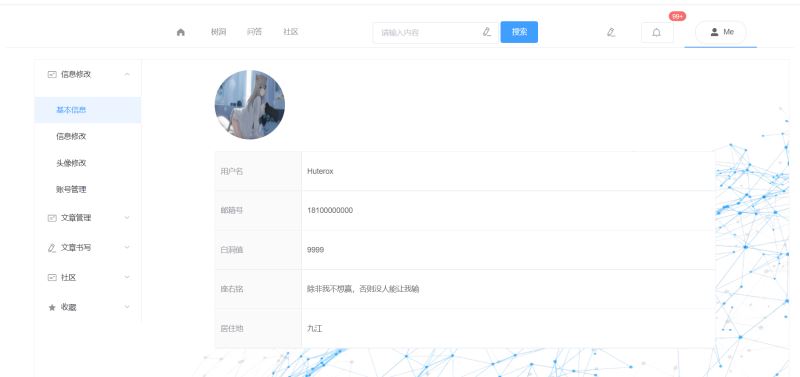
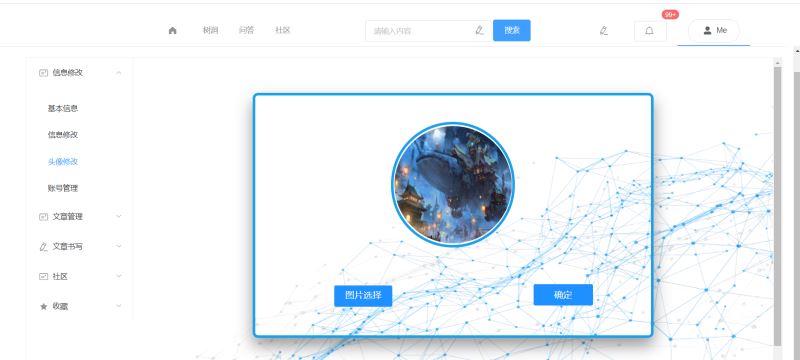
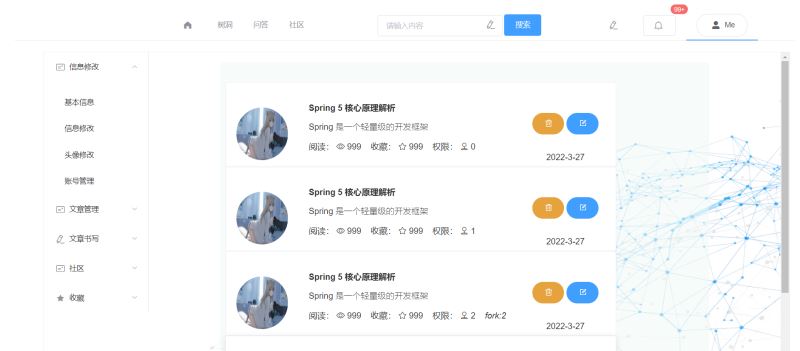
后面加个路由超链接,嘿嘿~
个人空间
我们先来聊聊主要的这个玩意,也就是咱们的入口。
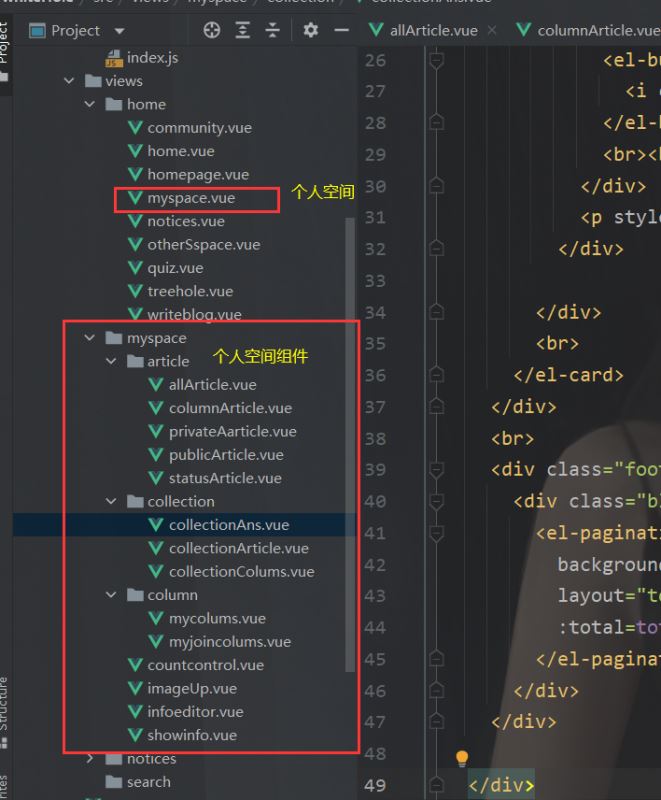
对应的路由是:
这里面的组件可不少,里面还有很多分组件,没写,有空我就写写。
  {
      path: '/myspace',
      name: 'myspace',
      component: myspace,
      children:[
        {
          path: 'showinfo',
          name: 'showinfo',
          component: showinfo
        },
        {
          path: 'infoeditor',
          name: 'infoeditor',
          component: infoeditor,
        },
        {
          path: 'countcontrol',
          name: 'countcontrol',
          component: countcontrol,
        },
        {
          path: 'imageUp',
          name: 'imageUp',
          component: imageUp
        },
        {
          path: 'privateAarticle',
          name: 'privateAarticle',
          component: privateAarticle,
        },
        {
          path: 'publicArticle',
          name: 'publicArticle',
          component: publicArticle,
        },
        {
          path: '',
          name: 'allArticle',
          component: allArticle,
        },
        {
          path: 'columnArticle',
          name: 'columnArticle',
          component: columnArticle
        },
        {
          path: 'statusArticle',
          name: 'statusArticle',
          component: statusArticle
        },
        {
          path: 'mycolums',
          name: 'mycolums',
          component: mycolums
        },
        {
          path: 'myjoincolums',
          name: myjoincolums,
          component: myjoincolums
        },
        {
          path: 'collectionAns',
          name: collectionAns,
          component: collectionAns
        },
        {
          path: 'collectionArticle',
          name: collectionArticle,
          component: collectionArticle
        },
        {
          path: 'collectionColums',
          name: collectionColums,
          component: collectionColums
        }
      ]
    },
个人空间导航代码如下:
<template>
  <div>
    <el-container style="height: 600px; border: 1px solid #eee">
      <el-aside width="200px" style="background-color: white">
        <el-menu :default-openeds="['1']">

          <el-submenu index="1">
            <template slot="title">
              <i class="el-icon-postcard"></i>信息修改</template>
            <el-menu-item-group>

              <router-link class="alink" to="/myspace/showinfo">
                <el-menu-item index="1-1">
                  基本信息
                </el-menu-item>

              </router-link>

              <router-link class="alink" to="/myspace/infoeditor">
                <el-menu-item index="1-2">
                  信息修改
                </el-menu-item>
              </router-link>

              <router-link class="alink" to="/myspace/imageUp">
                <el-menu-item index="1-3">

                  头像修改

                </el-menu-item>
              </router-link>

              <router-link class="alink" to="/myspace/countcontrol">
                <el-menu-item index="1-4">

                    账号管理

                </el-menu-item>
              </router-link>


            </el-menu-item-group>

          </el-submenu>


          <el-submenu index="2">
            <template slot="title">
              <i class="el-icon-postcard"></i>文章管理</template>
            <el-menu-item-group>
              <router-link class="alink" to="/myspace/privateAarticle">
                <el-menu-item index="2-1">
                  私密文章
                </el-menu-item>
              </router-link>

              <router-link class="alink" to="/myspace/publicArticle">
                <el-menu-item index="2-2">
                  PUBLIC
                </el-menu-item>
              </router-link>

              <router-link class="alink" to="/myspace">
                <el-menu-item index="2-3">
                  全部文章
                </el-menu-item>
              </router-link>

              <router-link class="alink" to="/myspace/columnArticle">
                <el-menu-item index="2-4">
                  我的专栏
                </el-menu-item>
              </router-link>

              <router-link class="alink" to="/myspace/statusArticle">
                <el-menu-item index="2-5">
                  审核状态
                </el-menu-item>
              </router-link>
            </el-menu-item-group>

          </el-submenu>


          <el-submenu index="3">
            <template slot="title">
              <i class="el-icon-edit"></i>文章书写
            </template>
            <el-menu-item-group>
              <router-link class="alink" to="/writeblog">
                <el-menu-item index="3-1">
                  文章书写
                </el-menu-item>
              </router-link>
            </el-menu-item-group>

          </el-submenu>

          <el-submenu index="4">
            <template slot="title">
              <i class="el-icon-postcard"></i>社区</template>

            <el-menu-item-group>

              <router-link class="alink" to="/myspace/myjoincolums">
                <el-menu-item index="4-1">
                  我的社区
                </el-menu-item>
              </router-link>

              <router-link class="alink" to="/myspace/mycolums">
                <el-menu-item index="4-2">
                  我创建的社区
                </el-menu-item>
              </router-link>


            </el-menu-item-group>
          </el-submenu>

          <el-submenu index="5">
            <template slot="title">
              <i class="el-icon-star-on"></i>收藏</template>

            <el-menu-item-group>

              <router-link class="alink" to="/myspace/collectionAns">
                <el-menu-item index="5-1">
                  问答收藏
                </el-menu-item>
              </router-link>

              <router-link class="alink" to="/myspace/collectionArticle">
                <el-menu-item index="5-2">
                  文章收藏
                </el-menu-item>
              </router-link>

              <router-link class="alink" to="/myspace/collectionColums">
                <el-menu-item index="5-3">
                  社区收藏
                </el-menu-item>
              </router-link>

            </el-menu-item-group>


          </el-submenu>
        </el-menu>
      </el-aside>


      <el-container
        style="background-image: url(/static/logo/noticesbg.jpg);
        background-repeat: no-repeat;
        background-size:100% 100%;
        "
      >
        <el-main>
          <div style="width: 80%;margin: 0 auto">
            <router-view></router-view>
          </div>
        </el-main>
      </el-container>

    </el-container>

  </div>
</template>

<script>
export default {
  name: "myspace",
  data() {

    return {

    }
  },
}
</script>

<style scoped>
.el-header {
  background-color: #e5efe2;
  color: #333;
  line-height: 60px;
}

.el-aside {
  color: #333;
}
.router-link-active {
  text-decoration: none;
}

.alink{

  text-decoration: none;
}
</style>
信息修改
由于每一个的组件都有一个分类,每一个分类的实现都是类似的,所以我们挑三个说说就行了,文章书写是一个超链接,会通向这儿,这个先去说过,我就不重复了。
基本信息实现
这个是展示,没什么copy组件的事儿
<template>
<div>
    <div  style="width:14%;height: 130px;border-radius: 100px;display:inline-block;">
      <img
        style="width:100%;height: 100%;border-radius: 100px"
        src="/static/temporary/headpic.jpg"
        class="image"
      >
    </div>

  <br>
  <br>
  <el-descriptions :column="1" border>

    <el-descriptions-item label="用户名" v-model="username" ><p class="message">{{username}}</p></el-descriptions-item>
    <el-descriptions-item label="邮箱号" v-model="email" class="message"><p class="message">{{email}}</p></el-descriptions-item>
    <el-descriptions-item label="白洞值" v-model="level" class="message"><p class="message">{{level}}</p></el-descriptions-item>
    <el-descriptions-item label="座右铭" v-model="motto" class="message" ><p class="message">{{motto}}</p></el-descriptions-item>
    <el-descriptions-item label="居住地" v-model="city" class="message"><p class="message">{{city}}</p></el-descriptions-item>

  </el-descriptions>
</div>
</template>

<script>
export default {
  name: "showinfo",
  data(){
    return{
      username: "Huterox",
      email: 18100000000,
      motto: "除非我不想赢,否则没人能让我输",
      city: "九江",
      level: 9999


    }
  }
}
</script>

<style scoped>
.message{
  width: 20em;
  overflow: hidden;
  text-overflow:ellipsis;
  white-space: nowrap;
}
</style>
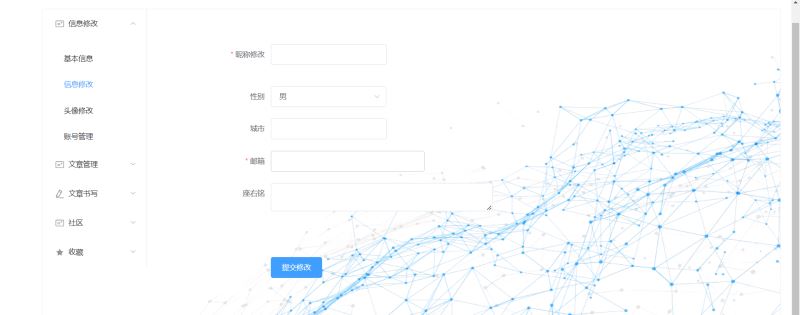
信息修改实现
这个也没啥就是这个
<template>
<div style="width: 70%;margin-top: 5%">
  <el-form :model="ruleForm"
           :rules="rules"
           ref="ruleForm"
           label-width="100px"
           class="demo-dynamic"


  >
    <el-form-item
      style="width: 49%"
      label="昵称修改"
      prop="name"
      :rules="[
          { required: true, message: '请注意昵称长度在3~15个字符', trigger: 'blur' },
          { min: 3, max: 15, message: '长度在 3 到 5 个字符', trigger: 'blur' }
        ]"

    >
      <el-input v-model="ruleForm.name"></el-input>
    </el-form-item>
    <br>
    <el-form-item label="性别" prop="region">
      <el-select v-model="ruleForm.sex" placeholder="请选择性别">
        <el-option label="男" value="shanghai"></el-option>
        <el-option label="女" value="beijing"></el-option>
      </el-select>
    </el-form-item>

    <el-form-item
      style="width: 49%"
      label="城市"
      prop="city"
      :rules="[
          { required: false, message: '请注意长度在3~20个字符', trigger: 'blur' },
          { min: 3, max: 20, message: '长度在 3 到 5 个字符', trigger: 'blur' }
        ]"

    >
      <el-input v-model="ruleForm.city"></el-input>
    </el-form-item>

    <el-form-item
      style="width: 60%"
      prop="email"
      label="邮箱"
      :rules="[
      { required: true, message: '请输入邮箱地址', trigger: 'blur' },
      { type: 'email', message: '请输入正确的邮箱地址', trigger: ['blur', 'change'] }
    ]"
    >
      <el-input v-model="ruleForm.email"></el-input>
    </el-form-item>

    <el-form-item
      style="width: 80%;height: 120px"
      label="座右铭"
      prop="motto"
      :rules="[
          { required: false, message: '请输入座右铭', trigger: 'blur' },
          { min: 0, max: 150, message: '请注意长度不能超过150个字符', trigger: 'blur' }
        ]"

    >
      <el-input type="textarea" style="height: 100px;resize: none" v-model="ruleForm.motto"></el-input>
    </el-form-item>

    <el-form-item>
      <el-button type="primary" @click="submitForm('ruleForm')">提交修改</el-button>

    </el-form-item>
  </el-form>
</div>
</template>

<script>
export default {
  name: "infoeditor",
  data() {
    return {
      ruleForm: {
        name: '',
        sex: '男',
        email: '',
        city: '',
        motto: '',

      },
    };
  },
  methods: {
    submitForm(formName) {
      this.$refs[formName].validate((valid) => {
        if (valid) {
          alert('submit!');
        } else {
          console.log('error submit!!');
          return false;
        }
      });
    },/uploads/20230408/3ce44f4d8f7e85ae3520d6db2b9390a3.jpg,.png"
             @click="changepic(this)" type="file" name="userpic"
             style="
              position: absolute;
              overflow: hidden;
              right: 0;
              top: 0;
              opacity: 0;
             width: 100%;
             height: 32px;
             "
      >
      </div>
      <button @click="subchangepic()" style="height: 40px;position: relative; margin-left:35%;">确定</button>
    </div>
  </div>
</template>

<script>
export default {
  name: "imageUp",
  data(){
    return {
      filename: null,
      f64: null,
      loadImage: ""
    }
  },
  methods: {
    changepic() {
      document.getElementById('file').onchange = function () {
        var imgFile = this.files[0];
        var fr = new FileReader();

        fr.onload = function () {
          let showing = document.getElementById('showimg')
          let img = fr.result;
          this.f64 = img;
          this.filename = imgFile.name
          showing.src = img;
          showing.style.height = "220px";
          showing.style.width = "220px";
          showing.style.borderRadius = "200px"
        };
        fr.readAsDataURL(imgFile);
      }
    },
  }
}
</script>

<style scoped>

.upload{
  margin-left: 20%;
  width: 12%;
  text-align: center;
  color: white;
  height: 32px;
  border-radius: 3px;
  background: #1E90FF;
  cursor: pointer;
  outline: none;
  border-width: 0px;
  font-size: 17px;
  display:inline-block;
  padding: 4px 10px;
  line-height:30px;
  position: relative;
  text-decoration: none;
}

button {
  margin-left: 70%;
  width: 15%;
  height: 35px;
  border-width: 0px;
  border-radius: 3px;
  background: #1E90FF;
  cursor: pointer;
  outline: none;
  color: white;
  font-size: 17px;
}
.show{
  margin: 100px auto;
  width: 80%;
  height: 450px;
  border: 5px solid #18a0ec;
  transition: all 0.9s;
  border-radius: 10px;
}
.show1{
  margin: 50px auto;
  width: 222px;
  height: 226px;
  border: 5px solid #18a0ec;
  transition: all 0.9s;
  border-radius: 150px;
}

.show1:hover{
  box-shadow: 0px 15px 30px rgba(0, 0, 0, 0.4);
  margin-top: 45px;
}

.show:hover{
  box-shadow: 0px 15px 30px rgba(0, 0, 0, 0.4);
  margin-top: 45px;
}

.texti{
  border: 1px solid #ccc;
  padding: 13px 14px;
  width: 30%;

  font-size: 14px;
  font-weight: 300;

  border-radius: 5px; /* 边框半径 */
  background: white; /* 背景颜色 */
  cursor: pointer; /* 鼠标移入按钮范围时出现手势 */
  outline: none; /* 不显示轮廓线 */
}
.texti:focus{
  border-color: #1e88e1;
  outline: 0;
  -webkit-box-shadow: inset 0 1px 1px rgba(0,0,0,.075),0 0 8px rgba(102,175,233,.6);
  box-shadow: inset 0 1px 1px rgba(0,0,0,.075),0 0 8px rgba(102,175,233,.6)
}
textarea {
  resize: none;

}
</style>
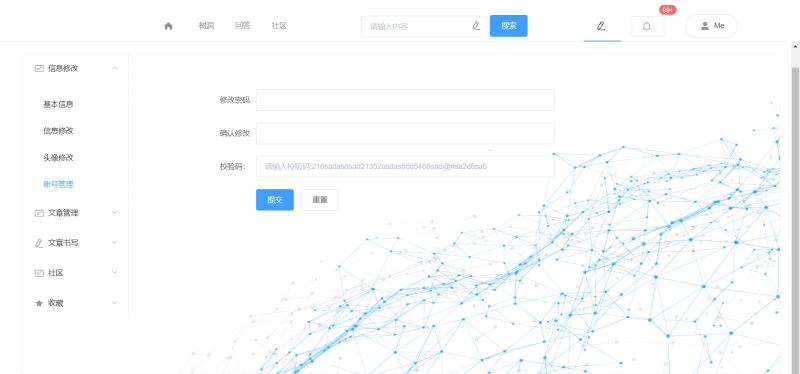
账号管理实现
这个其实就是修改账号,后面我想单独做大一点,所以要单独分开,例如信息验证,学历验证,专家验证啥的。
<template>
<div style="width: 70%;margin-top: 5%">
  <el-form :model="ruleForm" status-icon :rules="rules" ref="ruleForm" label-width="100px" class="demo-ruleForm">
    <el-form-item label="修改密码" prop="pass">
      <el-input type="password" v-model="ruleForm.pass" autocomplete="off"></el-input>
    </el-form-item>
    <el-form-item label="确认修改" prop="checkPass">
      <el-input type="password" v-model="ruleForm.checkPass" autocomplete="off"></el-input>
    </el-form-item>
    <el-form-item label="校验码:" prop="verify">

      <el-input placeholder="请输入校验码:216sadasdsad21352asdas55d5465sad@#sa2d6sa5" v-model.number="ruleForm.verify"></el-input>
    </el-form-item>
    <el-form-item>
      <el-button type="primary" @click="submitForm('ruleForm')">提交</el-button>
      <el-button @click="resetForm('ruleForm')">重置</el-button>
    </el-form-item>
  </el-form>
</div>
</template>

<script>
export default {
  name: "countcontrol",
  data() {
    var checkAge = (rule, value, callback) => {
      if (!value) {
        return callback(new Error('校验码不能为空'));
      }
      setTimeout(() => {
        if ((value)!=="216sadasdsad21352asdas55d5465sad@#sa2d6sa5") {
          callback(new Error('校验码错误'));
        } else {

            callback();

        }
      }, 1000);
    };
    var validatePass = (rule, value, callback) => {
      if (value === '') {
        callback(new Error('请输入密码'));
      } else {
        if(value.length<=6){
          callback(new Error("密码长度不能低于6"))
        }
        if (this.ruleForm.checkPass !== '' ) {
          this.$refs.ruleForm.validateField('checkPass');
        }
        callback();
      }
    };
    var validatePass2 = (rule, value, callback) => {
      if (value === '') {
        callback(new Error('请再次输入密码'));
      } else if (value !== this.ruleForm.pass) {
        callback(new Error('两次输入密码不一致!'));
      } else {
        callback();
      }
    };
    return {
      ruleForm: {
        pass: '',
        checkPass: '',
        verify: ''
      },
      rules: {
        pass: [
          { validator: validatePass, trigger: 'blur' }
        ],
        checkPass: [
          { validator: validatePass2, trigger: 'blur' }
        ],
        verify: [
          { validator: checkAge, trigger: 'blur' }
        ]
      }
    };
  },
  methods: {
    submitForm(formName) {
      this.$refs[formName].validate((valid) => {
        if (valid) {
          alert('submit!');
        } else {
          console.log('error submit!!');
          return false;
        }
      });
    },
    resetForm(formName) {
      this.$refs[formName].resetFields();
    }
  }
}
</script>

<style scoped>
</style>
文章列表实现
这个部分是这样的
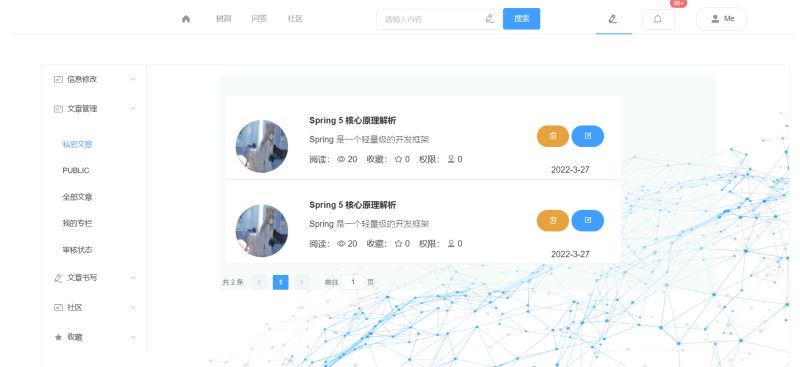
由于都是类似的,所以我直接把那个全部文章的代码拿出来
<template>
<div style="background-color: rgba(239,250,246,0.53)">
<br>
<br>
<div style="width: 80%;margin-left: 1%" class="main">
<el-card shadow="hover" v-for="(message,index) in Messages" :key="index">
<div style="height:100px">
<div style="width:14%;height: 100%;border-radius: 100px;display:inline-block;">
<img
style="width:100%;height: 100%;border-radius: 100px"
src="/static/temporary/headpic.jpg"
class="image"
>
</div>
<div style="display:inline-block;margin-left: 5%;width: 60%">
<p class="message" style="font-weight:bold">{{message.name}}</p>
<p style="font-weight: lighter" class="message"
>
{{message.info}}
</p>
<p class="message">
阅读:
<i class="el-icon-view"></i>
{{message.number}}
收藏:
<i class="el-icon-star-off"></i>
{{message.favorite}}
权限:
<i class="el-icon-coordinate"></i>
{{message.level}}
<i v-if="message.level>=2">fork:{{message.fork}}</i>
</p>
</div>
<div style="width:18%;height: 100%;
display:inline-block;
"
>
<div style="display: inline-block;width: 48%;">
<el-button type="warning" round style="height: 50%;width: 100%;display: inline-block">
<i class="el-icon-delete"></i>
</el-button>
<br><br>
</div>
<div style="display: inline-block;width: 48%">
<el-button type="primary" round style="height: 50%;width: 100%;display: inline-block">
<i class="el-icon-edit-outline"></i>
</el-button>
<br><br>
</div>
<p style="text-align: center">{{message.data}}</p>
</div>
</div>
<br>
</el-card>
</div>
<br>
<div class="footer" style="margin: 0 auto;width: 100%;">
<div class="block" >
<el-pagination
background
layout="total, prev, pager, next, jumper"
:total=total>
</el-pagination>
</div>
</div>
</div>
</template>
<script>
export default {
name: "allArticle",
data(){
return{
total: 999,
Messages:[
{"info":"Spring 是一个轻量级的开发框架",
"name":"Spring 5 核心原理解析",
"number": 999,"data":"2022-3-27",favorite: 999,level: 0,
"fork": 2
},
{"info":"Spring 是一个轻量级的开发框架",
"name":"Spring 5 核心原理解析",
"number": 999,"data":"2022-3-27",favorite: 999,level: 1,
"fork": 2
},
{"info":"Spring 是一个轻量级的开发框架",
"name":"Spring 5 核心原理解析",
"number": 999,"data":"2022-3-27",favorite: 999,level: 2,
"fork": 2
},
{"info":"Spring 是一个轻量级的开发框架",
"name":"Spring 5 核心原理解析",
"number": 999,"data":"2022-3-27",favorite: 999,level: 3,
"fork": 22
},
]
}
},
}
</script>
<style scoped>
.message{
width: 25em;
overflow: hidden;
text-overflow:ellipsis;
white-space: nowrap;
}
</style>收藏实现
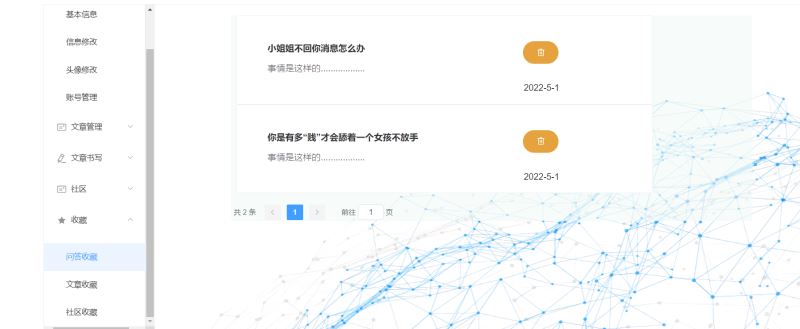
然后是收藏这个也是类似的
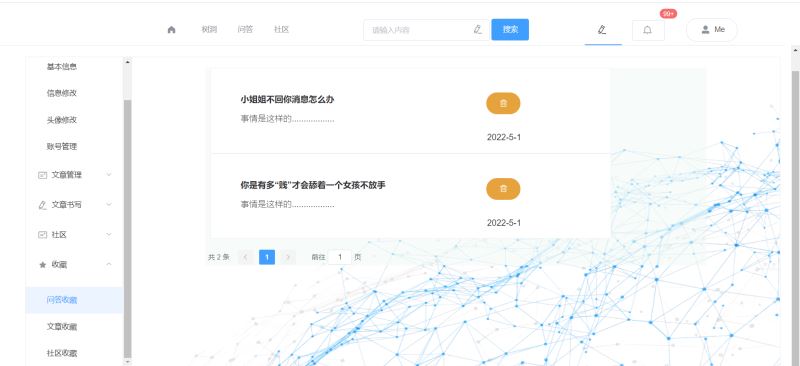
问答收藏
<template>
  <div style="background-color: rgba(239,250,246,0.53)">
    <div style="width: 80%;margin-left: 1%" class="main">
      <el-card shadow="hover" v-for="(message,index) in Messages" :key="index">

        <div style="height:100px">

          <div style="display:inline-block;margin-left: 5%;width: 60%">
            <p class="message" style="font-weight:bold">{{message.name}}</p>
            <p style="font-weight: lighter;color: #46433b" class="message"

            >
              {{message.info}}

            </p>
            <br>

          </div>

          <div  style="width:18%;height: 100%;
            display:inline-block;
          "
          >
            <div style="display: inline-block;width: 50%;margin-top: 20%;margin-left: 24%">
              <el-button type="warning" round style="height: 50%;width: 100%;display: inline-block">
                <i class="el-icon-delete"></i>
              </el-button>
              <br><br>
            </div>
            <p style="text-align: center;">{{message.date}}</p>
          </div>

        </div>
        <br>
      </el-card>
    </div>
    <br>
    <div class="footer" style="margin: 0 auto;width: 100%;">
      <div class="block" >
        <el-pagination
          background
          layout="total, prev, pager, next, jumper"
          :total=total>
        </el-pagination>
      </div>
    </div>

  </div>

</template>

<script>
export default {
  name: "collectionAns",
  data(){
    return{
      total: 2,
      Messages:[
        {"name":"小姐姐不回你消息怎么办",
          "info":"事情是这样的..................",
          "date": "2022-5-1"
        },
        {"name":"你是有多“贱”才会舔着一个女孩不放手",
          "info":"事情是这样的..................",
          "date": "2022-5-1"
        },
      ]
    }
  },
}
</script>

<style scoped>
.message{
  width: 30em;
  overflow: hidden;
  text-overflow:ellipsis;
  white-space: nowrap;
}
</style>
文章收藏
<template>
<div style="background-color: rgba(239,250,246,0.53)">
<br>
<br>
<div style="width: 80%;margin-left: 1%" class="main">
<el-card shadow="hover" v-for="(message,index) in Messages" :key="index">
<div style="height:100px">
<div style="width:14%;height: 100%;border-radius: 100px;display:inline-block;">
<img
style="width:100%;height: 100%;border-radius: 100px"
src="/static/temporary/headpic.jpg"
class="image"
>
</div>
<div style="display:inline-block;margin-left: 5%;width: 60%">
<p class="message" style="font-weight:bold">{{message.name}}</p>
<p style="font-weight: lighter" class="message"
>
{{message.info}}
</p>
<p class="message">
阅读:
<i class="el-icon-view"></i>
{{message.number}}
收藏:
<i class="el-icon-star-off"></i>
{{message.favorite}}
权限:
<i class="el-icon-coordinate"></i>
{{message.level}}
<i v-if="message.level>=2">fork:{{message.fork}}</i>
</p>
</div>
<div style="width:18%;height: 100%;
display:inline-block;
"
>
<div style="display: inline-block;width:80%;height: 100%">
<el-button type="warning" round style="height: 50%;width: 100%;display: inline-block">
<i class="el-icon-delete"></i>
</el-button>
<p style="text-align: center">{{message.data}}</p>
<br>
</div>
</div>
</div>
<br>
</el-card>
</div>
<br>
<div class="footer" style="margin: 0 auto;width: 100%;">
<div class="block" >
<el-pagination
background
layout="total, prev, pager, next, jumper"
:total=total>
</el-pagination>
</div>
</div>
</div>
</template>
<script>
export default {
name: "collectionArticle",
data(){
return{
total: 4,
Messages:[
{"info":"Spring 是一个轻量级的开发框架",
"name":"Spring 5 核心原理解析",
"number": 999,"data":"2022-3-27",favorite: 999,level: 1,
"fork": 2
},
{"info":"Spring 是一个轻量级的开发框架",
"name":"Spring 5 核心原理解析",
"number": 999,"data":"2022-3-27",favorite: 999,level: 1,
"fork": 2
},
{"info":"Spring 是一个轻量级的开发框架",
"name":"Spring 5 核心原理解析",
"number": 999,"data":"2022-3-27",favorite: 999,level: 2,
"fork": 2
},
{"info":"Spring 是一个轻量级的开发框架",
"name":"Spring 5 核心原理解析",
"number": 999,"data":"2022-3-27",favorite: 999,level: 3,
"fork": 2,
},
]
}
},
}
</script>
<style scoped>
.message{
width: 25em;
overflow: hidden;
text-overflow:ellipsis;
white-space: nowrap;
}
</style>后面那个社区收藏是和问答收藏类似的,所以就这样了。
总结
其实做这个东西用组件开发是很快的,麻烦的就是美感,怎么放置,后面就好办了,写你的小接口,和后端打交道,其实看目前的前端视图也知道,功能很多,目前为了便于维护也是要走分布式架构的,这次我想玩玩多语言开发~
到此这篇关于如何使用Vue Element做个个人中心的文章就介绍到这了,更多相关Vue Element个人中心内容请搜索Devmax以前的文章或继续浏览下面的相关文章希望大家以后多多支持Devmax!