本文实例为大家分享了Android实现简单的加载进度条的具体代码,供大家参考,具体内容如下
1.效果图
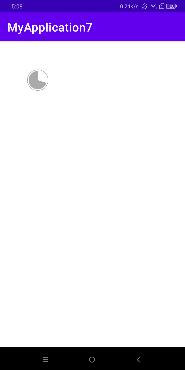
2.自定义progressBar
package com.example.myapplication7;

import android.animation.ValueAnimator;
import android.content.Context;
import android.content.res.TypedArray;
import android.graphics.Canvas;
import android.graphics.Color;
import android.graphics.Paint;
import android.graphics.RectF;
import android.os.Bundle;
import android.os.Parcelable;
import android.util.AttributeSet;
import android.view.animation.AccelerateDecelerateInterpolator;
import android.widget.ProgressBar;


import java.lang.annotation.Retention;
import java.lang.annotation.RetentionPolicy;

import androidx.annotation.IntDef;

public class CircleProgressView extends ProgressBar {

    private int mReachBarSize = Utils.dp2px(getContext(), 2); // 未完成进度条大小
    private int mNormalBarSize = Utils.dp2px(getContext(), 2); // 未完成进度条大小
    private int mReachBarColor = Color.parseColor("#108ee9"); // 已完成进度颜色
    private int mNormalBarColor = Color.parseColor("#FFD3D6DA"); // 未完成进度颜色
    private int mTextSize = Utils.sp2px(getContext(), 14); // 进度值字体大小
    private int mTextColor = Color.parseColor("#108ee9"); // 进度的值字体颜色
    private float mTextSkewX; // 进度值字体倾斜角度
    private String mTextSuffix = "%"; // 进度值前缀
    private String mTextPrefix = ""; // 进度值后缀
    private boolean mTextVisible = true; // 是否显示进度值
    private boolean mReachCapRound; // 画笔是否使用圆角边界,normalStyle下生效
    private int mRadius = Utils.dp2px(getContext(), 20); // 半径
    private int mStartArc; // 起始角度
    private int mInnerBackgroundColor; // 内部背景填充颜色
    private int mProgressStyle = ProgressStyle.NORMAL; // 进度风格
    private int mInnerPadding = Utils.dp2px(getContext(), 1); // 内部圆与外部圆间距
    private int mOuterColor; // 外部圆环颜色
    private boolean needDrawInnerBackground; // 是否需要绘制内部背景
    private RectF rectF; // 外部圆环绘制区域
    private RectF rectInner; // 内部圆环绘制区域
    private int mOuterSize = Utils.dp2px(getContext(), 1); // 外层圆环宽度
    private Paint mTextPaint; // 绘制进度值字体画笔
    private Paint mNormalPaint; // 绘制未完成进度画笔
    private Paint mReachPaint; // 绘制已完成进度画笔
    private Paint mInnerBackgroundPaint; // 内部背景画笔
    private Paint mOutPaint; // 外部圆环画笔

    private int mRealWidth;
    private int mRealHeight;

    @IntDef({ProgressStyle.NORMAL, ProgressStyle.FILL_IN, ProgressStyle.FILL_IN_ARC})
    @Retention(RetentionPolicy.SOURCE)
    public @interface ProgressStyle {
        int NORMAL = 0;
        int FILL_IN = 1;
        int FILL_IN_ARC = 2;
    }

    public CircleProgressView(Context context) {
        this(context, null);
    }

    public CircleProgressView(Context context, AttributeSet attrs) {
        this(context, attrs, 0);
    }

    public CircleProgressView(Context context, AttributeSet attrs, int defStyleAttr) {
        super(context, attrs, defStyleAttr);
        obtainAttributes(attrs);
        initPaint();
    }

    private void initPaint() {
        mTextPaint = new Paint();
        mTextPaint.setColor(mTextColor);
        mTextPaint.setStyle(Paint.Style.FILL);
        mTextPaint.setTextSize(mTextSize);
        mTextPaint.setTextSkewX(mTextSkewX);
        mTextPaint.setAntiAlias(true);

        mNormalPaint = new Paint();
        mNormalPaint.setColor(mNormalBarColor);
        mNormalPaint.setStyle(mProgressStyle == ProgressStyle.FILL_IN_ARC ? Paint.Style.FILL : Paint.Style.STROKE);
        mNormalPaint.setAntiAlias(true);
        mNormalPaint.setStrokeWidth(mNormalBarSize);

        mReachPaint = new Paint();
        mReachPaint.setColor(mReachBarColor);
        mReachPaint.setStyle(mProgressStyle == ProgressStyle.FILL_IN_ARC ? Paint.Style.FILL : Paint.Style.STROKE);
        mReachPaint.setAntiAlias(true);
        mReachPaint.setStrokeCap(mReachCapRound ? Paint.Cap.ROUND : Paint.Cap.BUTT);
        mReachPaint.setStrokeWidth(mReachBarSize);

        if (needDrawInnerBackground) {
            mInnerBackgroundPaint = new Paint();
            mInnerBackgroundPaint.setStyle(Paint.Style.FILL);
            mInnerBackgroundPaint.setAntiAlias(true);
            mInnerBackgroundPaint.setColor(mInnerBackgroundColor);
        }
        if (mProgressStyle == ProgressStyle.FILL_IN_ARC) {
            mOutPaint = new Paint();
            mOutPaint.setStyle(Paint.Style.STROKE);
            mOutPaint.setColor(mOuterColor);
            mOutPaint.setStrokeWidth(mOuterSize);
            mOutPaint.setAntiAlias(true);
        }
    }

    private void obtainAttributes(AttributeSet attrs) {
        TypedArray ta = getContext().obtainStyledAttributes(attrs, R.styleable.CircleProgressView);
        mProgressStyle = ta.getInt(R.styleable.CircleProgressView_cpv_progressStyle, ProgressStyle.NORMAL);
        // 获取三种风格通用的属性
        mNormalBarSize = (int) ta.getDimension(R.styleable.CircleProgressView_cpv_progressNormalSize, mNormalBarSize);
        mNormalBarColor = ta.getColor(R.styleable.CircleProgressView_cpv_progressNormalColor, mNormalBarColor);

        mReachBarSize = (int) ta.getDimension(R.styleable.CircleProgressView_cpv_progressReachSize, mReachBarSize);
        mReachBarColor = ta.getColor(R.styleable.CircleProgressView_cpv_progressReachColor, mReachBarColor);

        mTextSize = (int) ta.getDimension(R.styleable.CircleProgressView_cpv_progressTextSize, mTextSize);
        mTextColor = ta.getColor(R.styleable.CircleProgressView_cpv_progressTextColor, mTextColor);
        mTextSkewX = ta.getDimension(R.styleable.CircleProgressView_cpv_progressTextSkewX, 0);
        if (ta.hasValue(R.styleable.CircleProgressView_cpv_progressTextSuffix)) {
            mTextSuffix = ta.getString(R.styleable.CircleProgressView_cpv_progressTextSuffix);
        }
        if (ta.hasValue(R.styleable.CircleProgressView_cpv_progressTextPrefix)) {
            mTextPrefix = ta.getString(R.styleable.CircleProgressView_cpv_progressTextPrefix);
        }
        mTextVisible = ta.getBoolean(R.styleable.CircleProgressView_cpv_progressTextVisible, mTextVisible);

        mRadius = (int) ta.getDimension(R.styleable.CircleProgressView_cpv_radius, mRadius);
        rectF = new RectF(-mRadius, -mRadius, mRadius, mRadius);

        switch (mProgressStyle) {
            case ProgressStyle.FILL_IN:
                mReachBarSize = 0;
                mNormalBarSize = 0;
                mOuterSize = 0;
                break;
            case ProgressStyle.FILL_IN_ARC:
                mStartArc = ta.getInt(R.styleable.CircleProgressView_cpv_progressStartArc, 0)   270;
                mInnerPadding = (int) ta.getDimension(R.styleable.CircleProgressView_cpv_innerPadding, mInnerPadding);
                mOuterColor = ta.getColor(R.styleable.CircleProgressView_cpv_outerColor, mReachBarColor);
                mOuterSize = (int) ta.getDimension(R.styleable.CircleProgressView_cpv_outerSize, mOuterSize);
                mReachBarSize = 0;// 将画笔大小重置为0
                mNormalBarSize = 0;
                if (!ta.hasValue(R.styleable.CircleProgressView_cpv_progressNormalColor)) {
                    mNormalBarColor = Color.TRANSPARENT;
                }
                int mInnerRadius = mRadius - mOuterSize / 2 - mInnerPadding;
                rectInner = new RectF(-mInnerRadius, -mInnerRadius, mInnerRadius, mInnerRadius);

                break;
            case ProgressStyle.NORMAL:
                mReachCapRound = ta.getBoolean(R.styleable.CircleProgressView_cpv_reachCapRound, true);
                mStartArc = ta.getInt(R.styleable.CircleProgressView_cpv_progressStartArc, 0)   270;
                if (ta.hasValue(R.styleable.CircleProgressView_cpv_innerBackgroundColor)) {
                    mInnerBackgroundColor = ta.getColor(R.styleable.CircleProgressView_cpv_innerBackgroundColor, Color.argb(0, 0, 0, 0));
                    needDrawInnerBackground = true;
                }
                break;
        }
        ta.recycle();
    }

    @Override
    protected synchronized void onMeasure(int widthMeasureSpec, int heightMeasureSpec) {
        int maxBarPaintWidth = Math.max(mReachBarSize, mNormalBarSize);
        int maxPaintWidth = Math.max(maxBarPaintWidth, mOuterSize);
        int height = 0;
        int width = 0;
        switch (mProgressStyle) {
            case ProgressStyle.FILL_IN:
                height = getPaddingTop()   getPaddingBottom()  // 边距
                          Math.abs(mRadius * 2);  // 直径
                width = getPaddingLeft()   getPaddingRight()  // 边距
                          Math.abs(mRadius * 2);  // 直径
                break;
            case ProgressStyle.FILL_IN_ARC:
                height = getPaddingTop()   getPaddingBottom()  // 边距
                          Math.abs(mRadius * 2)  // 直径
                          maxPaintWidth;// 边框
                width = getPaddingLeft()   getPaddingRight()  // 边距
                          Math.abs(mRadius * 2)  // 直径
                          maxPaintWidth;// 边框
                break;
            case ProgressStyle.NORMAL:
                height = getPaddingTop()   getPaddingBottom()  // 边距
                          Math.abs(mRadius * 2)  // 直径
                          maxBarPaintWidth;// 边框
                width = getPaddingLeft()   getPaddingRight()  // 边距
                          Math.abs(mRadius * 2)  // 直径
                          maxBarPaintWidth;// 边框
                break;
        }

        mRealWidth = resolveSize(width, widthMeasureSpec);
        mRealHeight = resolveSize(height, heightMeasureSpec);

        setMeasuredDimension(mRealWidth, mRealHeight);
    }

    @Override
    protected synchronized void onDraw(Canvas canvas) {
        switch (mProgressStyle) {
            case ProgressStyle.NORMAL:
                drawNormalCircle(canvas);
                break;
            case ProgressStyle.FILL_IN:
                drawFillInCircle(canvas);
                break;
            case ProgressStyle.FILL_IN_ARC:
                drawFillInArcCircle(canvas);
                break;
        }
    }

    /**
     * 绘制PROGRESS_STYLE_FILL_IN_ARC圆形
     */
    private void drawFillInArcCircle(Canvas canvas) {
        canvas.save();
        canvas.translate(mRealWidth / 2, mRealHeight / 2);
        // 绘制外层圆环
        canvas.drawArc(rectF, 0, 360, false, mOutPaint);
        // 绘制内层进度实心圆弧
        // 内层圆弧半径
        float reachArc = getProgress() * 1.0f / getMax() * 360;
        canvas.drawArc(rectInner, mStartArc, reachArc, true, mReachPaint);

        // 绘制未到达进度
        if (reachArc != 360) {
            canvas.drawArc(rectInner, reachArc   mStartArc, 360 - reachArc, true, mNormalPaint);
        }

        canvas.restore();
    }

    /**
     * 绘制PROGRESS_STYLE_FILL_IN圆形
     */
    private void drawFillInCircle(Canvas canvas) {
        canvas.save();
        canvas.translate(mRealWidth / 2, mRealHeight / 2);
        float progressY = getProgress() * 1.0f / getMax() * (mRadius * 2);
        float angle = (float) (Math.acos((mRadius - progressY) / mRadius) * 180 / Math.PI);
        float startAngle = 90   angle;
        float sweepAngle = 360 - angle * 2;
        // 绘制未到达区域
        rectF = new RectF(-mRadius, -mRadius, mRadius, mRadius);
        mNormalPaint.setStyle(Paint.Style.FILL);
        canvas.drawArc(rectF, startAngle, sweepAngle, false, mNormalPaint);
        // 翻转180度绘制已到达区域
        canvas.rotate(180);
        mReachPaint.setStyle(Paint.Style.FILL);
        canvas.drawArc(rectF, 270 - angle, angle * 2, false, mReachPaint);
        // 文字显示在最上层最后绘制
        canvas.rotate(180);
        // 绘制文字
        if (mTextVisible) {
            String text = mTextPrefix   getProgress()   mTextSuffix;
            float textWidth = mTextPaint.measureText(text);
            float textHeight = (mTextPaint.descent()   mTextPaint.ascent());
            canvas.drawText(text, -textWidth / 2, -textHeight / 2, mTextPaint);
        }
    }

    /**
     * 绘制PROGRESS_STYLE_NORMAL圆形
     */
    private void drawNormalCircle(Canvas canvas) {
        canvas.save();
        canvas.translate(mRealWidth / 2, mRealHeight / 2);
        // 绘制内部圆形背景色
        if (needDrawInnerBackground) {
            canvas.drawCircle(0, 0, mRadius - Math.min(mReachBarSize, mNormalBarSize) / 2,
                    mInnerBackgroundPaint);
        }
        // 绘制文字
        if (mTextVisible) {
            String text = mTextPrefix   getProgress()   mTextSuffix;
            float textWidth = mTextPaint.measureText(text);
            float textHeight = (mTextPaint.descent()   mTextPaint.ascent());
            canvas.drawText(text, -textWidth / 2, -textHeight / 2, mTextPaint);
        }
        // 计算进度值
        float reachArc = getProgress() * 1.0f / getMax() * 360;
        // 绘制未到达进度
        if (reachArc != 360) {
            canvas.drawArc(rectF, reachArc   mStartArc, 360 - reachArc, false, mNormalPaint);
        }
        // 绘制已到达进度
        canvas.drawArc(rectF, mStartArc, reachArc, false, mReachPaint);
        canvas.restore();
    }

    /**
     * 动画进度(0-当前进度)
     *
     * @param duration 动画时长
     */
    public void runProgressAnim(long duration) {
        setProgressInTime(0, duration);
    }

    /**
     * @param progress 进度值
     * @param duration 动画播放时间
     */
    public void setProgressInTime(final int progress, final long duration) {
        setProgressInTime(progress, getProgress(), duration);
    }

    /**
     * @param startProgress 起始进度
     * @param progress      进度值
     * @param duration      动画播放时间
     */
    public void setProgressInTime(int startProgress, final int progress, final long duration) {
        ValueAnimator valueAnimator = ValueAnimator.ofInt(startProgress, progress);
        valueAnimator.addUpdateListener(new ValueAnimator.AnimatorUpdateListener() {

            @Override
            public void onAnimationUpdate(ValueAnimator animator) {
                //获得当前动画的进度值,整型,1-100之间
                int currentValue = (Integer) animator.getAnimatedValue();
                setProgress(currentValue);
            }
        });
        AccelerateDecelerateInterpolator interpolator = new AccelerateDecelerateInterpolator();
        valueAnimator.setInterpolator(interpolator);
        valueAnimator.setDuration(duration);
        valueAnimator.start();
    }

    public int getReachBarSize() {
        return mReachBarSize;
    }

    public void setReachBarSize(int reachBarSize) {
        mReachBarSize = Utils.dp2px(getContext(), reachBarSize);
        invalidate();
    }

    public int getNormalBarSize() {
        return mNormalBarSize;
    }

    public void setNormalBarSize(int normalBarSize) {
        mNormalBarSize = Utils.dp2px(getContext(), normalBarSize);
        invalidate();
    }

    public int getReachBarColor() {
        return mReachBarColor;
    }

    public void setReachBarColor(int reachBarColor) {
        mReachBarColor = reachBarColor;
        invalidate();
    }

    public int getNormalBarColor() {
        return mNormalBarColor;
    }

    public void setNormalBarColor(int normalBarColor) {
        mNormalBarColor = normalBarColor;
        invalidate();
    }

    public int getTextSize() {
        return mTextSize;
    }

    public void setTextSize(int textSize) {
        mTextSize = Utils.sp2px(getContext(), textSize);
        invalidate();
    }

    public int getTextColor() {
        return mTextColor;
    }

    public void setTextColor(int textColor) {
        mTextColor = textColor;
        invalidate();
    }

    public float getTextSkewX() {
        return mTextSkewX;
    }

    public void setTextSkewX(float textSkewX) {
        mTextSkewX = textSkewX;
        invalidate();
    }

    public String getTextSuffix() {
        return mTextSuffix;
    }

    public void setTextSuffix(String textSuffix) {
        mTextSuffix = textSuffix;
        invalidate();
    }

    public String getTextPrefix() {
        return mTextPrefix;
    }

    public void setTextPrefix(String textPrefix) {
        mTextPrefix = textPrefix;
        invalidate();
    }

    public boolean isTextVisible() {
        return mTextVisible;
    }

    public void setTextVisible(boolean textVisible) {
        mTextVisible = textVisible;
        invalidate();
    }

    public boolean isReachCapRound() {
        return mReachCapRound;
    }

    public void setReachCapRound(boolean reachCapRound) {
        mReachCapRound = reachCapRound;
        invalidate();
    }

    public int getRadius() {
        return mRadius;
    }

    public void setRadius(int radius) {
        mRadius = Utils.dp2px(getContext(), radius);
        invalidate();
    }

    public int getStartArc() {
        return mStartArc;
    }

    public void setStartArc(int startArc) {
        mStartArc = startArc;
        invalidate();
    }

    public int getInnerBackgroundColor() {
        return mInnerBackgroundColor;
    }

    public void setInnerBackgroundColor(int innerBackgroundColor) {
        mInnerBackgroundColor = innerBackgroundColor;
        invalidate();
    }

    public int getProgressStyle() {
        return mProgressStyle;
    }

    public void setProgressStyle(int progressStyle) {
        mProgressStyle = progressStyle;
        invalidate();
    }

    public int getInnerPadding() {
        return mInnerPadding;
    }

    public void setInnerPadding(int innerPadding) {
        mInnerPadding = Utils.dp2px(getContext(), innerPadding);
        int mInnerRadius = mRadius - mOuterSize / 2 - mInnerPadding;
        rectInner = new RectF(-mInnerRadius, -mInnerRadius, mInnerRadius, mInnerRadius);
        invalidate();
    }

    public int getOuterColor() {
        return mOuterColor;
    }

    public void setOuterColor(int outerColor) {
        mOuterColor = outerColor;
        invalidate();
    }

    public int getOuterSize() {
        return mOuterSize;
    }

    public void setOuterSize(int outerSize) {
        mOuterSize = Utils.dp2px(getContext(), outerSize);
        invalidate();
    }

    private static final String STATE = "state";
    private static final String PROGRESS_STYLE = "progressStyle";
    private static final String TEXT_COLOR = "textColor";
    private static final String TEXT_SIZE = "textSize";
    private static final String TEXT_SKEW_X = "textSkewX";
    private static final String TEXT_VISIBLE = "textVisible";
    private static final String TEXT_SUFFIX = "textSuffix";
    private static final String TEXT_PREFIX = "textPrefix";
    private static final String REACH_BAR_COLOR = "reachBarColor";
    private static final String REACH_BAR_SIZE = "reachBarSize";
    private static final String NORMAL_BAR_COLOR = "normalBarColor";
    private static final String NORMAL_BAR_SIZE = "normalBarSize";
    private static final String IS_REACH_CAP_ROUND = "isReachCapRound";
    private static final String RADIUS = "radius";
    private static final String START_ARC = "startArc";
    private static final String INNER_BG_COLOR = "innerBgColor";
    private static final String INNER_PADDING = "innerPadding";
    private static final String OUTER_COLOR = "outerColor";
    private static final String OUTER_SIZE = "outerSize";

    @Override
    public Parcelable onSaveInstanceState() {
        final Bundle bundle = new Bundle();
        bundle.putParcelable(STATE, super.onSaveInstanceState());
        // 保存当前样式
        bundle.putInt(PROGRESS_STYLE, getProgressStyle());
        bundle.putInt(RADIUS, getRadius());
        bundle.putBoolean(IS_REACH_CAP_ROUND, isReachCapRound());
        bundle.putInt(START_ARC, getStartArc());
        bundle.putInt(INNER_BG_COLOR, getInnerBackgroundColor());
        bundle.putInt(INNER_PADDING, getInnerPadding());
        bundle.putInt(OUTER_COLOR, getOuterColor());
        bundle.putInt(OUTER_SIZE, getOuterSize());
        // 保存text信息
        bundle.putInt(TEXT_COLOR, getTextColor());
        bundle.putInt(TEXT_SIZE, getTextSize());
        bundle.putFloat(TEXT_SKEW_X, getTextSkewX());
        bundle.putBoolean(TEXT_VISIBLE, isTextVisible());
        bundle.putString(TEXT_SUFFIX, getTextSuffix());
        bundle.putString(TEXT_PREFIX, getTextPrefix());
        // 保存已到达进度信息
        bundle.putInt(REACH_BAR_COLOR, getReachBarColor());
        bundle.putInt(REACH_BAR_SIZE, getReachBarSize());

        // 保存未到达进度信息
        bundle.putInt(NORMAL_BAR_COLOR, getNormalBarColor());
        bundle.putInt(NORMAL_BAR_SIZE, getNormalBarSize());
        return bundle;
    }

    @Override
    public void onRestoreInstanceState(Parcelable state) {
        if (state instanceof Bundle) {
            final Bundle bundle = (Bundle) state;

            mProgressStyle = bundle.getInt(PROGRESS_STYLE);
            mRadius = bundle.getInt(RADIUS);
            mReachCapRound = bundle.getBoolean(IS_REACH_CAP_ROUND);
            mStartArc = bundle.getInt(START_ARC);
            mInnerBackgroundColor = bundle.getInt(INNER_BG_COLOR);
            mInnerPadding = bundle.getInt(INNER_PADDING);
            mOuterColor = bundle.getInt(OUTER_COLOR);
            mOuterSize = bundle.getInt(OUTER_SIZE);

            mTextColor = bundle.getInt(TEXT_COLOR);
            mTextSize = bundle.getInt(TEXT_SIZE);
            mTextSkewX = bundle.getFloat(TEXT_SKEW_X);
            mTextVisible = bundle.getBoolean(TEXT_VISIBLE);
            mTextSuffix = bundle.getString(TEXT_SUFFIX);
            mTextPrefix = bundle.getString(TEXT_PREFIX);

            mReachBarColor = bundle.getInt(REACH_BAR_COLOR);
            mReachBarSize = bundle.getInt(REACH_BAR_SIZE);
            mNormalBarColor = bundle.getInt(NORMAL_BAR_COLOR);
            mNormalBarSize = bundle.getInt(NORMAL_BAR_SIZE);

            initPaint();
            super.onRestoreInstanceState(bundle.getParcelable(STATE));
            return;
        }
        super.onRestoreInstanceState(state);
    }

    @Override
    public void invalidate() {
        initPaint();
        super.invalidate();
    }
}
3.设置宽高
package com.example.myapplication7;


import android.content.Context;
import android.graphics.Bitmap;
import android.graphics.Canvas;
import android.graphics.Color;
import android.graphics.Paint;
import android.graphics.RectF;
import android.graphics.drawable.BitmapDrawable;
import android.graphics.drawable.Drawable;
import android.text.TextUtils;
import android.util.DisplayMetrics;
import android.view.WindowManager;

import java.util.Collection;

import androidx.annotation.ColorRes;

public class Utils {

    private static WindowManager windowManager;

    private static WindowManager getWindowManager(Context context) {
        if (windowManager == null) {
            windowManager = (WindowManager) context.getSystemService(Context.WINDOW_SERVICE);
        }
        return windowManager;
    }

    public static float getDensity(Context context) {
        return context.getResources().getDisplayMetrics().density;
    }

    public static float getFontDensity(Context context) {
        return context.getResources().getDisplayMetrics().scaledDensity;
    }

    public static DisplayMetrics getDisplayMetrics(Context context) {
        DisplayMetrics displayMetrics = new DisplayMetrics();
        getWindowManager(context).getDefaultDisplay().getMetrics(displayMetrics);
        return displayMetrics;
    }

    public static int dp2px(Context context, float dp) {
        return (int) (getDensity(context) * dp   0.5f);
    }

    public static int px2dp(Context context, float px) {
        return (int) (px / getDensity(context)   0.5f);
    }

    public static int sp2px(Context context, float sp) {
        return (int) (getFontDensity(context) * sp   0.5f);
    }

    public static int px2sp(Context context, float px) {
        return (int) (px / getFontDensity(context)   0.5f);
    }

    public static int getWindowWidth(Context context) {
        return getDisplayMetrics(context).widthPixels;
    }

    public static int getWindowHeight(Context context) {
        return getDisplayMetrics(context).heightPixels;
    }

    public static String getPathFormat(String path) {
        if (!TextUtils.isEmpty(path)) {
            int lastPeriodIndex = path.lastIndexOf('.');
            if (lastPeriodIndex > 0 && lastPeriodIndex   1 < path.length()) {
                String format = path.substring(lastPeriodIndex   1);
                if (!TextUtils.isEmpty(format)) {
                    return format.toLowerCase();
                }
            }
        }
        return "";
    }

    public static boolean isGif(String url) {
        return "gif".equals(getPathFormat(url));
    }

    public static Bitmap getTextBitmap(Context context, int width, int height, int radius, String text, int textSize, @ColorRes int bgColor) {
        radius = dp2px(context, radius);
        Bitmap bitmap = Bitmap.createBitmap(dp2px(context, width), dp2px(context, height), Bitmap.Config.ARGB_8888);
        Canvas canvas = new Canvas(bitmap);
        RectF rect = new RectF(0, 0, canvas.getWidth(), canvas.getHeight());
        Paint paint = new Paint(Paint.ANTI_ALIAS_FLAG);
        paint.setColor(context.getResources().getColor(bgColor));
        canvas.drawRoundRect(new RectF(0, 0, rect.width(), rect.height()), radius, radius, paint);
        paint.setColor(Color.WHITE);
        paint.setTextSize(dp2px(context, textSize));
        paint.setTextAlign(Paint.Align.CENTER);
        Paint.FontMetricsInt fontMetrics = paint.getFontMetricsInt();
        float baseline = (rect.bottom   rect.top - fontMetrics.bottom - fontMetrics.top) / 2;
        canvas.drawText(text, rect.centerX(), baseline, paint);
        return bitmap;
    }

    public static Drawable getTextDrawable(Context context, int width, int height, int radius, String text, int textSize, @ColorRes int bgColor) {
        return new BitmapDrawable(getTextBitmap(context, width, height, radius, text, textSize, bgColor));
    }

    public static boolean isEmpty(Collection<?> collection) {
        return collection == null || collection.isEmpty();
    }

    public static int getSize(Collection<?> collection) {
        return collection == null ? 0 : collection.size();
    }
}
4.主界面
package com.example.myapplication7;


import android.graphics.Bitmap;
import android.graphics.Color;
import android.os.Bundle;
import android.os.Handler;
import android.os.Message;
import android.util.Log;
import android.view.View;

import androidx.annotation.NonNull;
import androidx.annotation.Nullable;
import androidx.appcompat.app.AppCompatActivity;

public class MainActivity extends AppCompatActivity {
    private String fileName;
    private CircleProgressView progressView;
    private Bitmap bitmap;
    private int i = 0;

    final Handler handler = new Handler(new Handler.Callback() {
        @Override
        public boolean handleMessage(@NonNull Message msg) {
            if (msg.what == 1) {
                //do something
                int a = (int) msg.obj;
                Log.e("TAG", "handleMessage"   a);
                progressView.setProgress(a * 10);
                if (a == 10) {
                    progressView.setVisibility(View.GONE);
                }
            }
            return false;
        }
    });

    @Override
    protected void onCreate(@Nullable Bundle savedInstanceState) {
        super.onCreate(savedInstanceState);
        setContentView(R.layout.activity_main);
        progressView = findViewById(R.id.progressView);
        getWindow().setTitleColor(Color.rgb(65, 183, 216));
        //主线程中调用:
        new Thread(new MyThread()).start();
    }

    class MyThread extends Thread {//这里也可用Runnable接口实现

        @Override
        public void run() {
            while (true) {
                try {
                    Thread.sleep(500);//每隔1s执行一次
                    Message msg = new Message();
                    msg.what = 1;
                    i  ;
                    msg.obj = i;
                    handler.sendMessage(msg);
                } catch (InterruptedException e) {
                    e.printStackTrace();
                }
            }
        }
    }


}
5.布局
<?xml version="1.0" encoding="utf-8"?>
<LinearLayout xmlns:android="http://schemas.android.com/apk/res/android"
    xmlns:app="http://schemas.android.com/apk/res-auto"
    android:layout_width="match_parent"
    android:layout_height="match_parent"
    android:orientation="vertical">


    <com.example.myapplication7.CircleProgressView
        android:id="@ id/progressView"
        android:layout_width="150dp"
        android:layout_height="150dp"
        android:progress="0"
        app:cpv_innerPadding="2dp"
        app:cpv_outerColor="@android:color/darker_gray"
        app:cpv_outerSize="1dp"
        app:cpv_progressNormalColor="@android:color/darker_gray"
        app:cpv_progressReachColor="@color/white"
        app:cpv_progressStyle="FillInnerArc" />

</LinearLayout>
6.资源文件
<?xml version="1.0" encoding="utf-8"?>
<resources>
    <declare-styleable name="CircleProgressView">
        <attr name="cpv_progressNormalColor" format="color" />
        <attr name="cpv_progressReachColor" format="color" />
        <attr name="cpv_progressTextColor" format="color" />
        <attr name="cpv_progressTextSize" format="dimension" />
        <attr name="cpv_progressTextOffset" format="dimension" />
        <attr name="cpv_progressNormalSize" format="dimension" />
        <attr name="cpv_progressReachSize" format="dimension" />
        <attr name="cpv_radius" format="dimension" />
        <attr name="cpv_progressTextVisible" format="boolean" />
        <attr name="cpv_progressStartArc" format="integer" />
        <attr name="cpv_progressTextSkewX" format="dimension" />
        <attr name="cpv_progressTextPrefix" format="string" />
        <attr name="cpv_progressTextSuffix" format="string" />
        <attr name="cpv_innerBackgroundColor" format="color" />
        <attr name="cpv_progressStyle" format="enum">
            <enum name="Normal" value="0" />
            <enum name="FillInner" value="1" />
            <enum name="FillInnerArc" value="2" />
        </attr>
        <attr name="cpv_innerProgressColor" format="color" />
        <attr name="cpv_innerPadding" format="dimension" />
        <attr name="cpv_outerColor" format="color" />
        <attr name="cpv_outerSize" format="dimension" />
        <attr name="cpv_reachCapRound" format="boolean" />
    </declare-styleable>

</resources>
以上就是本文的全部内容,希望对大家的学习有所帮助,也希望大家多多支持Devmax。