本文实例为大家分享了Android实现简易的计算器的具体代码,供大家参考,具体内容如下
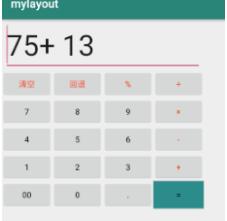
布局(activity_main.xml)
<GridLayout xmlns:android="http://schemas.android.com/apk/res/android"
   xmlns:tools="http://schemas.android.com/tools"
   android:id="@ id/GridLayout1"
   android:layout_width="wrap_content"
   android:layout_height="wrap_content"
   android:columnCount="4"
   android:orientation="horizontal"
   android:rowCount="6" >

 <EditText
   android:id="@ id/editText"
   android:layout_columnSpan="4"
   android:layout_gravity="fill"
   android:layout_marginLeft="5dp"
   android:layout_marginRight="5dp"
   android:text="0"
   android:textSize="50sp" />


 <Button
   android:id="@ id/clear"
   android:layout_columnSpan="1"
   android:layout_gravity="fill"
   android:text="清空"
   android:textColor="#FF4500"

 />

 <Button
   android:id="@ id/back"
   android:layout_columnSpan="1"
   android:layout_gravity="fill"
   android:text="回退"
   android:textColor="#FF4500"

 />

 <Button
   android:id="@ id/per"
   android:text="%"
   android:textColor="#FF4500"

 />

 <Button
   android:id="@ id/div"
   android:text="÷"
   android:textColor="#FF4500"

 />

 <Button
   android:id="@ id/b7"
   android:text="7"

 />

 <Button
   android:id="@ id/b8"
   android:text="8"
 />

 <Button
   android:id="@ id/b9"
   android:text="9"
 />

 <Button
   android:id="@ id/mul"
   android:text="×"
   android:textColor="#FF4500"
 />

 <Button
   android:id="@ id/b4"
   android:text="4"
 />

 <Button
   android:id="@ id/b5"
   android:text="5"
 />

 <Button
   android:id="@ id/b6"
   android:text="6"
 />

 <Button
   android:id="@ id/sub"
   android:text="-"
   android:textColor="#FF4500"

 />

 <Button
   android:id="@ id/b1"
   android:text="1"
 />

 <Button
   android:id="@ id/b2"
   android:text="2"
 />

 <Button
   android:id="@ id/b3"
   android:text="3"
 />

 <Button
   android:id="@ id/plus"
   android:layout_width="wrap_content"
   android:text=" "
   android:textColor="#FF4500"

 />

 <Button
   android:id="@ id/b00"
   android:text="00"
 />
 <Button
   android:id="@ id/b0"
   android:text="0"
 />
 <Button
   android:id="@ id/dot"
   android:text="."
 />

 <Button
   android:id="@ id/equ"
   android:text="="
   android:background="#008B8B"
 />

</GridLayout>
响应及计算(MainActivity)
package com.mylayout;

import android.support.v7.app.AppCompatActivity;
import android.os.Bundle;
import android.view.View;
import android.widget.Button;
import android.widget.EditText;


public class MainActivity extends AppCompatActivity implements View.OnClickListener {

 private EditText editText;

 //数字0-9
 private Button b1;
 private Button b2;
 private Button b3;
 private Button b4;
 private Button b5;
 private Button b6;
 private Button b7;
 private Button b8;
 private Button b9;
 private Button b0;
 private Button b00;

 //运算符
 private Button per;
 private Button add;//
 private Button sub; // -
 private Button mul; // *
 private Button div; // /
 private Button dot; //小数点
 private Button equ; // =

 private boolean back; //退格

 private boolean clear_bool= true;//清空
 private boolean dot_flag1 = true;
 private boolean dot_flag2 = true;

 @Override
 public void onClick(View view) {

  String input = editText.getText().toString();
  switch (view.getId()){

   case R.id.b0:
   case R.id.b1:
   case R.id.b2:
   case R.id.b3:
   case R.id.b4:
   case R.id.b5:
   case R.id.b6:
   case R.id.b7:
   case R.id.b8:
   case R.id.b9:
   case R.id.b00:
     if(dot_flag1)dot_flag2 = true;
     if(clear_bool)
     {
      clear_bool = false;
      editText.setText("" ((Button)view).getText());
     }
     else
     {
      editText.setText(input   ((Button)view).getText());//结果集就为本身
     }
    break;
   case R.id.dot:
     if(dot_flag1&&dot_flag2)
     {
      dot_flag1 = false;
      dot_flag2 = false;
      editText.setText(input   ((Button)view).getText());
     }
     break;
   case R.id.per:
   case R.id.plus:
   case R.id.sub:
   case R.id.mul:
   case R.id.div:
    dot_flag1 = true;
    if(clear_bool)
    {
     clear_bool = false;
     input = "";
     editText.setText("");
    }
    editText.setText(input   ((Button)view).getText() " ");
    break;
   case R.id.back: //退格
    if(input != null || !input.equals("")) {
     if(input.length()>1) {
      editText.setText(input.substring(0, input.length() - 1));//
     }
     else{
      clear_bool =true;
      editText.setText("0");
     }


    }
    break;
   case R.id.clear: //清空
    editText.setText("0");
    clear_bool = true;
    break;
   case R.id.equ:
    calculation();
    break;
  }


 }

 //计算结果
 private void calculation() {
  String s1 = editText.getText().toString();   //获取字符串
  if (s1 == null){
   return;
  }
  boolean flag = false;
  if(s1.charAt(0)=='-')
  {
   s1 = s1.substring(1);
   flag = true;
  }
  String []num = s1.split("[-÷× ]");  //分割字符串获得各个数字
  double []n = new double[num.length];
  for(int i=0;i<num.length;i  )  //字符串转数字
  {
   if(num[i].equals(""))continue;
    //百分号
   else if(num[i].contains("%")) n[i] = Double.parseDouble(num[i].replace("%",""))/100;
    //开根
//   else if(num[i].contains("√")) n[i] = Math.sqrt(Double.parseDouble(num[i].replace("√", "")));
   else n[i] = Double.parseDouble(num[i]);
  }

  if(flag) n[0] -= n[0]*2;   //负数情况
  char[] sy = s1.replaceAll("[^-÷× ]","").toCharArray(); //获得运算符
  int slen = sy.length;
  if(sy.length == num.length)slen--;
  char c = ' ';
  double result = n[0] ;                //结果
  if(n.length>1)
  {
   for (int j = 0; j < slen; j  )    //先算乘除
   {
    if (sy[j] == '×')
    {
     n[j   1] = n[j] * n[j   1];
     n[j] = 0;
     if (c == ' ') sy[j] = ' '; //判断乘除的前一个运算符是什么
     else sy[j] = '-';
    }
    else if (sy[j] == '÷')
    {
     if (n[j   1] != 0) n[j   1] = n[j] / n[j   1];
     else n[j   1] = 0;
     n[j] = 0;
     if (c == ' ') sy[j] = ' ';
     else sy[j] = '-';
    } else
     c = sy[j];
   }
   result = n[0];
   for (int j = 0; j < slen; j  ) {    //求和
    if (sy[j] == ' ') result  = n[j   1];
    if (sy[j] == '-') result -= n[j   1];
   }
  }
  if((int)result == result )editText.setText((int)result "");       //显示
  else
  { //控制输出小数点后6位
   result = Double.parseDouble(String.format("%.6f", result));
   editText.setText(result "");
  }


 }


 @Override
 protected void onCreate(Bundle savedInstanceState) {
  super.onCreate(savedInstanceState);
  setContentView(R.layout.activity_main);

  //获取id
  View b1 = findViewById(R.id.b1);
  View b2 = findViewById(R.id.b2);
  View b3= findViewById(R.id.b3);
  View b4 = findViewById(R.id.b4);
  View b5 = findViewById(R.id.b5);
  View b6 = findViewById(R.id.b6);
  View b7 = findViewById(R.id.b7);
  View b8 = findViewById(R.id.b8);
  View b9 = findViewById(R.id.b9);
  View b0 = findViewById(R.id.b0);
  View b00 = findViewById(R.id.b00);

  //运算符

  View plus = findViewById(R.id.plus);//
  View sub = findViewById(R.id.sub);// -
  View mul = findViewById(R.id.mul);// *
  View per = findViewById(R.id.per); // %
  View div = findViewById(R.id.div); // /
  View dot = findViewById(R.id.dot);//小数点
  View equ = findViewById(R.id.equ);//=
  View clear = findViewById(R.id.clear);//清空
  View back = findViewById(R.id.back); //回退

  editText = (EditText) findViewById(R.id.editText);//结果集

  //添加监听事件
  b0.setOnClickListener(this);
  b1.setOnClickListener(this);
  b2.setOnClickListener(this);
  b3.setOnClickListener(this);
  b4.setOnClickListener(this);
  b5.setOnClickListener(this);
  b6.setOnClickListener(this);
  b7.setOnClickListener(this);
  b8.setOnClickListener(this);
  b9.setOnClickListener(this);
  b00.setOnClickListener(this);

  per.setOnClickListener(this);
  plus.setOnClickListener(this);
  sub.setOnClickListener(this);
  mul.setOnClickListener(this);
  div.setOnClickListener(this);
  dot.setOnClickListener(this);
  equ.setOnClickListener(this);
  clear.setOnClickListener(this);
  back.setOnClickListener(this);

 }


}
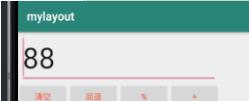
测试
关于计算器的精彩文章请查看《计算器专题》 ,更多精彩等你来发现!
以上就是本文的全部内容,希望对大家的学习有所帮助,也希望大家多多支持Devmax。