android 系统按键音framework源码解析(基于android 9.0)
今天来看下android中按键音的处理,首先看下按键是在那里开启的。然后再看看当按下按键后一个按键音是怎么播放出来的。
1.首先在setting app里面 SoundFragment.java
private void setSoundEffectsEnabled(boolean enabled) {
            mAudioManager = (AudioManager) getActivity().getSystemService(Context.AUDIO_SERVICE); //1
        if (enabled) {
            mAudioManager.loadSoundEffects();   // 从这里可以看到调用AudioManager里面的方法打开按键音
        } else {
            mAudioManager.unloadSoundEffects();
        }
        Settings.System.putInt(getActivity().getContentResolver(),
                Settings.System.SOUND_EFFECTS_ENABLED, enabled ? 1 : 0);
}大家可能很好奇像AudioManager,WifiManager等,都是通过getSystemService 这个方法得到的。这里花一点时间顺带先说一下1处这个吧。我们先一步一步来看。(其实最终还是回到AudioManager方法里面的,不感兴趣的可以直接跳过)。
2. framework/base/core/java/android/app/Activity.java
@Override
    public Object getSystemService(@ServiceName @NonNull String name) {
        if (getBaseContext() == null) {
            throw new IllegalStateException(
                    "System services not available to Activities before onCreate()");
        }
        if (WINDOW_SERVICE.equals(name)) {
            return mWindowManager;
        } else if (SEARCH_SERVICE.equals(name)) {
            ensureSearchManager();
            return mSearchManager;
        }
        return super.getSystemService(name);    //除了WINDOW_SERVICE和SEARCH_SERVICE外,其他服务都在父类中
    }
除了WINDOW_SERVICE和SEARCH_SERVICE外,其他服务都在父类中
3.framework/base/core/java/android/view/ContextThemeWrapper.java
@Override
    public Object getSystemService(String name) {
        if (LAYOUT_INFLATER_SERVICE.equals(name)) {
            if (mInflater == null) {
                mInflater = LayoutInflater.from(getBaseContext()).cloneInContext(this);
            }
            return mInflater;

        }
        return getBaseContext().getSystemService(name);  //还要再往上
    }
4. framework/base/core/java/android/content/Context.java
@SuppressWarnings("unchecked")
    public final @Nullable <T> T getSystemService(@NonNull Class<T> serviceClass) {
        // Because subclasses may override getSystemService(String) we cannot
        // perform a lookup by class alone.  We must first map the class to its
        // service name then invoke the string-based method.
        String serviceName = getSystemServiceName(serviceClass);
        return serviceName != null ? (T)getSystemService(serviceName) : null;
    }
/**
     * Gets the name of the system-level service that is represented by the specified class.
     *
     * @param serviceClass The class of the desired service.
     * @return The service name or null if the class is not a supported system service.
     */
    public abstract @Nullable String getSystemServiceName(@NonNull Class<?> serviceClass);

    /**
     * Use with {@link #getSystemService(String)} to retrieve a
     * {@link android.os.PowerManager} for controlling power management,
     * including "wake locks," which let you keep the device on while
     * you're running long tasks.
     */
    public static final String POWER_SERVICE = "power";

   /**
     * Use with {@link #getSystemService(String)} to retrieve a
     * {@link android.view.WindowManager} for accessing the system's window
     * manager.
     *
     * @see #getSystemService(String)
     * @see android.view.WindowManager
     */
    public static final String WINDOW_SERVICE = "window";

    /**
     * Use with {@link #getSystemService(String)} to retrieve a {@link
     * android.net.wifi.WifiManager} for handling management of
     * Wi-Fi access.
     *
     * @see #getSystemService(String)
     * @see android.net.wifi.WifiManager
     */
    public static final String WIFI_SERVICE = "wifi";

    /**
     * Use with {@link #getSystemService(String)} to retrieve a
     * {@link android.media.AudioManager} for handling management of volume,
     * ringer modes and audio routing.
     *
     * @see #getSystemService(String)
     * @see android.media.AudioManager    //在audiomanager 里面
     */
    public static final String AUDIO_SERVICE = "audio";
framework/base/media/java/android/media/AudioManager.java
**
* AudioManager provides access to volume and ringer mode control.
*/
@SystemService(Context.AUDIO_SERVICE) //通过注解来讲AUDIO_SERVICE与AudioManager绑定在一块
public class AudioManager {
private Context mOriginalContext;
private Context mApplicationContext;
private long mVolumeKeyUpTime;这里可以看到,之前那些wifimanager,audiomanager 都是这样来设置得到的。
好了,再继续说按键音的事,就是到AudioManager里面。
5. framework/base/media/java/android/media/AudioManager.java
/**
     *  Load Sound effects.
     *  This method must be called when sound effects are enabled.
*/
    public void loadSoundEffects() {
        final IAudioService service = getService();
        try {
            service.loadSoundEffects();
        } catch (RemoteException e) {
            throw e.rethrowFromSystemServer();
        }
    }
private static IAudioService getService()
{
if (sService != null) {
return sService;
}
IBinder b = ServiceManager.getService(Context.AUDIO_SERVICE);
sService = IAudioService.Stub.asInterface(b);
return sService;
}这里不得不再说一下。其实最后还是跑到AudiioService里面了。通过跨进程binder来拿到audioservice的对象。这里再顺带说一下那些service都是在哪里设置的。
6. framework/base/core/java/android/os/ServiceManager.java
/**
     * Returns a reference to a service with the given name
     * @param name the name of the service to get
     * @return a reference to the service, or <code>null</code> if the service doesn't exist
*/
    public static IBinder getService(String name) {
        try {
            IBinder service = sCache.get(name);   //在这个里面拿到
            if (service != null) {
                return service;
            } else {
                return Binder.allowBlocking(rawGetService(name));
            }
        } catch (RemoteException e) {
            Log.e(TAG, "error in getService", e);
        }
        return null;
    }
/**
* Cache for the "well known" services, such as WM and AM.
*/
private static HashMap<String, IBinder> sCache = new HashMap<String, IBinder>();
/**
* This is only intended to be called when the process is first being brought
* up and bound by the activity manager. There is only one thread in the process
* at that time, so no locking is done.
*
* @param cache the cache of service references
* @hide
*/
public static void initServiceCache(Map<String, IBinder> cache) {
if (sCache.size() != 0) {
throw new IllegalStateException("setServiceCache may only be called once");
}
sCache.putAll(cache);
}从上面可以看到 sCache 是一个Map。所以之前拿到的那些管理的对象(wifiManager,AudioManage,WindowManager等等),都是通过get map拿到的。
7. framework/base/services/core/java/com/android/server/audio/AudioService.java
/**
     * Loads samples into the soundpool.
     * This method must be called at first when sound effects are enabled
     */
    public boolean loadSoundEffects() {
        int attempts = 3;
        LoadSoundEffectReply reply = new LoadSoundEffectReply();

        synchronized (reply) {
            sendMsg(mAudioHandler, MSG_LOAD_SOUND_EFFECTS, SENDMSG_QUEUE, 0, 0, reply, 0); //发送消息
            while ((reply.mStatus == 1) && (attempts-- > 0)) {
                try {
                    reply.wait(SOUND_EFFECTS_LOAD_TIMEOUT_MS);
                } catch (InterruptedException e) {
                    Log.w(TAG, "loadSoundEffects Interrupted while waiting sound pool loaded.");
                }
            }
        }
        return (reply.mStatus == 0);
    }
当在setting里面打开按键音之后会调这来,从类名就可以看出是加载事件。后面按键声的的播放之前也会调用到这里来。
case MSG_LOAD_SOUND_EFFECTS:
                    //FIXME: onLoadSoundEffects() should be executed in a separate thread as it
                    // can take several dozens of milliseconds to complete
                    boolean loaded = onLoadSoundEffects();   // 调用这个方法
                    if (msg.obj != null) {
                        LoadSoundEffectReply reply = (LoadSoundEffectReply)msg.obj;
                        synchronized (reply) {
                            reply.mStatus = loaded ? 0 : -1;
                            reply.notify();
                        }
                    }
                    break;
private boolean onLoadSoundEffects() {
int status;
synchronized (mSoundEffectsLock) {
if (!mSystemReady) {
Log.w(TAG, "onLoadSoundEffects() called before boot complete");
return false;
}
if (mSoundPool != null) {
return true;
}
loadTouchSoundAssets(); // 记载要播放声音的资源
mSoundPool = new SoundPool.Builder()
.setMaxStreams(NUM_SOUNDPOOL_CHANNELS)
.setAudioAttributes(new AudioAttributes.Builder()
.setUsage(AudioAttributes.USAGE_ASSISTANCE_SONIFICATION)
.setContentType(AudioAttributes.CONTENT_TYPE_SONIFICATION)
.build())
.build(); //链式调用
mSoundPoolCallBack = null;
mSoundPoolListenerThread = new SoundPoolListenerThread();
mSoundPoolListenerThread.start();
int attempts = 3;
while ((mSoundPoolCallBack == null) && (attempts-- > 0)) {
try {
// Wait for mSoundPoolCallBack to be set by the other thread
mSoundEffectsLock.wait(SOUND_EFFECTS_LOAD_TIMEOUT_MS);
} catch (InterruptedException e) {
Log.w(TAG, "Interrupted while waiting sound pool listener thread.");
}
}
if (mSoundPoolCallBack == null) {
Log.w(TAG, "onLoadSoundEffects() SoundPool listener or thread creation error");
if (mSoundPoolLooper != null) {
mSoundPoolLooper.quit();
mSoundPoolLooper = null;
}
mSoundPoolListenerThread = null;
mSoundPool.release();
mSoundPool = null;
return false;
}
/*
* poolId table: The value -1 in this table indicates that corresponding
* file (same index in SOUND_EFFECT_FILES[] has not been loaded.
* Once loaded, the value in poolId is the sample ID and the same
* sample can be reused for another effect using the same file.
*/
int[] poolId = new int[SOUND_EFFECT_FILES.size()];
for (int fileIdx = 0; fileIdx < SOUND_EFFECT_FILES.size(); fileIdx ) {
poolId[fileIdx] = -1;
}
/*
* Effects whose value in SOUND_EFFECT_FILES_MAP[effect][1] is -1 must be loaded.
* If load succeeds, value in SOUND_EFFECT_FILES_MAP[effect][1] is > 0:
* this indicates we have a valid sample loaded for this effect.
*/
int numSamples = 0;
for (int effect = 0; effect < AudioManager.NUM_SOUND_EFFECTS; effect ) {
// Do not load sample if this effect uses the MediaPlayer
if (SOUND_EFFECT_FILES_MAP[effect][1] == 0) {
continue;
}
if (poolId[SOUND_EFFECT_FILES_MAP[effect][0]] == -1) {
String filePath = getSoundEffectFilePath(effect);
int sampleId = mSoundPool.load(filePath, 0);
if (sampleId <= 0) {
Log.w(TAG, "Soundpool could not load file: " filePath);
} else {
SOUND_EFFECT_FILES_MAP[effect][1] = sampleId;
poolId[SOUND_EFFECT_FILES_MAP[effect][0]] = sampleId;
numSamples ;
}
} else {
SOUND_EFFECT_FILES_MAP[effect][1] =
poolId[SOUND_EFFECT_FILES_MAP[effect][0]];
}
}
// wait for all samples to be loaded
if (numSamples > 0) {
mSoundPoolCallBack.setSamples(poolId);
attempts = 3;
status = 1;
while ((status == 1) && (attempts-- > 0)) {
try {
mSoundEffectsLock.wait(SOUND_EFFECTS_LOAD_TIMEOUT_MS);
status = mSoundPoolCallBack.status();
} catch (InterruptedException e) {
Log.w(TAG, "Interrupted while waiting sound pool callback.");
}
}
} else {
status = -1;
}
if (mSoundPoolLooper != null) {
mSoundPoolLooper.quit();
mSoundPoolLooper = null;
}
mSoundPoolListenerThread = null;
if (status != 0) {
Log.w(TAG,
"onLoadSoundEffects(), Error " status " while loading samples");
for (int effect = 0; effect < AudioManager.NUM_SOUND_EFFECTS; effect ) {
if (SOUND_EFFECT_FILES_MAP[effect][1] > 0) {
SOUND_EFFECT_FILES_MAP[effect][1] = -1;
}
}
mSoundPool.release();
mSoundPool = null;
}
}
return (status == 0);
}8.接下来看看当按下一个按键后按键音的触发
当按下一个按键或者焦点落到一个view上时,会有很多种情况,如下,
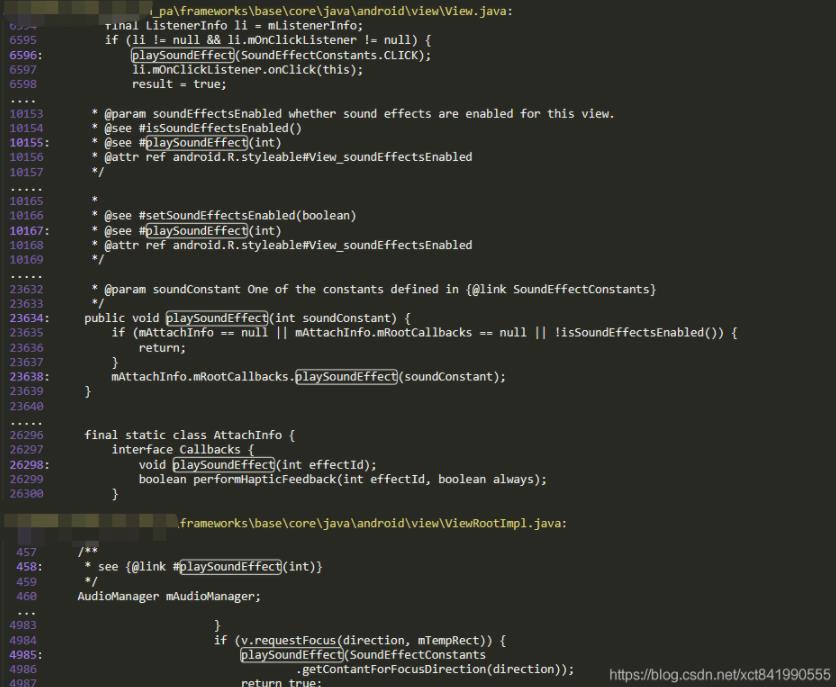
无论如何,最后都会调用到如下的方法中
framework/base/media/java/android/media/AudioManager.java
public void  playSoundEffect(int effectType) {
        if (effectType < 0 || effectType >= NUM_SOUND_EFFECTS) {
            return;
        }
        if (!querySoundEffectsEnabled(Process.myUserHandle().getIdentifier())) {
            return;
        }
        final IAudioService service = getService();
        try {
            service.playSoundEffect(effectType);
        } catch (RemoteException e) {
            throw e.rethrowFromSystemServer();
        }
    }
还是会到AudioSetvice中。
9.framework/base/services/core/java/com/android/server/audio/AudioService.java
/** @see AudioManager#playSoundEffect(int) */
    public void playSoundEffect(int effectType) {
        playSoundEffectVolume(effectType, -1.0f);
    }

    /** @see AudioManager#playSoundEffect(int, float) */
    public void playSoundEffectVolume(int effectType, float volume) {
        // do not try to play the sound effect if the system stream is muted
        if (isStreamMutedByRingerOrZenMode(STREAM_SYSTEM)) {
            return;
        }

        if (effectType >= AudioManager.NUM_SOUND_EFFECTS || effectType < 0) {
            Log.w(TAG, "AudioService effectType value "   effectType   " out of range");
            return;
        }

        sendMsg(mAudioHandler, MSG_PLAY_SOUND_EFFECT, SENDMSG_QUEUE, // 发送消息
                effectType, (int) (volume * 1000), null, 0);
    }
case MSG_PLAY_SOUND_EFFECT:
onPlaySoundEffect(msg.arg1, msg.arg2);
break;
private void onPlaySoundEffect(int effectType, int volume) {
synchronized (mSoundEffectsLock) {
onLoadSoundEffects(); //上面提到过的的加载
if (mSoundPool == null) {
return;
}
float volFloat;
// use default if volume is not specified by caller
if (volume < 0) {
volFloat = (float)Math.pow(10, (float)sSoundEffectVolumeDb/20);
} else {
volFloat = volume / 1000.0f;
}
if (SOUND_EFFECT_FILES_MAP[effectType][1] > 0) {
mSoundPool.play(SOUND_EFFECT_FILES_MAP[effectType][1],
volFloat, volFloat, 0, 0, 1.0f);
} else {
MediaPlayer mediaPlayer = new MediaPlayer();
try {
String filePath = getSoundEffectFilePath(effectType); //得到播放音频资源的地址。如果要替换资源,可以到此位置替换
mediaPlayer.setDataSource(filePath);
mediaPlayer.setAudioStreamType(AudioSystem.STREAM_SYSTEM);
mediaPlayer.prepare();
mediaPlayer.setVolume(volFloat);
mediaPlayer.setOnCompletionListener(new OnCompletionListener() {
public void onCompletion(MediaPlayer mp) {
cleanupPlayer(mp);
}
});
mediaPlayer.setOnErrorListener(new OnErrorListener() {
public boolean onError(MediaPlayer mp, int what, int extra) {
cleanupPlayer(mp);
return true;
}
});
mediaPlayer.start(); //开始播放
} catch (IOException ex) {
Log.w(TAG, "MediaPlayer IOException: " ex);
} catch (IllegalArgumentException ex) {
Log.w(TAG, "MediaPlayer IllegalArgumentException: " ex);
} catch (IllegalStateException ex) {
Log.w(TAG, "MediaPlayer IllegalStateException: " ex);
}
}
}
}到此,android 系统的按键音的流程就走完了。
以上就是本文的全部内容,希望对大家的学习有所帮助,也希望大家多多支持Devmax。